/ EQ / PuigTec EQs
Waves

PuigTec EQs

4.5 (2 Reviews)
$29.99 $149.00

79% off until Dec 07

Waves PuigTec EQs
Waves PuigTec EQs
Waves PuigTec EQs
Waves PuigTec EQs gallery thumbnail
Buy Now
Product information

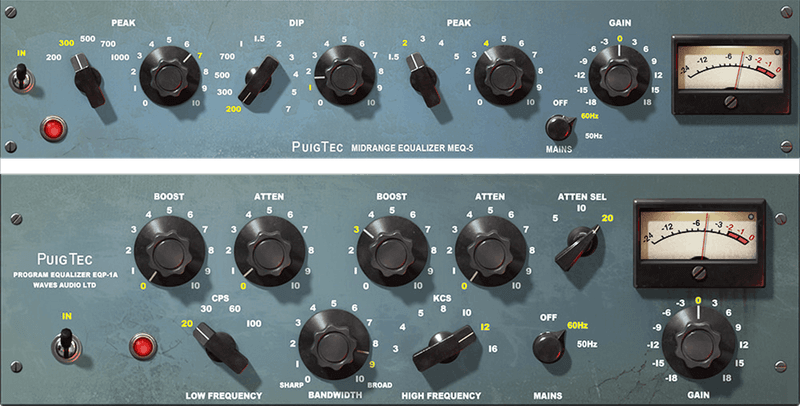
PuigTec EQs

A Prestigious Pair of Passive EQs for Silky Smooth Tone

Pultec’s passive EQs—introduced over 50 years ago—became mainstays for mastering, as well as for vocals, bass, guitar, and more. With their gentle tone-shaping talents, the EQP-1A (highs and lows) and MEQ-5 (midrange) set a standard for passive EQs that remains unchallenged to this day.

Waves modeled these beautifully maintained, hand-crafted legends from the personal collection of Grammy-winning producer/mixer Jack Joseph Puig (John Mayer, Lady Gaga, Rolling Stones). Now they can help you shape your sound.

Features

  • Mix fat, punchy bass and drums with EQP-1A
  • Enrich vocals, guitars and synths with MEQ-5’s 3 midrange bands
  • Faithful to the transparent, gentle nature of passive circuity
  • Renowned for shaping tone with a light yet highly effective touch
  • A favorite for tone sculpting during both mixing and mastering
  • Get a tighter low end with EQP-1A’s ability to cut/boost the same frequencies simultaneously

System Requirements

Mac

  • macOS Monterey 12, Ventura 13, Sonoma 14, Sequoia 15
  • VST / AU / AAX

PC

  • Windows 10+
  • VST / AAX
Installation Instructions

1. Head to https://www.waves.com/create-account

2. Enter your email and choose a password to create an account (if you already have a Waves account, choose Log in, enter your details and head to Step 5) > click 'Submit'

3. Open your email inbox > click the activation link in the email from Waves

4. Click 'Log in here' > Log in to your Waves account

5. Click 'Register New Products'

6. Enter the Serial Number found in your Plugin Boutique user account > click 'Submit'

7. Click download in your Plugin Boutique user account or head to https://www.waves.com/downloads/central > download the Waves Central app for your operating system

8. Install Waves Central > Open Waves Central

9. Click 'Log in' > enter your log in details

10. Click the 'Install Products' tab

11. Tick the blue dot on all products you wish to install or click the top dot to install all products > click 'Install & Activate'

12. Click 'OK'

13. Open your DAW > open the Waves plugin

Your Waves plugins are installed and ready to use, enjoy!

Plugin Boutique Rewards

Discover the most rewarding loyalty programme among all plugin retailers.

  • Free Loopmasters Samplepacks
  • Discounts on products and courses
  • Extra Virtual Cash claimed immediately at checkout
Find out more

Follow us:

X (Twitter) Facebook YouTube Instagram
Logo Logo

Plugin Boutique Limited, Part of the Beatport Group LLC.

Copyright © 2011-2025 Plugin Boutique. All rights reserved