


 Log In

Free gifts available with your purchase
Stress-Free Sound
Whether sculpting silky synths or crafting perfectly-balanced vocals, it’s always a challenge to make audio pop whilst simultaneously reigning in those irksome frequencies. Certain areas often need soothing, especially if your audio sounds overly harsh, boxy or boomy. This is where DETROUBLER comes to the rescue, swooping in to smooth your sounds and tackle the most troublesome areas of audio processing.
Use this plugin as your guide to navigate the tricky path between great sound and tired ears. Those grating frequency areas need eliminating and now you have an all-in-one toolbox to fix your mix.
DETROUBLER isn't just blindly stabbing at frequencies. It's operating from the science of psychoacoustics, pinpointing those sonic irritations that even the most seasoned ears might miss. This plugin uses techniques such as Fletcher-Munson curves and the Bark Scale to decipher the very essence of auditory discomfort. But if you’d rather skip the theory, then it’s easy enough to use DETROUBLER’s six uniquely targeted meters to smooth out the rough edges of your tracks in a way that feels utterly musical.
Listen & Learn
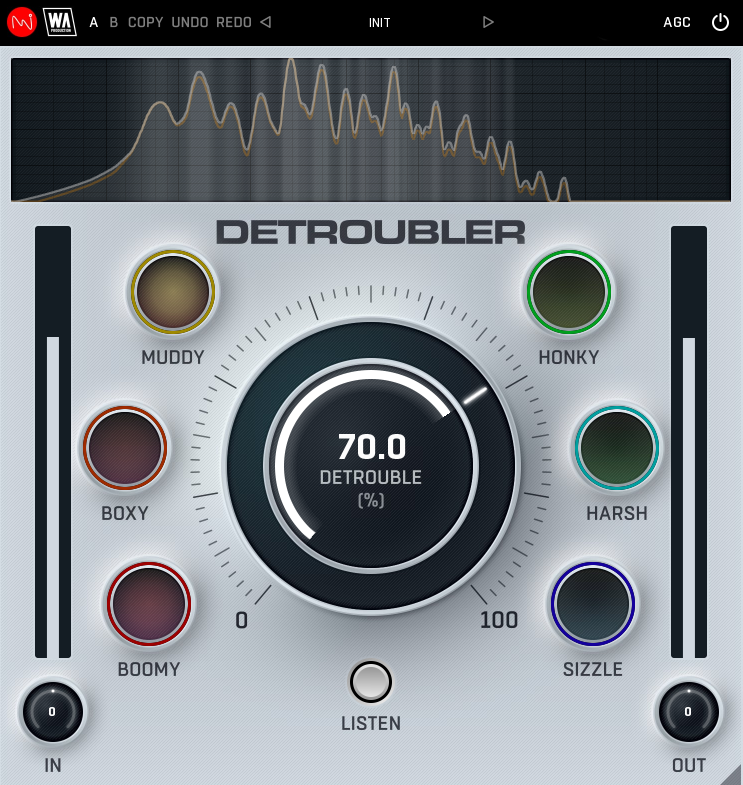
The dedicated Listen button should be the first step in your journey, letting you clearly hear the aspects of your audio that need fixing. As you increase the main Detrouble knob, you’ll hear what the plugin begins to capture, in real time. Then switch off the Listen mode to hear those changes in context.
Six ways to Success
The glowing orbs surrounding the main Detrouble knob function as clickable meters for each area of frequencies. Enable or disable processing in each area by clicking. The brighter the orbs, the greater the processing. If a certain orb shows minimal activity, your audio is already in great shape and no gain reduction needs to be applied by the plugin.
Areas for Improvement
There are six distinct areas that DETROUBLER focuses on. The plugin uses psychoacoustic principles to make changes, improving the sound of frequency bands and their corresponding masking frequencies according to the Bark Scale.
- Boomy: Excessive low-frequency resonance, often in the 100-250 Hz range, making the sound overpowering or lacking clarity.
- Boxy: A hollow or resonant sound, usually due to excessive energy around 150-250 Hz, making instruments (especially drums and vocals) sound like they’re playing in a small box
- Muddy: Lack of clarity due to overlapping frequencies in the 200-500 Hz region, often causing instruments to blend indistinctly.
- Honky: A nasal, resonant midrange quality, typically around 500-1500 Hz, making vocals or instruments sound somewhat brassy.
- Harsh: Overly aggressive or piercing high-mid frequencies, often in the 2-6 kHz range, causing listener fatigue.
- Sizzle: Excessive, uncontrolled high-frequency energy in the 8-12 kHz range, sometimes making cymbals or vocals sound overly bright or artificial.
Visual Feedback & Comparison
DETROUBLER is built on vector graphics with a resizable interface. A live spectrum is displayed at the top, to help you identify problematic areas of your sound and show exactly what’s happening to the signal as it travels through the plugin in real time. This allows for accurate monitoring at every step of the chain. For those who like to experiment, contrast different processing chains with AB comparison and copy / paste. Use the undo / redo buttons to revert any changes.
Presets
DETROUBLER includes a huge number of factory presets, covering everything from subtle surgical correction, to more broad-strokes transformations. Use the provided parameters as starting points to clean-up any type of audio, bringing the best out of your sounds and productions.
W. A. Production are real-life producers making creative plugins to help you achieve studio quality processing quickly and easily. Enjoy!
Features
- Research-based psychoacoustic processing plugin
- Targeting problem areas of your audio
- Easy identification of ear-fatiguing frequencies
- Six specifically targeted areas
- Listen mode for enhanced monitoring
- Frequency spectrum display
- AB comparison & Undo / Redo
- Resizable interface
- Responsive & CPU friendly
- Flexible factory presets
- Full PDF Manual & Tutorial video
System Requirements
- Windows 8 or higher (64 bit)
- macOS 10.10 or higher (64 bit)
- AAX - ProTools 11 or higher
Important Note for Mac Apple Silicon users: Before purchasing, please review the current compatibility status of this plugin on your system here.
Reviews Summary
While it aims to provide a helpful overview, it may not capture every perspective or detail. We encourage you to read individual reviews to make an informed decision.
Reviewers generally praise the plugin as an intuitive, fast, and budget-friendly tool for cleaning up problematic frequency zones like harshness, mud, and boominess. Many appreciate its helpful 'Listen' feature and subtle cleanup on mix buses and mastering chains. However, users note that it requires careful listening and shouldn't be overused across every track, as excessive use can make mixes sound sterile and thin, nor does it fully replace advanced flagship processors.


