


 Log In

Free gifts available with your purchase
Manny Marroquin Reverb
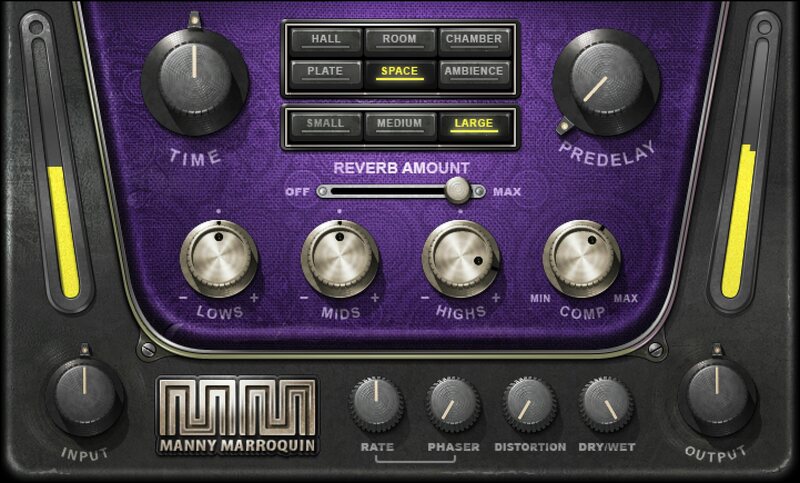
Go Creative—Beyond Traditional Reverb
10x Grammy® winner Manny Marroquin’s personal vision of reverb requires multiple effects—and for the first time, Waves has put them together in one plugin. These are the reverb sounds on tracks by Kendrick Lamar, Lizzo, Kanye West, Imagine Dragons, Alicia Keys, Sia, and so many more that Manny has mixed.
This fresh, flexible approach incorporates 18 different reverbs types/sizes—from tight ambience to luxurious spaces—complemented by compression, 3-band EQ, flanger, and distortion. It’s brilliant.
“We’ve modeled the very best reverbs in my room: 6 different reverbs, with 3 different room sizes for each. We’ve also included built-in EQ and compression, which I always use to shape the reverbs so they sit perfectly in the mix. Plus, we added what I like to call the ‘fun’ section, with phaser and distortion. Sometimes I’ll send something to a really big reverb, then add phase and distortion to get some really unique tails. With this plugin, it’s all right there in front of you.” —Manny Marroquin
Features
- Created with mix engineer Manny Marroquin (Kendrick Lamar, Lizzo)
- 6 reverb types: Hall, Room, Plate, Chamber, Space, Ambience
- 3 reverb sizes per type, with different reverb algorithms
- Slow attack, fast release compressor shapes dynamics
- Wide low- and high-frequency shelf EQs, wide midrange bell EQ
- Thru-zero flanger adds silky tape flanging (can use without reverb)
- Parallel distortion adds an effect like a “fog” of reverb
- Pre-Delay up to 500 ms, and reverb time multiplier (50-200%)
- 37 presets from star mixers like Ross Hogarth and Tony Maserati
- Equally well-suited as an insert or bus effect
System Requirements
Mac
- macOS Monterey 12, Ventura 13, Sonoma 14, Sequoia 15
- VST / AU / AAX
PC
- Windows 10+
- VST / AAX














