/ Reverb / PSP 2445 EMT
PSP Audioware

PSP 2445 EMT

4.7 (252 Reviews)
$149.00
PSP 2445 Main Image
PSP 2445 Main Image
PSP 2445 a reverb processor plug-in. gallery thumbnail
Buy Now
Product information

PSP 2445 is a reverb processor plug-in (VST, AAX and RTAS for Windows; AudioUnit, VST, AAX and RTAS for Mac OSX) inspired by two legendary early digital age reverberators: the EMT® 244 and the EMT® 245. PSP thoroughly researched how to bring the specific features of those simple, yet very musical sounding reverbs to life as a plug-in. We then improved from the originals with a handy set of parameters to control details of the sound and mix the reverb not available in the original hardware. The PSP 2445 is capable of processing using one selected engine or both of them simultaneously.

System Requirements

PC

  • Windows 7 – Windows 11
  • VST, VST 3 and AAX
  • The latest iLok License Manager application installed 

Mac

  • macOS 10.12 – macOS 13 Ventura (Apple Silicon Supported)
  • VST, VST 3, AAX and AU
  • The latest iLok License Manager application installed 

Awards

Testimonials

George Daly

''There are plenty of high quality reverbs out there, whose differences are only in nuance. The PSP 2445 is different from them all, this is "A Rare Reverb."


Steve Levine

''Once again PSP have created a plugin that I'm sure will become your "Go To" reverb effect.''

Michael Brauer

"The PSP 2445 is an exceptional reverb plugin. I remember seeing the original in all the mastering rooms. It was a really high quality verb that few could afford."

Installation Instructions

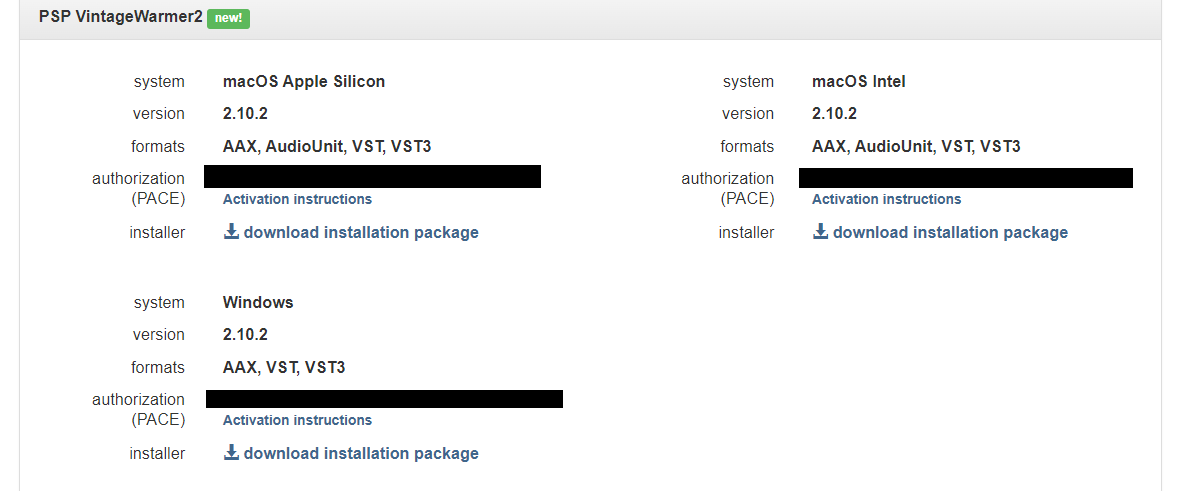
Please Note: PSP VintageWarmer2 is used as an example.

Activation

1. Visit the PSP Registration Centre and create/log into your PSPaudioware account.

2. Select the Manual Product Activation link and copy and paste/manually enter the serial number that is provided with your User Account. > click 'Activate!.'

3. Your PSP product will now show up in your PSP customer account. Your 30-digit iLok activation code will also be listed under authorization (PACE). Download the relevant installer.

iLok Registration

1. Go to the iLok website and create a new account if you are not currently registered and do not have the iLok Licence Manager installed on your computer.

2. Download and install the iLok License Manager.

3. Open your iLok license manager application > click 'Sign In'.

4. Enter your iLok registered User ID and password > click ‘Sign In'.

5. Once you are signed in, click the ‘Redeem’ icon which is located at the top-right corner of the iLok Licence Manager’s interface.

6. Copy and paste/manually enter the 30-digit code from your PSP Audioware account into the available Activation Code boxes, and then click ‘Next'.

7. Select your activation destination > Click 'Activate'.

8. Click 'Ok'.

Installation

Mac

1. Open the recently downloaded .dmg file to begin the installation.

2. Click 'Continue'.

3. Click 'Continue'.

4. Click 'Continue'.

5. Click 'Agree'.

6. Click 'Continue'.

7. Click 'Install'.

8. Click 'Close'.

9. Open your DAW > Open your newly installed software.

Your software is now activated and ready to use.

PC

1. Open the recently downloaded .exe file to begin the installation.

2. Click 'Next >'.

3. Select 'I Accept the Agreement' > Click 'Next'.

4. Click 'Next >'.

5. Click 'Next'.

6. Click 'Next'.

7. Click 'Next' to begin the installation.

8. Click 'Finish'.

9. Open your DAW > Open your newly installed software.

Your software is now activated and ready to use.

Plugin Boutique Rewards

Discover the most rewarding loyalty programme among all plugin retailers.

  • Free Loopmasters Samplepacks
  • Discounts on products and courses
  • Extra Virtual Cash claimed immediately at checkout
Find out more

Follow us:

X (Twitter) Facebook YouTube Instagram
Logo Logo

Plugin Boutique Limited, Part of the Beatport Group LLC.

Copyright © 2011-2025 Plugin Boutique. All rights reserved