Log In
.jpg)
Free gifts available with your purchase
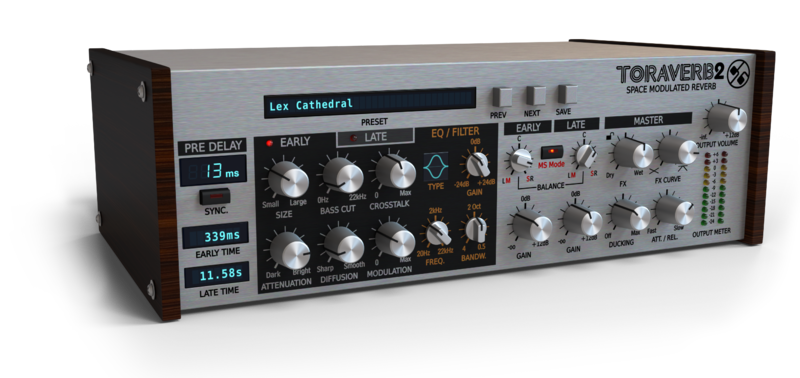
A concept ‘verb, come alive
Toraverb was never meant to be an emulation, approximation or recreation. D16 did not implement any "off-the-shelf" algorithm or impulse response. Unlike a classic unit such as spring, room, hall or plate, Toraverb is a concept in its own right. Using a set of easily accessible parameters, Toraverb allows the user to create practically ANY type of algorithmic reverb. D16's goal was to create something which would sound beautiful no matter where the knobs are.
Reverb is a critical effect in a mix. A good digital reverb depends on the algorithms used and their implementation quality. Usually, reverb is used as a send effect in which many channels in a mix are routed to it. If a poorly designed plug-in or hardware unit is used, the end result is tinnier/muddier mixes, with reverb tails sounding like they’re being torn off inhumanely.
The Utmost Diffusion Quality
In Toraverb, D16 designed a diffusing network of the highest possible quality based on modified all-pass filters and implemented fine-tuned parameters, eliminating almost all unwanted flutter echo effects across diverse sound sources. That’s fancy talk for “ D16 made it smooth and easy to tweak.”
Two Parametric EQs
Toraverb has two independent, single-band, fully parametric equalizers; one for each reflection engine. With low shelf, peak and high shelf options, they become incredibly useful in shaping the colouration and character of the reverb as well as intentionally sustaining certain frequencies in your source.
Modulated Tail
Toraverb also has an additional modulation parameter, which affects the diffusing network. These are responsible for the distribution of the sound waves reflections in time. By changing the modulation, the sound of the reverb tail can be altered to give a more realistic effect of sound propagation. Modulation amount is controlled independently for early and late reflections.
Realistic Cross-Talk
To give an even better impression of physical space, D16 added an innovative spatial reflection algorithm to Toraverb. This improves spatial reflections by interjecting some reflected stereo waves between both stereo channels. This models what happens in the real world when a single, localized sound source is reflected and becomes audible to both ears, allowing for spatial localisation as well as a heightened sense of realism.
Early, Late-ish, Hall & Plate-ish
A quick, convenient blend between Early and Late reflections. Now with balance parameters, for both reflection types, working in Left / Right or Mid / Side modes allows for retro reverb panning, or mono’ing your low-frequency early reflections while widening your longer, high-mid tails!
Built-in Ducker
Essential functionality in most studio situations. Toraverb features a built-in ducker, which compresses the FX signal's amplitude proportionally to the loudness of dry/unprocessed input, thus saving an overall output signal energy. Such a tool built into the plug-in is a real time-saver for any music producer or studio engineer. No need to employ any additional side-chain compression unit into your fx chain and simplify this aspect of use to the minimum.
Features
- High-quality diffusion network.
- Pre-delay with optional tempo sync.
- Reverb's tail modulation (with independent control for Early and Late reflections).
- Controllable crosstalking spatial reflections.
- Parametric EQ for Early and Late reflections (with 3 different curves each).
- Early and Late mixer (with stereo balance working in either L/R or M/S domains).
- Built-in ducker.
- Adjustable FX crossfade characteristics.
- Tag-based preset browser.
- Two alternative GUI sizes.
- MIDI-learn functionality throughout.
- 64bit internal processing.
System Requirements
Windows
- Windows 7 - 10 (32 or 64-bit)
- CPU - Single-core 2.5 GHz SSE (Multi-core 2.8 GHz SSE recommended)
- RAM - 8 GB (16 GB Recommended)
- Plugin Formats - VST2, VST3, AAX
Mac
- macOS 10.13 - macOS 12 Monterey (64-bit only)
- CPU - Intel 1.8 GHz / Apple M1 (Intel 2.4 GHz / Apple M1 recommended)
- RAM - 8 GB (16 GB Recommended)
- Plugin Formats - VST2, VST3, AU, AAX
Please Note: This is not a standalone program - a host application (DAW) is required to use it.
Awards


It’s been quite a while since “Phoscyon” came out and a small coder team named d16 got loads of attention by music producers. While first being critical about just another TB-303 clone it became clear those guys know what they are doing – so no surprise there the plugin’s successors, being emulat...
Read More