/ Reverb / Rum
Klevgrand

Rum

4.9 (43 Reviews)
$39.99
Rum
Rum
Klevgrand Rum
Klevgrand Rum - GUI
Klevgrand Rum - Overview Video gallery thumbnail
Buy Now
Product information

Room Simulator

Plenty good room for everyone

Rum simulates different kinds of rooms – from acoustically treated studio booths to spaces found in an ordinary home. Think of this plug-in as if the audio source was recorded in stereo from the other side of the room, a common technique for recording acoustic instruments in order to breathe life into a dry sound source.

In addition to the ten multi-recorded rooms (with different mic settings and characters that can be cross combined) there’s an advanced stereo spread and modulation unit for even more tweakability.

This plug-in also comes with low cut and high cut filters, pre-delay (with tempo sync), a full set of factory presets, and a built-in ducker making it easy to tame transients on the wet signal.

Anatomy
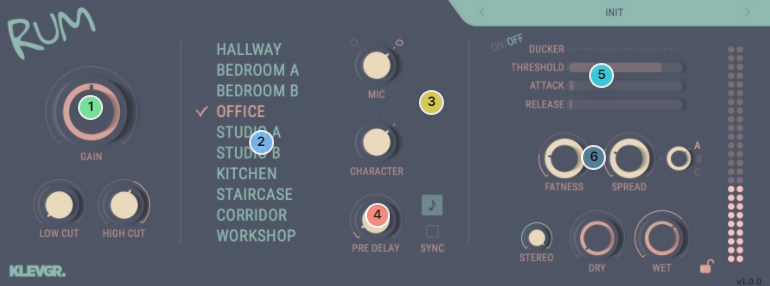
1. Make an entrance - Input gain + filter.

2. Go to your go-to room - Choose between 10 carefully sampled small rooms.

3. Make it yours - Choose mic setting + different characters of the room.

4. Move away from the walls - Simulate how far from the walls your sound source is by setting a pre-delay.

5. Need a duck? - Taming the transients in a more natural way.

6. Spread with butter - Modulation & stereo-spreader to set the final width.

Features

  • 10 different rooms with 6 variants each
  • 3 different types of stereo spread algorithms
  • Modulation control
  • Ducker (compression) for the wet signal
  • Pre-delay with tempo synchronization
  • Low cut and high cut filters
  • Plenty of factory presets

System Requirements

  • macOS 10.15 or later (optimized for the M1-processor)
  • Windows 10 or later
  • AU, VST-2, VST-3, AAX

Important note: When accessing this software via a Rent to Own plan or the Beatport Studio membership, it's installed and run through the Beatport Access portal. An internet connection is required every 30 days to validate your license.


Installation Instructions

Please Note: Pana is used as the example:

Mac

License Redemption

1. Navigate to https://klevgrand.com/redeem > Paste your 16 digit redemption code found in your Plugin Boutique User Account > Click 'Submit!'.

2. Your redemption code has been accepted > Scroll down to Step 2.

3. Click either 'Sign in' if you already have a Klevgrand account, or 'Create new account' if you do not > Fill in your personal details > Click 'I'm ready'.

4. Your account has now been created.

5. Navigate to your email inbox and locate the activation email that you should have received from Klevgrand > Click 'Let me in!' to activate your account.

6. Create a password for your account > Click 'Enter Klevgrand'.

7. Your software and serial number is now available within your Klevgrand account > Click the Apple logo to download the installer file.

Installation

1. Launch the pana_x_x_x_macOS.dmg installer file.

2. Double click the KLEVGR. logo to launch the installer.

3. Click 'Continue'.

4. Click 'Continue'.

5. Click 'Agree'.

6. Click 'Install'.

7. Enter your system password > Click 'Install Software'.

8. Click 'Close'.

9. Navigate back to your Klevgrand My Account page > Click on the serial number to copy it to your clipboard.

10. Launch your DAW > Create a new audio track > Insert Pana onto the channel > Paste your serial number into the box.

Your software is now activated and ready to use within your DAW

Windows

License Redemption

1. Navigate to https://klevgrand.com/redeem > Paste your 16 digit redemption code found in your Plugin Boutique User Account > Click 'Submit!'.

2. Your redemption code has been accepted > Scroll down to Step 2.

3. Click either 'Sign in' if you already have a Klevgrand account, or 'Create new account' if you do not > Fill in your personal details > Click 'I'm ready'.

4. Your account has now been created.

5. Navigate to your email inbox and locate the activation email that you should have received from Klevgrand > Click 'Let me in!' to activate your account.

6. Create a password for your account > Click 'Enter Klevgrand'.

7. Your software and serial number is now available within your Klevgrand account > Click the Windows logo to download the installer file.

Installation

1. Unpack the pana_x_x_x_win.zip installer file > Launch the pana_x_x_x_win.exe file.

2. Click 'I accept the agreement' > Click 'Next'.

3. Click 'Next'.

4. Click 'Next'.

5. Click 'Next'.

6. Click 'Install'.

7. Click 'Finish'.

8. Navigate back to your Klevgrand My Account page > Click on the serial number to copy it to your clipboard.

9. Launch your DAW > Create a new audio track > Insert Pana onto the channel > Paste your serial number into the box.

Your software is now activated and ready to use within your DAW

Plugin Boutique Rewards

Discover the most rewarding loyalty programme among all plugin retailers.

  • Free Loopmasters Samplepacks
  • Discounts on products and courses
  • Extra Virtual Cash claimed immediately at checkout
Find out more

Follow us:

X (Twitter) Facebook YouTube Instagram
Logo Logo

Plugin Boutique Limited, Part of the Beatport Group LLC.

Copyright © 2011-2025 Plugin Boutique. All rights reserved