


 Log In

Free gifts available with your purchase
UAD Ruby '63 Top Boost Amplifier
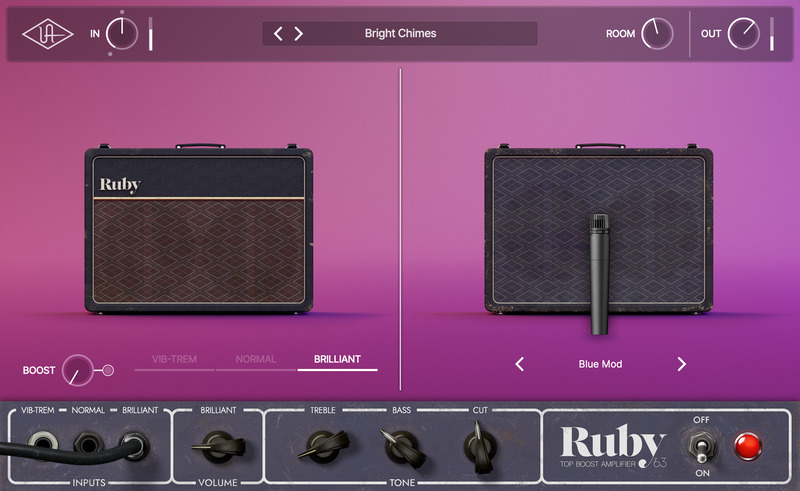
The British Invasion – now in a plug-in
The native UAD Ruby '63 Top Boost Amplifier plug-in gives you the quintessential British valve amp tones beloved by artists and producers for over 60 years, from Queen to U2 to Radiohead*.
Based on the award-winning UAFX pedal, the Ruby '63 plug-in serves up choirboy cleans, complex overdrive, and classic vibrato effects — just like a prized vintage Top Boost amp. Plus you'll get classic boost effects, room sound, and a collection of perfectly mic'd speaker cabs.
Get Legit British Tube Amp Tone in your DAW
The UAD Ruby ‘63 plug-in gives you the inspiring, album‑ready tone of an expertly miked "golden unit" Top Boost amp, within seconds. Based on the award-winning UAFX pedal, you get all the controls that make this amp a must-have for recording pop, rock, metal, country, and more.
Explore Normal, Brilliant, and Vibrato Channels
UAD Ruby '63 gives you the Normal, Brilliant, and Vibrato channels from the original amp — so you can fly to Ireland, London, or Liverpool with the flip of a switch. From mellow to chime to grind, it's all in here, with the unmatched sound and feel of a truly iconic amp.
Push the Limit with Classic Boosts
Ruby '63 packs emulations of classic boost pedals, right onboard. Namely, we've included the legendary '60s Dallas Rangemaster germanium treble booster and the preamp of a '70s Maestro EP-3 tape delay.** Just flip the Boost switch for searing layered tones that add even more character to the amp.
Explore Famous Mic & Speaker Pairings
UAD Ruby ‘63 gives you six classic speaker cabinet setups, as heard on generations of hits, with perfectly placed studio mics and dynamic room sounds.
Models include:
- Silver: 2x12 Rare 15W Celestion Silver Bulldog speakers mic’d with a 57
- Blue: 2x12 Original Celestion Blue Bulldog speakers mic'd with a 57.
- Green: 2x12 Modern Celestion G12Hs speakers mic'd with a 160 ribbon mic.
- Blue Mod: 2x12 Modern Blue Bulldog speakers mic'd with a 57
- Match: 2x12 Celestion G12Hs mic'd with a 57
- Gold: 1x12 Celestion Gold mic'd with a 421 dynamic mic.
Find Your Sound Fast with Expert Presets
Dial in classic tones fast with a curated collection of presets that cover genres from rock, pop, country, funk, and more. Use them to start recording quickly, or tweak the controls to dial in the perfect sound that fits your playing style.
Features
- Get the world's most accurate emulation of a vintage Top Boost amp — no Apollo required
- Capture ace studio amp tones with legendary mic/speaker pairings and famous boost effects
- Stay inspired with three flavors of Top Boost tone (Normal, Brilliant, Vibrato)
- Get classic boost emulations including a '60s Dallas Rangemaster and the preamp of a Maestro EP-3**
*Use of artist names does not constitute official endorsement of UAD Ruby '63 Top Boost Amplifier.
**Product names used herein are trademarks of their respective owners, which are in no way affiliated with Universal Audio Inc. These name(s) are used solely to identify products studied in the creation of the sound models found in UAD Ruby '63 Top Boost Amplifier.
- macOS Big Sur 11, Monterey 12, Ventura 13, Sonoma 14, Sequoia 15 and Tahoe 26
- Windows 10 or Windows 11 (64-bit editions)
- Intel, AMD, or Apple silicon processor
- Internet connection to download software and authorize UAD Native plug-ins (UADx)
- Free iLok account
- Compatible with iLok USB (2nd generation or higher) but not required
- Free UA Connect application for managing UAD Native plug-ins (UADx)
- A supported DAW compatible with VST3, AU, or AAX plug-in file formats.


