/ Amp Simulator / PRS SuperModels
Waves

PRS SuperModels

5.0 (2 Reviews)
$29.99 $129.00

76% off until Dec 07

Waves PRS SuperModels
Waves PRS SuperModels gallery thumbnail
Buy Now
Product information

PRS SuperModels

Experience the Feel of Physical Guitar Amps

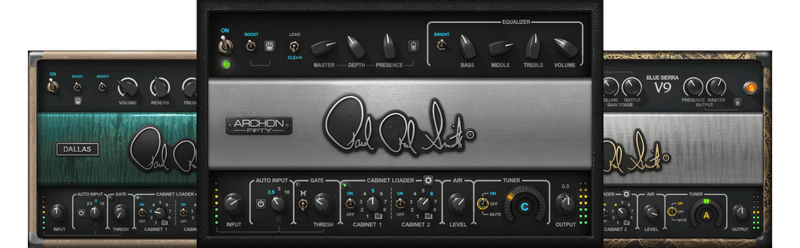
This is the breakthrough guitarists have craved: amp models that not only sound like physical amps, but feel like them. Created in close collaboration with Paul Reed Smith, this power trio of three unique models re-creates the experience—not just the tone—of playing through high-end tube amplifiers.

From the Blue Sierra/V9’s clean crunch, to the Dallas amp’s range of big rock and blues overdrive, to the Archon’s versatility that ranges from pristine to high-gain, these SuperModels have it all.

Features

  • The feel of playing through physical amplifiers
  • 3 amps deliver exquisite tones for all musical genres
  • Customize the dual cabs with 8 cab IRs, or use 3rd-party IRs
  • Musical tone stacks to shape your own distinctive sound
  • Auto-Gain provides the perfect match for your guitar
  • Boost switch sends amps into high-gain territory
  • Controls for shaping tube, transformer and boost responses
  • Full MIDI implementation for compatibility with foot controllers
  • Plugin or standalone app
  • Smart Mix, Phase Fix & Time Fix for perfectly matching any 2 cabs

System Requirements

Mac

  • macOS Monterey 12, Ventura 13, Sonoma 14, Sequoia 15
  • VST / AU / AAX

PC

  • Windows 10+
  • VST / AAX
Installation Instructions

1. Head to https://www.waves.com/create-account

2. Enter your email and choose a password to create an account (if you already have a Waves account, choose Log in, enter your details and head to Step 5) > click 'Submit'

3. Open your email inbox > click the activation link in the email from Waves

4. Click 'Log in here' > Log in to your Waves account

5. Click 'Register New Products'

6. Enter the Serial Number found in your Plugin Boutique user account > click 'Submit'

7. Click download in your Plugin Boutique user account or head to https://www.waves.com/downloads/central > download the Waves Central app for your operating system

8. Install Waves Central > Open Waves Central

9. Click 'Log in' > enter your log in details

10. Click the 'Install Products' tab

11. Tick the blue dot on all products you wish to install or click the top dot to install all products > click 'Install & Activate'

12. Click 'OK'

13. Open your DAW > open the Waves plugin

Your Waves plugins are installed and ready to use, enjoy!

Plugin Boutique Rewards

Discover the most rewarding loyalty programme among all plugin retailers.

  • Free Loopmasters Samplepacks
  • Discounts on products and courses
  • Extra Virtual Cash claimed immediately at checkout
Find out more

Follow us:

X (Twitter) Facebook YouTube Instagram
Logo Logo

Plugin Boutique Limited, Part of the Beatport Group LLC.

Copyright © 2011-2025 Plugin Boutique. All rights reserved