


 Log In

Free gifts available with your purchase
Please Note: For existing owners of previous versions of Filterscape, please check your u-he account for your free upgrade.

The Creative Multi-Talent
Filterscape 1.5: A Trio of Plug-Ins With Morphing EQ
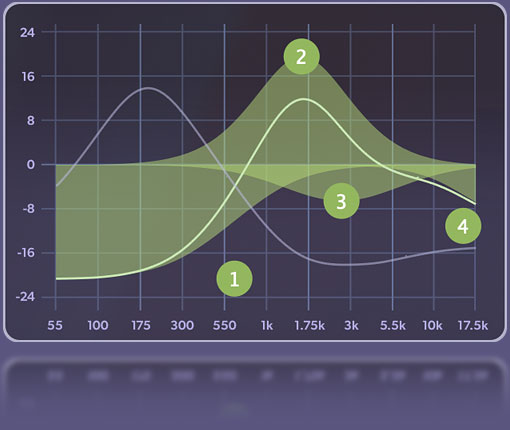
At the core of all three plugins is the distinctive EQ, capable of seamlessly transitioning between 8 different "snapshots". Each EQ band’s frequency and amplitude can be dynamically modulated, even from different sources for each snapshot! With a sleek and future-proof new design, Filterscape has become more visually appealing and more comfortable to use.
Originally published in 2004, Filterscape was u-he's very first cross-platform, multi-format plugin. An important milestone for u-he as a brand, it quickly became a staple in the arsenal of many musicians. Now upgraded with modern technology and ready for tomorrow's tasks, we're once again showing our commitment to maintaining our product line. Filterscape may have been overlooked in recent years, but no longer!
Upgrading the Inner Workings
The new multiband EQ is based on an analogue model which has been optimized for rapid modulation, resulting in significantly improved audio quality when pushed to the limits.
The filter section has been expanded, introducing three new analogue filter models that offer beautifully smooth drive and resonance characteristics.
Multi-Band Morphing EQ
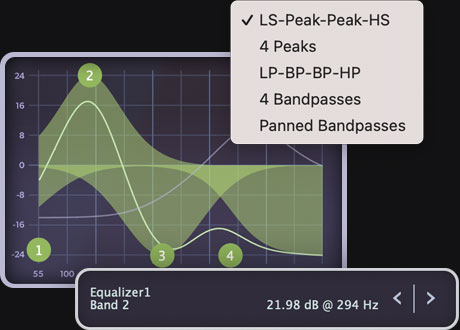
Get surgical with the classic LS-Peak-Peak-HS mode or try your hand at the more exotic multi-bandpass modes. Either way, you can get up to 24 dB of cut and boost per band. EQ bands can be individually modulated at the snapshot level as well as globally.
Snapshot Morphing
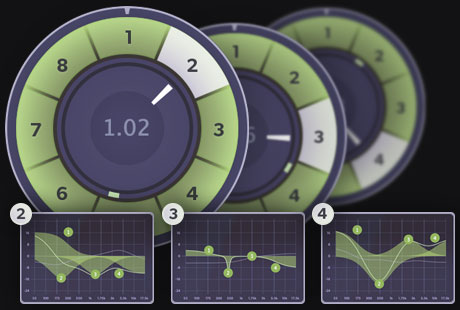
Smoothly transition between up to 8 different EQ settings: either manually, in auto-mode or using any of the available modulation sources. Automate these snapshots in your DAW to suit different sections of your track.
Multi-Mode Filters
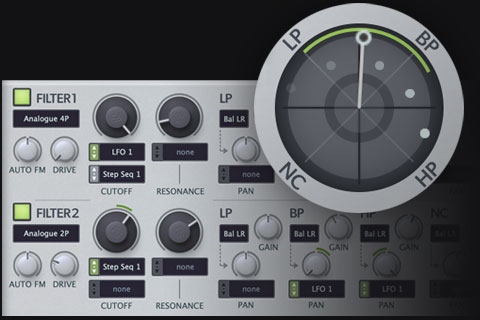
2 parallel state-variable filters (lowpass, bandpass, highpass and notch) offer both legacy and novel analogue-modeled designs. The blender control lets you seamlessly fade between all 4 modes. It even lets you blur the boundaries between the modes as you fade into an allpass, which is great for phasing effects.
Filterscape FX/Q6
Dynamic 6-Band Equalization
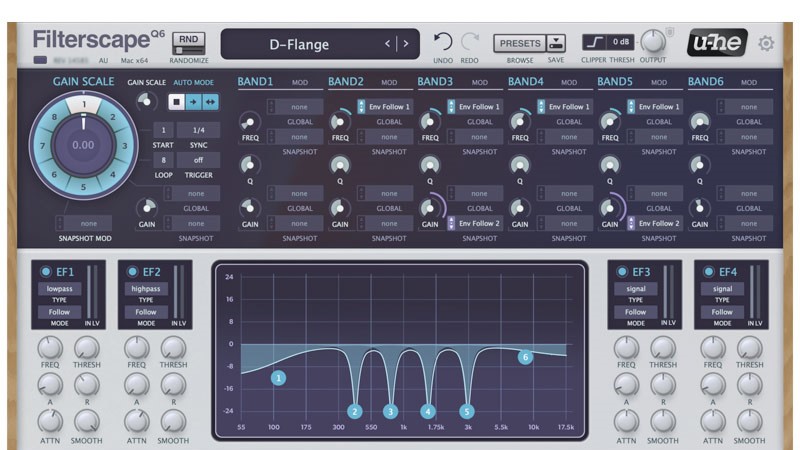
Filterscape Q6 features the same morphing EQ as in Filterscape FX, but with additional low and high shelving filters—hence the name Q6. The four envelope followers can react to different frequencies within the track and modulate just about anything. You can seamlessly automate the EQ settings using just one parameter: snapshot index. Q6 is an engineer's dream come true in a simple but sophisticated interface.
- 6-band equalizer: 4 bands like Filterscape’s EQ plus high and low shelving filters
- 8 morphable snapshots for user-defined EQ settings
- 4 frequency-dependent envelope followers with adjustable signal threshold and filtering for the trigger
Features
- 2 multimode filters, each with mixable lowpass, bandpass, highpass and notch
- NEW in 1.5: 9 additional analogue filter options (2-pole, 3-pole, 4-pole)
- 4-band parametric EQ with five modes:
- LS-Peak-Peak-HS, 4 Peaks, LP-BP-BP-HP, 4 Bandpasses , Panned Bandpasses
- 8 morphable snapshots for user-defined EQ settings
- Modulation options for each EQ band
- 2 signal mixers (roles depend on selected routing configuration)
- Stereo delay with independent times for each channel
- 2 host-synchronized sequencers, up to 16 steps, blend (glide) control
- 2 host-synchronized LFOs with 8 waveforms
- 4 envelope followers
- 5 routing options for delay, filter and EQ signal path
- Overhauled + expanded factory library - improved categorization, volume balancing, larger variety
Filterscape VA
Features
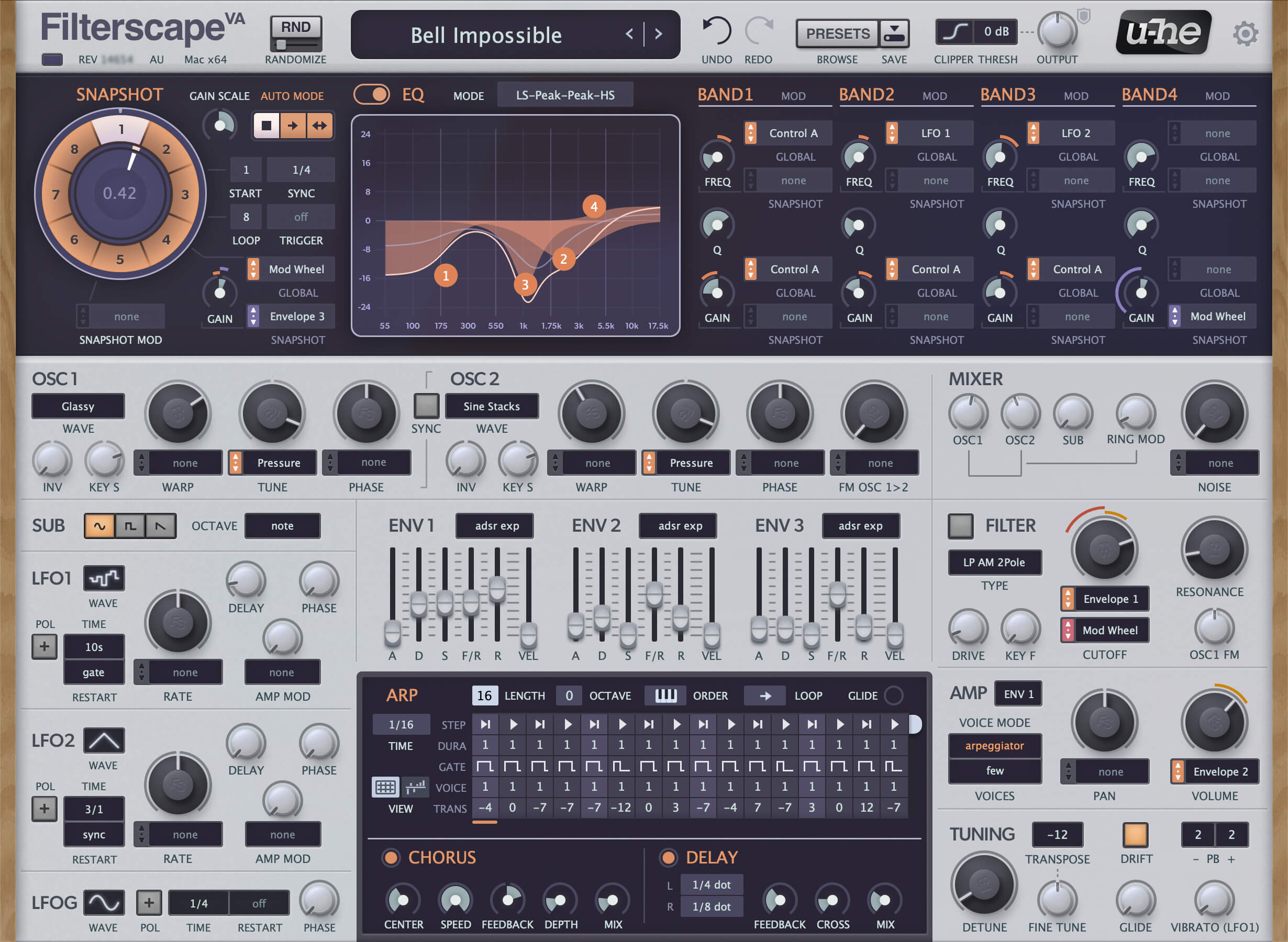
- 2 spectral oscillators with 15 waveform options including wavetables
- EQ identical to Filterscape FX, but polyphonic!
- Ring modulation, hard sync
- Sub-oscillator with 3 waveforms
- Noise generator
- 3 LFOs: 1 global, 2 per-voice
- 3 envelope generators with fall/rise and 4 shape modes
- Combined arpeggiator / sequencer
- Multimode filter: lowpass, bandpass, highpass
- Polyphonic, duophonic or monophonic (retrigger or legato)
- 2 effects: delay, chorus
- Overhauled + expanded factory library - the 200+ new VA presets make use of the new waveforms and filters
System Requirements
Mac
- Mac OS X 10.10 or newer (Intel and M1 Mac Supported) (64-bit only)
- AU2, VST2, VST3
Windows
- Windows 7 or newer (32 / 64-bit)
- VST2, VST3
Minimum Requirements
- Host software / DAW
- 1GB RAM, more recommended
- 1000 × 600 or larger display
- 50-200 MB free disk space
- Modern CPU required:
- Windows/Linux: Intel Nehalem or newer, AMD Bulldozer or newer
- Mac: Intel Nehalem or newer, Apple M1
- Linux: glibc version 2.28 or newer
Plugin Formats:
- Filterscape is not a standalone product, it requires host software. Filterscape is compatible with nearly all DAWs.


