/ Channel Strip / Maserati ACG
Waves

Maserati ACG

5.0 (1 Reviews)
$24.99 $99.00

74% off until Dec 07

Waves Maserati ACG
Waves Maserati ACG
Waves Maserati ACG
Waves Maserati ACG gallery thumbnail
Buy Now
Product information

Maserati ACG

Standout Acoustic Guitar Sounds—Every Time

There’s nothing like a driving acoustic guitar to push a song’s rhythm, or solo picking for expressive leads. But in a dense mix, acoustic instruments can end up getting buried. This multi-effect chain plugin by master mixer Tony Maserati (Beyoncé, Jason Mraz, David Bowie) helps you solve that.

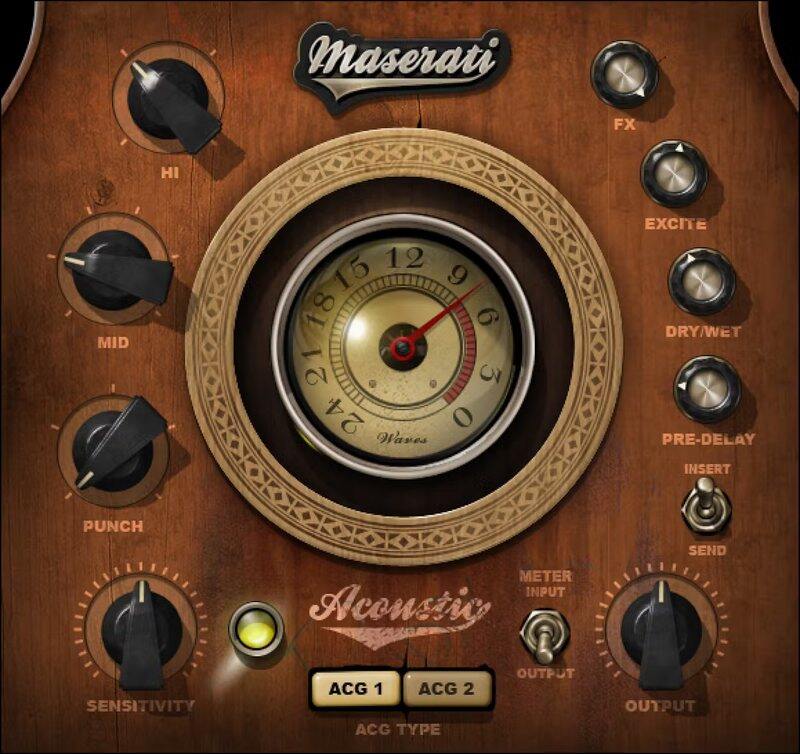
Prioritize level and tone for rhythm, or nuances for leads, with two modes. Then, shape the sound further with punch, mid and hi EQ, reverb, and exciter—for a guitar sound with focus and energy.

“These controls give you my chains for giving acoustic guitars an energy boost: ACG 1 helps you to maximize levels and sculpt your top and bottom. ACG 2 has more built-in compression for bringing out the subtleties in a live performance. Both have appropriate room settings available to be dialed in at varying levels.”—Tony Maserati

Features

  • Designed with Grammy®-winning mix engineer Tony Maserati
  • Choose from customizable chains: ACG1 and ACG2
  • PUNCH helps guitar cut through crowded mixes
  • EXCITE adds shimmer and emphasizes strums
  • Reverb with pre-delay adds ambiance
  • Mid and hi frequency controls optimized for acoustic guitar
  • 42 ready-to-go presets in multiple styles
  • Separate modes for use as an insert or send effect

System Requirements

Mac

  • macOS Monterey 12, Ventura 13, Sonoma 14, Sequoia 15
  • VST / AU / AAX

PC

  • Windows 10+
  • VST / AAX
Installation Instructions

1. Head to https://www.waves.com/create-account

2. Enter your email and choose a password to create an account (if you already have a Waves account, choose Log in, enter your details and head to Step 5) > click 'Submit'

3. Open your email inbox > click the activation link in the email from Waves

4. Click 'Log in here' > Log in to your Waves account

5. Click 'Register New Products'

6. Enter the Serial Number found in your Plugin Boutique user account > click 'Submit'

7. Click download in your Plugin Boutique user account or head to https://www.waves.com/downloads/central > download the Waves Central app for your operating system

8. Install Waves Central > Open Waves Central

9. Click 'Log in' > enter your log in details

10. Click the 'Install Products' tab

11. Tick the blue dot on all products you wish to install or click the top dot to install all products > click 'Install & Activate'

12. Click 'OK'

13. Open your DAW > open the Waves plugin

Your Waves plugins are installed and ready to use, enjoy!

Plugin Boutique Rewards

Discover the most rewarding loyalty programme among all plugin retailers.

  • Free Loopmasters Samplepacks
  • Discounts on products and courses
  • Extra Virtual Cash claimed immediately at checkout
Find out more

Follow us:

X (Twitter) Facebook YouTube Instagram
Logo Logo

Plugin Boutique Limited, Part of the Beatport Group LLC.

Copyright © 2011-2025 Plugin Boutique. All rights reserved