


 Log In
Free gifts available with your purchase

The Quickest Route to Better Guitar Production
Crafting the Perfect Guitar Tone
SSL Guitarstrip is your new go-to processor for electric, acoustic and bass guitars. Providing 4 carefully tailored guitar processing modules, Guitarstrip is packed with useful tools for crafting the perfect guitar tone at both the pre-mix and mixing stages.
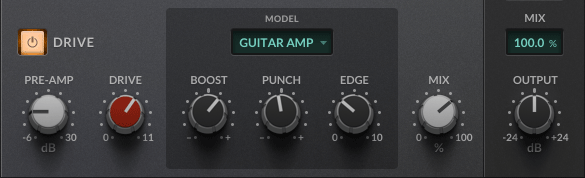
Featuring two classic analogue drive emulations – guitar amp and bass amp – Guitarstrip's DRIVE module allows you to easily add overdrive and grit to your guitar and bass DIs, tame harshness, or electrify your acoustic guitar recordings. Use the BOOST, PUNCH, EDGE and SHAPE controls to sculpt the added harmonics, and the DRIVE MIX control to dial in anything from trashy distortion to subtle saturation.
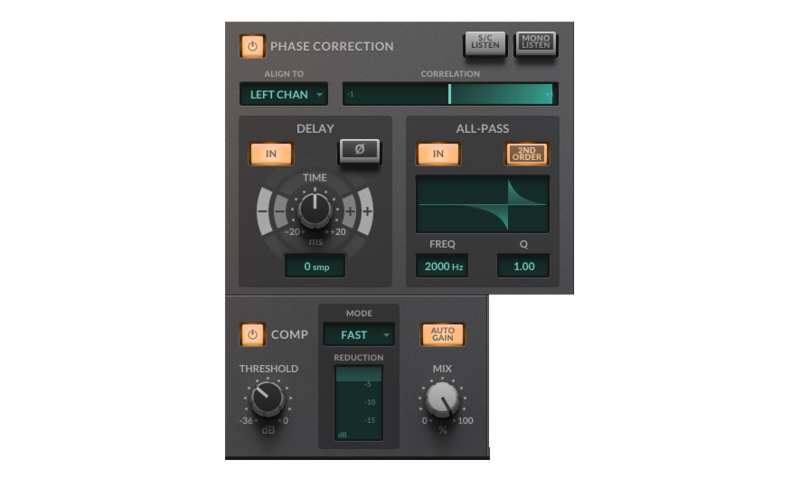
Guitarstrip also provides a dedicated COMPRESSOR section with 5 preset response characteristics to quickly tame levels or add punch to your guitar tracks. Use the intuitive PHASE CORRECTION module to identify phase issues between multiple recordings and correct them using the DELAY, PHASE INVERT and ALLPASS filters. By setting the ALIGN TO mode. You can even repurpose the phase correction module delay as a quick-and-easy way to add stereo depth to a mono signal.
Summary
- 4 Carefully Tailored Guitar Processing Modules - Packed with useful tools for crafting the perfect guitar tone
- Add Drive and Grit to DI Signals and Electrify your Acoustic Recordings - Two classic analogue tube amp drive emulations, including harmonic tone-shaping controls
- Tame levels and Add Punch with the Compressor Module - Easily dial in one of the 5 preset compressor responses to tame levels and add punch
- Intuitive Phase Correction - Fix phase issues between your guitar amp recording and pedalboard DI using the delay and allpass filter
- Easy-to-Use 3-Band Channel EQ and Filter - Including an asymmetrical low gain control and automatic band auditioning
Features
- 4 carefully tailored guitar processing modules
- All-in-one processor for electric, acoustic and bass guitars
- Quickly dial in compression, EQ and tube amp drive
- Packed with useful tools for mixing
- Drive module
- Classic tube amp emulation for adding saturation and taming harshness
- Two classic guitar amp models included – GUITAR AMP and BASS AMP
- Dial in DRIVE to emulate overdriving tube amplifier
- DRIVE is automatically gain-compensated – introduce harmonic content without effecting the level of your signal
- Use the BOOST, PUNCH, EDGE and SHAPE controls to sculpt the tone of the drive
- Enhance upper harmonic content and attack, or reduce for a silky-smooth high-end
- Wet/dry MIX control
- Phase Correction module
- Simple and intuitive processor for correcting phase issues
- Fix phase issues between your guitar amp recording and pedalboard DI
- Quickly switch between two phase correction routing modes
- Use SIDECHAIN mode to phase correct and align your track with reference to an externally sidechained signal
- Use LEFT CHAN or RIGHT CHAN modes to phase correct and align only the left/right component of a stereo signal
- CORRELATION METER indicates the phase difference between your signals
- Use the sample-accurate DELAY and PHASE INVERT controls to make broad improvements to phasing issues
- Use the ALLPASS filter with unity gain to make frequency-dependent phase corrections
- Compressor module
- 5 carefully designed compressor presets, for a wide range of guitar source material – from electric lead to acoustic strumming
- AUTO-GAIN introduces an automatic make-up gain
- Instantaneous GAIN REDUCTION meter
- COMPRESSOR MIX control lets you dial in parallel compression
- 24 dB/8ve HIGH-PASS FILTER at the input, for carving out unwanted low-frequencies and mud
- EQ module
- Simplified 3-band channel EQ for tone-shaping
- Asymmetrical LOW GAIN control cut-off increases as you boost, and decreases as you attenuate
- Quickly dial back the MID GAIN to tame unpleasant frequencies in the midrange
- Use the PRE/POST control to move the EQ to the input
- EQ AUTO LISTEN automatically auditions an EQ band in place when a related parameter is changed
- ECO mode for reduced CPU use
- Built-in help – simply click the ‘?’ and mouseover the GUI to find out more
- Cross-platform preset management
- Undo / Redo
- Apple Silcon Native Support - Guitarstrip is a universal binary and features Silicon Native support.
System Requirements
Please Note: A FREE iLok Account is required for the authorisation of this software.
Mac
- macOS 11 Big Sur - macOS 13 Ventura (64-bit only) (M1 Mac supported)
- Intel Dual-Core Mac running at 2.4GHz or higher
- 4 GB of RAM minimum (8 GB of RAM recommended)
- AU, VST2, VST3, AAX Native
Windows
- Windows 10 - Windows 11 (64-bit only)
- Intel Core 2 (or comparable) CPU running at 2.4GHz or higher
- 4 GB of RAM minimum (8 GB of RAM recommended)
- VST 2, VST3, AAX Native
Reviews Summary
While it aims to provide a helpful overview, it may not capture every perspective or detail. We encourage you to read individual reviews to make an informed decision.
Overall, customers praise this plugin for its high quality, intuitive interface, and easy workflow. It excels at adding warmth, color, and harmonic character to guitars, bass, and synths using its tube drive emulations. While a few users noted it can be a niche tool that they don't use frequently, it is widely considered a great value for tone enhancement and re-amping.


