


 Log In
Free gifts available with your purchase
Immersed in Space
Eventide designed MicroPitch Immersive from the ground up for immersive, Dolby Atmos, and surround workflows. With up to 12 channels of spatialized, detuned delays, plus modulation, EQ, and crossfeed controls, MicroPitch Immersive excels in creating an immersive space with boundaries that reflect, move, diffuse, and dissolve. Whether it be adding a touch of space or creating delayed, pitch diving chaos, MicroPitch Immersive will help you architect both real and unreal immersive realities.
Immersed in History
Eventide's MicroPitch effect has long been crucial to packing a huge, detailed stereo production into just two speakers. The panned pitch and delay effect is essential for creating beautiful and wide stereo productions, often better than the real thing. Starting out in the Eventide H910 in the mid-1970s, the MicroPitch effect has continuously evolved and advanced throughout the years, with notable appearances in the legendary H3000 and continuing to
this day in the flagship H9000 and popular MicroPitch plugin. Now Eventide engineers have pushed the proven power of strategically decorrelated sound into 3 dimensions, taking your immersive mixes to a place never before possible.
MicroPitch, MetaParameters, MegaControl
The clean and intuitive interface seamlessly fits into your projects - whether it be mixing music, postproduction for film, or sound design for games. This enhanced workflow empowers you to spread, tilt, and dynamically morph MicroPitch across the width, depth, and height of your immersive mix.
Workflow Examples
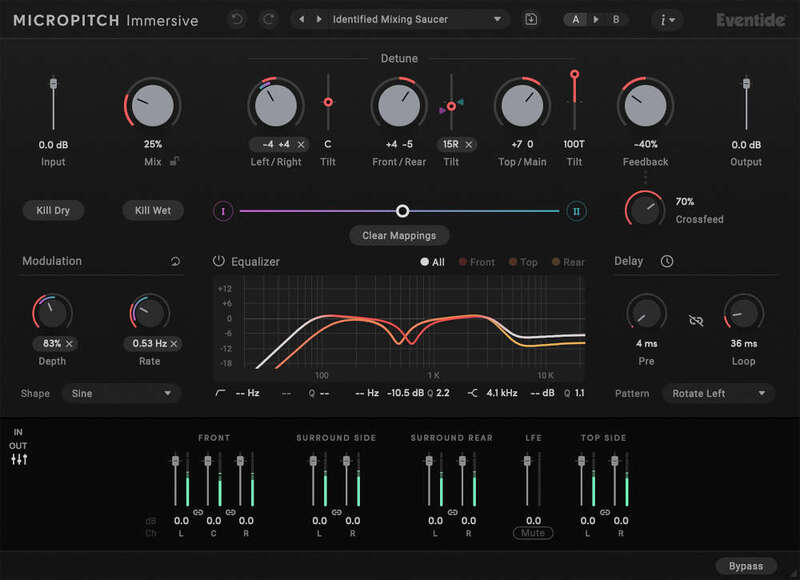
- Tilt the Left/Right, Front/Back, and Top/Main Detune parameters for quick and easy asymmetrical detuning and space fine tuning
- EQ the Front, Top, and Rear speakers separately to sculpt the effect around the listener
- Morph between two distinct settings smoothly and seamlessly - great for sound design
The Universe is Expanding
An immersive ecosystem awaits you, your creations, and your clients, and MicroPitch Immersive gets you in. The list of platforms supporting immersive is substantial, and growing:
- Music: Amazon Music Unlimited, Apple Music, and Tidal.
- Film and Television: Amazon Prime, AppleTV+, Disney+, Kaleidescape, Max, Netflix, and Vudu.
- Games: Xbox X|S. PS5
Features
- Powerful and flexible detuning - widen sources in 3D space, or add Feedback and turn up Crossfeed for verb-like sheen
- Enhanced delay and modulation capability - create slapbacks, add movement with pitch modulation, or create exciting motion with patterned Loop Delay
- Supports LCR, Quadraphonic, 5.0 - 5.1.4, and 7.0 - 7.1.4 channel layouts
- Easy-to-use UI optimized for immersive workflows - same controls for all channel layouts, with no menu diving required
- Transparent signal processing - effect always sounds the same across all immersive formats, and always maintains incoming spatial image integrity
- Quickly set individual speaker levels using the integrated Levels section
- Kill Dry, Kill Wet, and Freeze controls are great for creating drastic effects
- Mix Lock allows for scrolling through presets or settings while keeping the wet/dry mix constant
- Resizable GUI with Undo/Redo and A/B comparison
- Comprehensive Presets Library includes over N presets
System Requirements
Windows
- Windows 10 and later (Windows 11 supported) (64-bit only)
- AAX, VST2, VST3
Mac
- macOS 10.14 and later (Intel / Apple Silicon supported) (64-bit only)
- AAX, AU, VST2, VST3
Important Notes:
- Eventide tests their desktop plugins in Ableton Live, Cubase, FL Studio, Logic Pro, Pro Tools, and Studio One (However, their plugins should work with any compatible host.)
- No iLok dongle is required to run this software - only a FREE iLok account/Manager is required for authorisation.


