/ Stereo Width / MondoMod
Waves

MondoMod

$24.99 $79.00

68% off until Dec 07

Waves MondoMod
Waves MondoMod
Waves MondoMod
Waves MondoMod gallery thumbnail
Buy Now
Product information

MondoMod

Visit an Alternate Universe of Modulation Effects

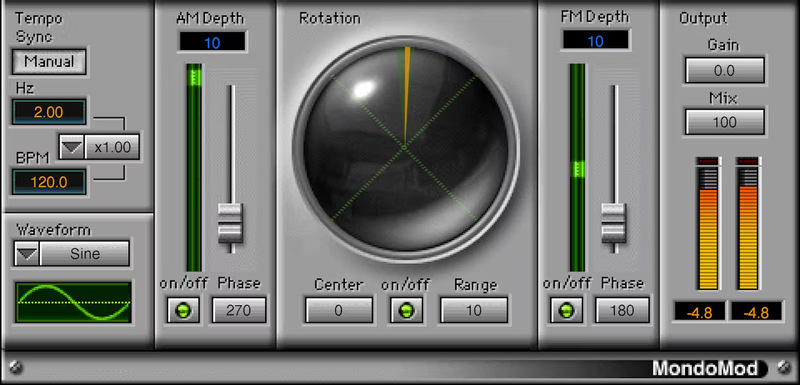
Whether you’re a seasoned sound designer or exploring the furthest reaches of what effects can do, MondoMod re-casts the role of tremolo, vibrato, and panning. Spanning the range from sweet to insane, MondoMod ventures where other no other modulation effect has gone before.

From vibrato frequencies so high they can create lo-fi ring mod FX, to rotation-based panning that gives movement beyond stereo placement, MondoMod makes modulation surprising again.

Features

  • Use frequency, amplitude, and rotational panning simultaneously
  • 360-degree rotational panning gives space and motion to sounds
  • Pan audio over any range in the stereo field
  • Modulation rate goes to 6 kHz, for ring modulation and lo-fi effects
  • Turn off FM modulation to add tight delay to processed sound
  • Create subtle chorusing, doubling, and image-widening

System Requirements

Mac

  • macOS Monterey 12, Ventura 13, Sonoma 14, Sequoia 15
  • VST / AU / AAX

PC

  • Windows 10+
  • VST / AAX
Installation Instructions

1. Head to https://www.waves.com/create-account

2. Enter your email and choose a password to create an account (if you already have a Waves account, choose Log in, enter your details and head to Step 5) > click 'Submit'

3. Open your email inbox > click the activation link in the email from Waves

4. Click 'Log in here' > Log in to your Waves account

5. Click 'Register New Products'

6. Enter the Serial Number found in your Plugin Boutique user account > click 'Submit'

7. Click download in your Plugin Boutique user account or head to https://www.waves.com/downloads/central > download the Waves Central app for your operating system

8. Install Waves Central > Open Waves Central

9. Click 'Log in' > enter your log in details

10. Click the 'Install Products' tab

11. Tick the blue dot on all products you wish to install or click the top dot to install all products > click 'Install & Activate'

12. Click 'OK'

13. Open your DAW > open the Waves plugin

Your Waves plugins are installed and ready to use, enjoy!

Plugin Boutique Rewards

Discover the most rewarding loyalty programme among all plugin retailers.

  • Free Loopmasters Samplepacks
  • Discounts on products and courses
  • Extra Virtual Cash claimed immediately at checkout
Find out more

Follow us:

X (Twitter) Facebook YouTube Instagram
Logo Logo

Plugin Boutique Limited, Part of the Beatport Group LLC.

Copyright © 2011-2025 Plugin Boutique. All rights reserved