/ Distortion / Berzerk Distortion
Waves

Berzerk Distortion

$24.99 $99.00

74% off until Dec 07

Waves Berzerk Distortion
Waves Berzerk Distortion gallery thumbnail
Buy Now
Product information

Berzerk Distortion
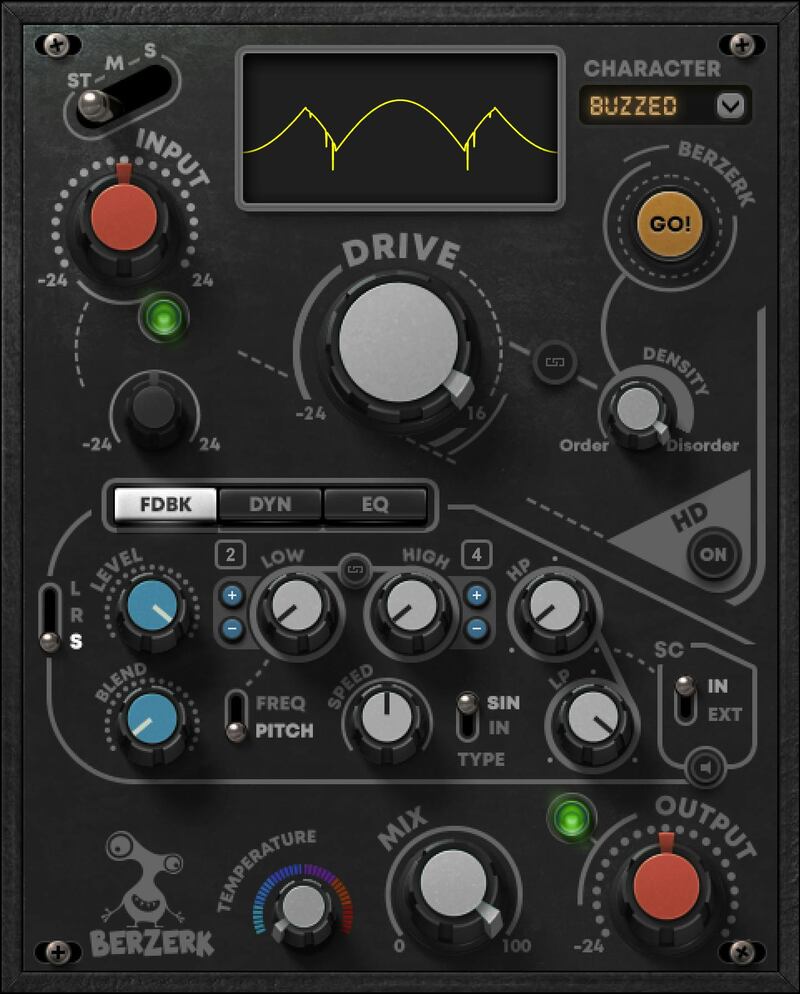
Transcend the Traditional with Deranged Distortion

Wild and versatile, Berzerk zooms past today’s boutique analog distortion pedals with more parameters, more creative options, and breakthrough features. Add feedback, randomize distortion shapes, apply inventive dynamics, do mid/side/stereo processing, and more.

Fashioned for creative musicians and sound designers frustrated by the limits of traditional distortion plugins, Berzerk shatters convention—and provides an antidote to creative ruts.

Features

  • 10 original distortion shapes, with ‘Go Berzerk’ randomizer option
  • Transform drum loops, synth lines & more into pulsating monsters
  • A dream come true for creative musicians and sound designers
  • Insane frequency-based effects from level-tracking oscillator
  • Dynamics pumps, gates, ducks, and expands the distorted audio
  • 3 fully parametric EQ stages further colorize the distortion
  • Resonant feedback network creates pitched tonalities
  • Over 100 dazzling presets by Grammy winners
  • M/S distortion: Distort only mids or sides, leave the rest clean
  • Oversample for cleaner sounds—or keep it dirty
  • Unique Feedback oscillation section with pitch/speed controls, INT/EXT sidechaining and more
  • Temperature control to set overall signal color and warmth

System Requirements

Mac

  • macOS Monterey 12, Ventura 13, Sonoma 14, Sequoia 15
  • VST / AU / AAX

PC

  • Windows 10+
  • VST / AAX
Installation Instructions

1. Head to https://www.waves.com/create-account

2. Enter your email and choose a password to create an account (if you already have a Waves account, choose Log in, enter your details and head to Step 5) > click 'Submit'

3. Open your email inbox > click the activation link in the email from Waves

4. Click 'Log in here' > Log in to your Waves account

5. Click 'Register New Products'

6. Enter the Serial Number found in your Plugin Boutique user account > click 'Submit'

7. Click download in your Plugin Boutique user account or head to https://www.waves.com/downloads/central > download the Waves Central app for your operating system

8. Install Waves Central > Open Waves Central

9. Click 'Log in' > enter your log in details

10. Click the 'Install Products' tab

11. Tick the blue dot on all products you wish to install or click the top dot to install all products > click 'Install & Activate'

12. Click 'OK'

13. Open your DAW > open the Waves plugin

Your Waves plugins are installed and ready to use, enjoy!

Plugin Boutique Rewards

Discover the most rewarding loyalty programme among all plugin retailers.

  • Free Loopmasters Samplepacks
  • Discounts on products and courses
  • Extra Virtual Cash claimed immediately at checkout
Find out more

Follow us:

X (Twitter) Facebook YouTube Instagram
Logo Logo

Plugin Boutique Limited, Part of the Beatport Group LLC.

Copyright © 2011-2025 Plugin Boutique. All rights reserved










