


 Log In

Free gifts available with your purchase
This product is an expansion for Softube Modular. If you do not currently own Modular, you can purchase it HERE.
A long-awaited addition to the Softube Modular platform, the 4ms Pingable Envelope Generator opens up a vast array of possibilities beyond the basic ADSR envelope generator included in the core Modular package. Two independent envelope generators can be 'pinged' by external sources - your DAW clock, for example - to define the cycle-length of the envelope(s) and generate rhythmic effects and interactions never before possible in Modular.
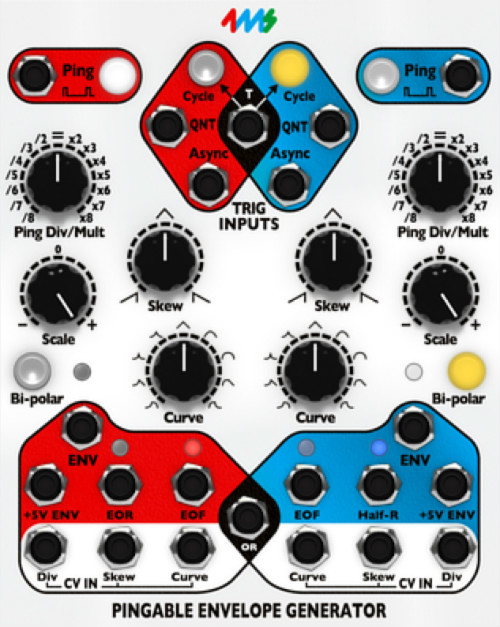
Fully licensed and endorsed by 4ms, manufacturers of the original hardware, the 4ms PEG expands your creative horizon. Create crazy polyrhythms for percussive clicks and beeps, or match the elastic wobble of a dubstep bassline to the tempo of your track with ease. Multiply the pinged tempo of each channel to fit two, three, four or more envelope cycles into each beat, or divide to generate longer cycles which still conform to your pinged tempo. And send the envelope generated by one side to CV modulate the parameters of the other. This module is fantastic for fun experimentation, and often results in happy accidents and creative inspiration.
What the 4ms PEG does
With tons of routing options and CV inputs, this module makes serious noise even if it's not intended to make a single sound of its own. Try it and see.
In Short
- Two-channel pingable envelope generator
- Use one side at a time to sync the rhythmic aspects of a sound to your track tempo
- Use both sides to quickly concoct awesome generative rhythmic chaos
- Detailed control of the shape of the envelope when generating drum sounds
- Easily create some controllable motion in your textures
- Adds hugely to the capabilities of your Softube Modular system
- Requires Modular
Please Note:
- Modular (cross-platform modular synthesizer) is required to run this software!
System Requirements
- macOS Big Sur 11, Monterey 12, Ventura 13
- Windows 10 (64-bit), Windows 11
- Softube account
- iLok account
- Computer with AU, VST, VST3, and/or AAX-compatible DAW host software
- Internet access (for downloading installers and managing licenses)
Supported CPU Families
- Apple macOS computers with Intel Core i3/i5/i7 or Apple silicon (M1 or newer) CPU. Apple silicon is supported natively.
- Windows computers with quad-core Intel Core i3/i5/i7 or AMD quad-core processors with SSE 4.2 support.
- Other Intel processors (Celeron, Pentium, and Xeon) are compatible if they support SSE 4.2 instructions.
Supported Host Software (DAW)
Any 64-bit VST, VST3, AU, or AAX (Pro Tools 11.0.2 or higher) compatible host application should work. However, due to plug-in host differences between DAWs—and our rigorous standards—Softube only officially test their plug-ins and instruments in the most recent versions of Pro Tools, Logic Pro, Cubase, Ableton Live, Studio One, and Reaper. Softube plug-ins are not tested regularly in non-listed systems. They will likely work if the system requirements are met. However, the manufacturer cannot guarantee a solution for issues in unsupported systems.
Softube strongly recommend using VST3, as some of their plug-ins have features that are not present in the older VST format. Supported sample rates: 44.1, 48, 88.2, 96, 176.4, and 192 kHz, in both mono and stereo. The most recent maintenance release of your DAW application is recommended. AAX DSP is not currently in active development. TDM/VENUE/RTAS are no longer supported. See Legacy Installers.
- Softube Modular is required to run this software.
- Make sure that you always use the latest iLok License Manager. It is not included in the Softube installer but can be downloaded from www.ilok.com

Christoffer Berg
Programmer, mixer and producer for Depeche Mode, The Knife and Fever Ray.
"It's a fantastic rhythmic tool, making divisions and shaped envelopes, a contemporary take on the legendary function generators of early modular systems."
Ed Handley and Andy Turner (Plaid)
Electronic Artists.
"Its ping-ability makes this a really musical envelope generator, we’ve been using it as a synced, morphing LFO. With the trigger options and OR output the possibilities are mind boggling."
Robin Rimbaud, aka Scanner
Producer, DJ, remixer and artist.
"For the trigger happy the tempo-synced envelopes are rhythmic bliss. A very versatile and essential module in any setup."


