


 Log In

Free gifts available with your purchase
Tube Modulator is a collection of several tremolo, vibrato and spatial position effect circuits ranging from the late ‘50s tube bias tremolo to the late ‘60s psychedelic vibe pedals.
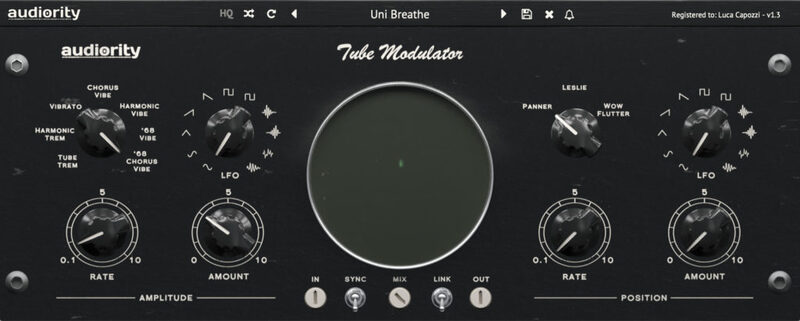
Tube Modulator spatial effects include a panner, a rotary speaker and a wide stereo “wow & flutter” simulators.
A wide XY scope will show you the current amplitude and spatial position modulation to get instant feedback from your settings.
Tube Modulator is Colored by Design, adding a great amount of warmth and colour to your signal.
Features
- 7 Tremolo / Vibrato modes
- 3 Spatial Position effects
- 11 Waveforms LFO
- XY Scope
- Parameters Linking
- Tempo Sync
- Coloured by Design
System Requirements
Mac (Intel)
- OSX 10.9 or later (64-bit only)
- Intel i5 or higher
- 2GB RAM
- Screen resolution: 1024×768
- VST2, VST3, AU 64-bit host
Mac (Apple Silicon)
- macOS 11.0 or later (64-bit only)
- Apple M1 or higher
- 2GB RAM
- Screen resolution: 1024×768
- VST2, VST3, AU 64-bit host
Windows
- Windows 7 (64-bit only)
- Intel i5 or higher
- 2GB RAM
- Screen resolution: 1024×768
- VST2, VST3 64-bit host
Please Note: Pro Tools 11 or higher is required in order to use the AAX 64-bit version.
Awards



Reviews Summary
While it aims to provide a helpful overview, it may not capture every perspective or detail. We encourage you to read individual reviews to make an informed decision.
Users highly praise this modulator plugin as an intuitive, fun, and highly creative tool that quickly transforms audio. Key features highlighted include its ability to shape space in mixes, create excellent presets with an XY scope, and deliver an endlessly customizable vintage vibrato sound.


