/ Pitch Shifter / Doppler
Waves

Doppler

5.0 (2 Reviews)
$24.99 $79.00

68% off until Dec 07

Waves Doppler
Waves Doppler
Waves Doppler
Waves Doppler gallery thumbnail
Buy Now
Product information

Doppler

Create the Frequency/Pitch Shift Effect of Sounds Traveling Past You

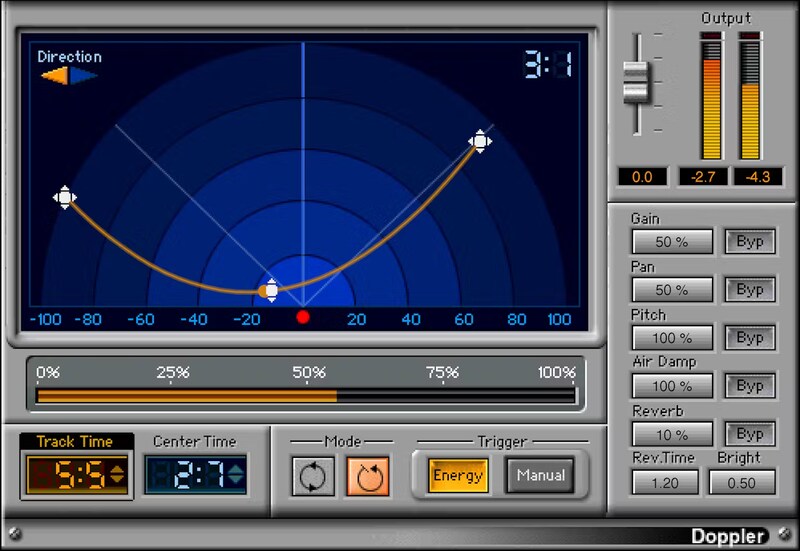
Speeding cars, airplane fly-bys, railroad trains moving past you—the Doppler effect is an essential sound design tool to create the impact of space and motion. Now, the Doppler plugin provides the aural cues that recreate a realistic environment, and place your sounds within a realistic space.

But as Doppler users have found out, this isn’t just about sound design. Add motion to mixes—percussion, hi-hats, guitars, synths, background vocals, and more—that no other effect can create.

Features

  • Create fly-bys and movement for FX, with pitch shifts and reverb
  • Control track curve, center time, pitch, start and end points
  • Intuitive display shows clearly how the sound moves in space
  • Bypass pitch-shifting to retain tempo with rhythmic instruments
  • Reverb tail generator emulates reflections from surroundings
  • Trigger one-shot or continuous sweeps, manually or by threshold
  • Air Damp emulates high-frequency loss as sound moves away
  • 20 presets for common sound design movements

System Requirements

Mac

  • macOS Monterey 12, Ventura 13, Sonoma 14, Sequoia 15
  • VST / AU / AAX

PC

  • Windows 10+
  • VST / AAX
Installation Instructions

1. Head to https://www.waves.com/create-account

2. Enter your email and choose a password to create an account (if you already have a Waves account, choose Log in, enter your details and head to Step 5) > click 'Submit'

3. Open your email inbox > click the activation link in the email from Waves

4. Click 'Log in here' > Log in to your Waves account

5. Click 'Register New Products'

6. Enter the Serial Number found in your Plugin Boutique user account > click 'Submit'

7. Click download in your Plugin Boutique user account or head to https://www.waves.com/downloads/central > download the Waves Central app for your operating system

8. Install Waves Central > Open Waves Central

9. Click 'Log in' > enter your log in details

10. Click the 'Install Products' tab

11. Tick the blue dot on all products you wish to install or click the top dot to install all products > click 'Install & Activate'

12. Click 'OK'

13. Open your DAW > open the Waves plugin

Your Waves plugins are installed and ready to use, enjoy!

Plugin Boutique Rewards

Discover the most rewarding loyalty programme among all plugin retailers.

  • Free Loopmasters Samplepacks
  • Discounts on products and courses
  • Extra Virtual Cash claimed immediately at checkout
Find out more

Follow us:

X (Twitter) Facebook YouTube Instagram
Logo Logo

Plugin Boutique Limited, Part of the Beatport Group LLC.

Copyright © 2011-2025 Plugin Boutique. All rights reserved