


 Log In

Free gifts available with your purchase
The H910 Harmonizer was the world’s first digital effects processor. With its unique combinations of pitch shifting, modulation and delay, the H910 can be heard on countless ground-breaking works by artists from AC/DC to David Bowie to Frank Zappa. Simply put, nothing sounds quite like it.
A powerful creative tool, the H910 plug-in for AAX, VST and AU is a faithful recreation of the original hardware. Use the H910's pitch changing ability to create specific musical intervals and perfect harmonies, spread guitars, fatten snares, apply subtle organic de-tuning to synths or add slap-back delays to vocals. At extreme settings, you can create unheard-of mechanical sounds, drone effects or robot language using self-oscillation, delay, and anti-feedback.
H910-EKD
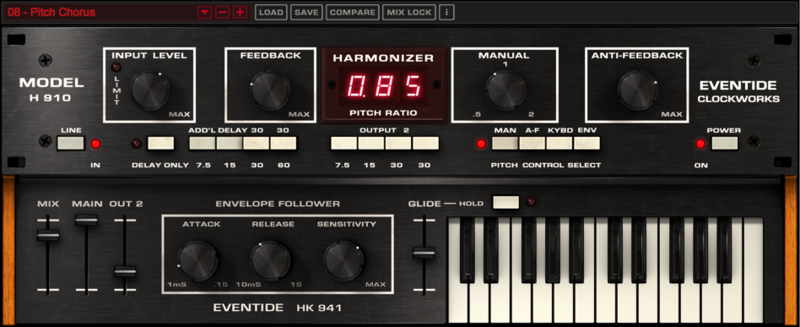
A number of enhancements have been added to this release including Keyboard and Envelope pitch control modes, Output 2 Delay Group and a Mixer. This H910-EKD (Envelope/Keyboard/Delay) as it is known, allows the plug-in to be even more responsive to your sound.
The recreation of the original piano-style keyboard remote control allows you to play musical pitch offsets and blend in a second delay line by using new mixer controls for added stereo sound. The new envelope follower uses the input signal to bend the pitch.
Two is Better than One
When you purchase the H910 Harmonizer plug-in, you also receive Eventide’s exclusive H910 Dual Harmonizer. This version recreates the popular technique of running two H910 units in parallel to create lush doubling and other interesting effects.
Features
- NEW Keyboard and MIDI mapping - The original H910 featured a keyboard remote control which was used live by several artists including Elton John. With the H910 plug-in you can easily use MIDI to control pitch and harmonization in real-time
- NEW Envelope Follower - An envelope follower has also been implemented in this latest release. Engineers and producers discovered that sending a control voltage to the hardware H910 could be used to slightly (or massively) vary the pitch, creating entirely new sounds. The built-in envelope follower makes exploring these possibilities easy
- NEW OUT2 Delay Group - adds inspiring attributes to your sound
- True analog modeling of highly nonlinear electronics for faithful reproduction of the original H910's juicyness and grit
- Perform perfect pitch changes controlled manually, via MIDI or with Anti-Feedback
- Anti-Feedback modulates the pitch around unity for a subtle or wild effect
- Optional "glitching" of original H910 hardware to create unpredictable sounds as it alters pitch
- Modify pitch by musical intervals (diatonic) to harmonize vocals or solo instruments
- Delay rhythms and melodies to create everything from slap-back echoes to feedback chaos
- Create colorful, unique sound effects and drones through self-oscillation
- Individually control delay outputs and dry/wet mix
- Mix Lock allows for scrolling through presets or settings while keeping the dry/wet mix constant
BONUS: H910 Dual
- H910 Dual recreates two H910 units running in parallel to create doubling effects and other unique sounds
- H910 Dual easily fattens and thickens instruments when assigning opposite pitch ratios
- H910 Dual Stereo (cross-unit) Feedback can cause the incoming signal to shift up and then down continuously
Presets
The H910 and H910 Dual feature hundreds of presets and include a number of artist presets.
- Chris Carter (Throbbing Gristle)
- Robin Finck (Nine Inch Nails)
- The Butcher Bros. (John Lennon, Bob Dylan)
- Joe Chiccarelli (Morrissey, Frank Zappa)
- Roy Hendrickson (Miles Davis, Frank Sinatra)
- Sasha (Madonna, Hot Chip)
The Glitch is Back
The original H910’s unique pitch change method introduced random ‘glitches’ into the audio and the word ‘glitch’ into the audio engineer’s vocabulary. Not surprisingly, artists found creative ways to use the glitch and, in fact, years later when the H949 was introduced with advanced de-glitching circuitry, some users were disappointed that the glitch was gone. In addition to the glitch, all of the quirkiness of the original H910 has been emulated. The design predates the introduction of the CD and digital audio sample rate standards (e.g. 44.1 kHz) by nearly a decade. The system clocks at the heart of the design drifted and wobbled introducing a degree of randomness in the effect not found in later crystal-based, precise digital devices. This was evident in the way that the display would flicker between pitch ratio readings. The combination of glitch, randomness and analog signal path, especially when the feedback control was turned up, added an ‘organic’ feel to the sound and that feeling comes through in the plug-in.
True End to End Emulation
Eventide has painstakingly modeled every section of the analog signal chain to recreate the sounds of the original H910.The original H910 was a 100% software-free, analog and digital processor that predated the earliest practical ADC or DSP chips by several years. It used simple digital logic gates and some of the earliest RAM memory chips but was, in large measure, an analog beast. A custom analog-to-digital converter, companding, filtering and analog feedback combined to give the unit a distinctive sound which this plug-in faithfully re-creates.
Join the Elite
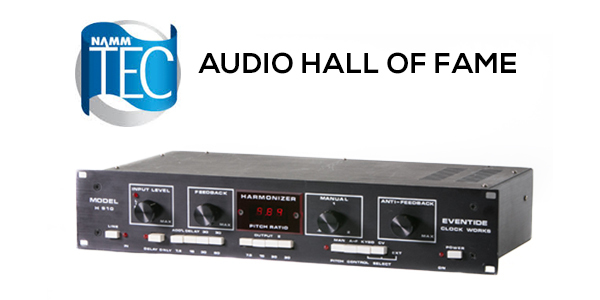
H910 Hall of FameIn 2007, the H910 was inducted in the technology Hall of Fame. The list of famed producers, audio engineers and musicians that still use it to this day—either in hardware or plug-in form—is a veritable “who’s who” of the recording industry. Thicken drums, create vocal harmonies and make your guitars fill up the track with the best of them. Just ask Tony Visconti (David Bowie, Thin Lizzy, ), Shelly Yakus (John Lennon, U2, Madonna), Tom Lord-Alge (Avril Lavigne, Blink 182, Santana), Tony Platt (AC/DC, Cheap Trick, Bob Marley), Laurie Anderson and Eddie Van Halen, to name a few. Once you have the H910 in your arsenal, you’ll wonder how you ever lived without it.
System Requirements
Windows
- Windows 10 and later (Windows 11 supported) (64-bit only)
- AAX, VST2, VST3
Mac
- macOS 10.14 and later (Intel / Apple Silicon supported) (64-bit only)
- AAX, AU, VST2, VST3
Important Notes:
- Eventide tests their desktop plugins in Ableton Live, Cubase, FL Studio, Logic Pro, Pro Tools, and Studio One (However, their plugins should work with any compatible host.)
- No iLok dongle is required to run this software - only a FREE iLok account/Manager is required for authorisation.
Gearspace.com
The world's best pro audio and music production community & discussion forum.
"Quirky, exotic and a bit unpredictable, the H910 just sounds beautiful...It's a plugin that really favors experimentation and can deliver some unexpected results."
Harmony Central
The leading Internet resource for musicians, supplying valuable information from news and product reviews to classified ads and chat rooms.
"I’d forgotten just how much fun the H910 could be, because of its mostly lo-fi nature. I always missed the funky effects it could deliver, particularly the 'bell tree' effects where a pitch spiraled upward or downward..."
Reviews Summary
While it aims to provide a helpful overview, it may not capture every perspective or detail. We encourage you to read individual reviews to make an informed decision.
Users highly praise this audio plugin for its clean sound, beautiful layout, and ease of use. It is considered a must-have tool for music production, especially for achieving perfect stereo widening and processing double vocals.


