Buy Fosfat, get a free gift with purchase:
Transient Fertilizer
Bring life to your drums and percussion
No drum deserves to be dull or lame. Fosfat will add bite and oomph to your drums or percussion (or any percussive sounds). It follows the dynamics of the incoming sound and adds tonal and noise textures to it. Klevgrand thinks of it almost like an EQ, in the way it shapes the sound, but it adds instead of cutting or boosting. It’s perfect for when you have a nutrient-deficient recording (lacking bass or attack in a kick drum for example), or if you just want to add some extra sub or pleasant stereo fizz to any percussive sound.
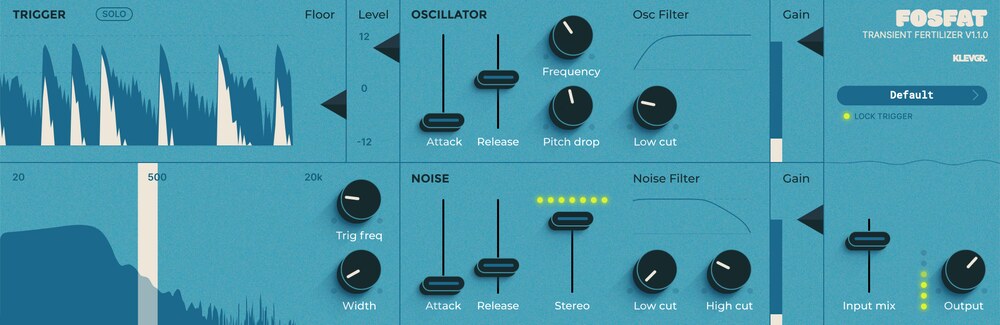
In addition to the obvious option of using multiple instances of Fosfat across your drum tracks, the possibility to precisely dial in its trigger lets you pinpoint any frequency area or transient of your choice in recordings of whole drum kits or any drum loop sample. This gives you a very efficient and musical way of enhancing specific parts. Together with an oscillator, noise generator, low- and high-cut filters, stereo width, gain and more, you have a beat-fertilizing hothouse letting your percussive sounds really grow and bloom.
-
What's your trigger point?
Multiple visualizers make it a breeze to dial in how the trigger should act
-
Toss in some boom
The sub-oscillator will bring body to any kick drum, but thanks to the many options you may very well find it useful for all kinds of sounds. Pitch drop included. Mic drop.
-
Add the kschh
For additional bite, the noise oscillator is your friend. Envelope control, stereo width and filter.
-
Just enough
A balanced diet is essential in every aspect of drum shaping.
-
Ready, preset, go!
While Fosfat is really easy to configure from scratch, Klevgrand has included a bunch of presets to get you up and running in no time.
How Fosfat can fertilize your sound
Klevgrand's new plug-in Fosfat will add bite and oomph to your percussive tracks. It can of course add its magic to any sound you can think of, but where Fosfat shines the most, and what it was primarily designed for, is to cultivate those drums.
Features
- Multiple audio-visualizations makes dialling in accurate settings very easy
- Controls for trigger frequency and width respectively
- Sine wave oscillator with optional pitch drop
- Noise with adjustable stereo width
- Attack and release controls
- Low cut and high cut filters
- Four instances of volume control
- Wave rendition
- Preset collection
System Requirements
- macOS 10.10 or later (optimized for the M1-processor)
- Windows 7 SP1 or later
- AU, VST-2, VST-3, AAX

Please Note: Pana is used as the example:
Mac
License Redemption
1. Navigate to https://klevgrand.com/redeem > Paste your 16 digit redemption code found in your Plugin Boutique User Account > Click 'Submit!'.
2. Your redemption code has been accepted > Scroll down to Step 2.
3. Click either 'Sign in' if you already have a Klevgrand account, or 'Create new account' if you do not > Fill in your personal details > Click 'I'm ready'.
4. Your account has now been created.
5. Navigate to your email inbox and locate the activation email that you should have received from Klevgrand > Click 'Let me in!' to activate your account.
6. Create a password for your account > Click 'Enter Klevgrand'.
7. Your software and serial number is now available within your Klevgrand account > Click the Apple logo to download the installer file.
Installation
1. Launch the pana_x_x_x_macOS.dmg installer file.
2. Double click the KLEVGR. logo to launch the installer.
3. Click 'Continue'.
4. Click 'Continue'.
5. Click 'Agree'.
6. Click 'Install'.
7. Enter your system password > Click 'Install Software'.
8. Click 'Close'.
9. Navigate back to your Klevgrand My Account page > Click on the serial number to copy it to your clipboard.
10. Launch your DAW > Create a new audio track > Insert Pana onto the channel > Paste your serial number into the box.
Your software is now activated and ready to use within your DAW
Windows
License Redemption
1. Navigate to https://klevgrand.com/redeem > Paste your 16 digit redemption code found in your Plugin Boutique User Account > Click 'Submit!'.
2. Your redemption code has been accepted > Scroll down to Step 2.
3. Click either 'Sign in' if you already have a Klevgrand account, or 'Create new account' if you do not > Fill in your personal details > Click 'I'm ready'.
4. Your account has now been created.
5. Navigate to your email inbox and locate the activation email that you should have received from Klevgrand > Click 'Let me in!' to activate your account.
6. Create a password for your account > Click 'Enter Klevgrand'.
7. Your software and serial number is now available within your Klevgrand account > Click the Windows logo to download the installer file.
Installation
1. Unpack the pana_x_x_x_win.zip installer file > Launch the pana_x_x_x_win.exe file.
2. Click 'I accept the agreement' > Click 'Next'.
3. Click 'Next'.
4. Click 'Next'.
5. Click 'Next'.
6. Click 'Install'.
7. Click 'Finish'.
8. Navigate back to your Klevgrand My Account page > Click on the serial number to copy it to your clipboard.
9. Launch your DAW > Create a new audio track > Insert Pana onto the channel > Paste your serial number into the box.
Your software is now activated and ready to use within your DAW


























