


 Log In

Free gifts available with your purchase
Product information
Dorrough Surround
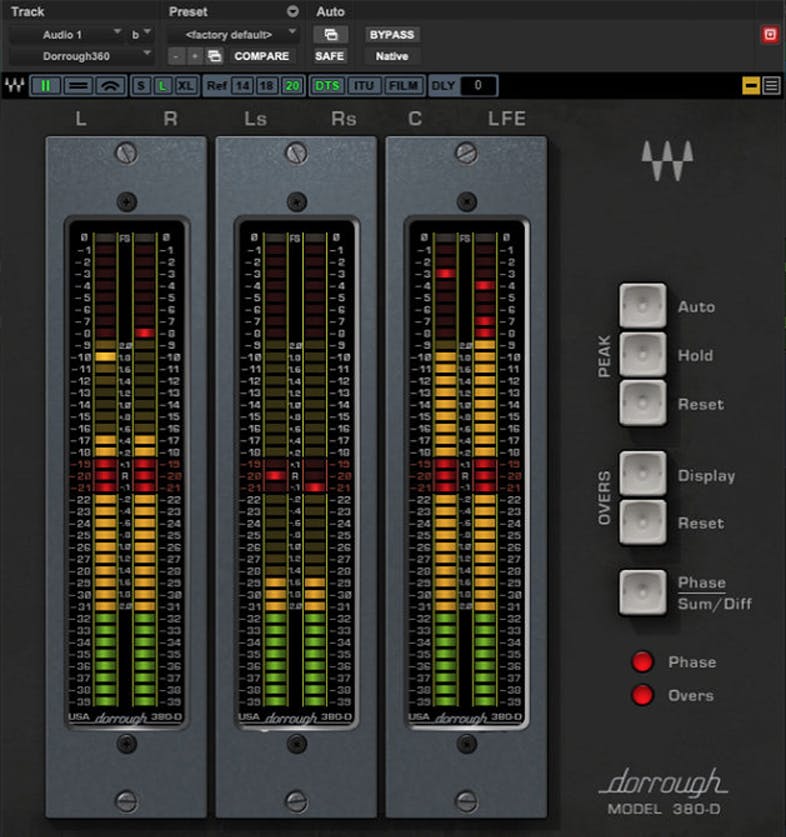
Safeguard Surround Levels with Absolute Accuracy
Surround multiplies the options for stunning sound—but also multiplies the opportunities for problems. It’s essential to make sure that peaks aren’t creating distortion, average levels have the correct relationship to peaks, and that all the surround channels are mixed as intended.
Working in close cooperation with Dorrough Electronics, Waves has modeled the physics of hardware meters with uncanny accuracy—so that you’ll see the truth behind the levels you hear.
Features
- Includes 5.0 and 5.1 meters, plus all Dorrough Stereo meters
- Displays both average and peak levels in a single meter
- Responds instantly to peaks, and averages the overall levels
- DTS, ITU/SMPTE, and Film/Dolby Digital modes
- “Overs” LED stays on when more than 3 samples exceed 0 dBFS
- Makes it easy to adhere to standards for film and television
- Meters can display in 3 sizes: Small, large, and extra large
- Hold peaks for 3 seconds, hold indefinitely, or reset peaks
- Controls for meter Order, Sum & Diff/Phase, and Collapse Meters
- Left/Right, Sum/Difference, and Phase Correlation modes
- Vertical, horizontal, and arc meter configurations
System Requirements
Mac
- macOS Monterey 12, Ventura 13, Sonoma 14, Sequoia 15
- VST / AU / AAX
PC
- Windows 10+
- VST / AAX
Installation Instructions














