


 Log In

Free gifts available with your purchase
For those that want to add smooth textures and fine-tune your end result.
W.A. Production has a smokin' deal for you. The Sphere Series Bundle. Comprised of 3 audio plugin effects that put you in the driver's seat. SphereComp, an approachable dual-mode compressor, SphereDelay, a multimode delay that offers more control than any other delay plugin, and SphereQuad, a lightweight multi-effects plugin that packs a powerful punch.
Our user-friendly and easy to navigate functionality allows you to approach effects processing with confidence and authority. The weightless design is easy on your CPU. Our results are second to none.
Professional quality gives you professional results. Stop playing with stock plugin toys and pick up this bundle of useful tools that will shape your mix and allow your talent to shine with pristine sound quality. Pick up the reigns and take control of your sound. Pick up The Sphere Series Bundle today.
SphereQuad
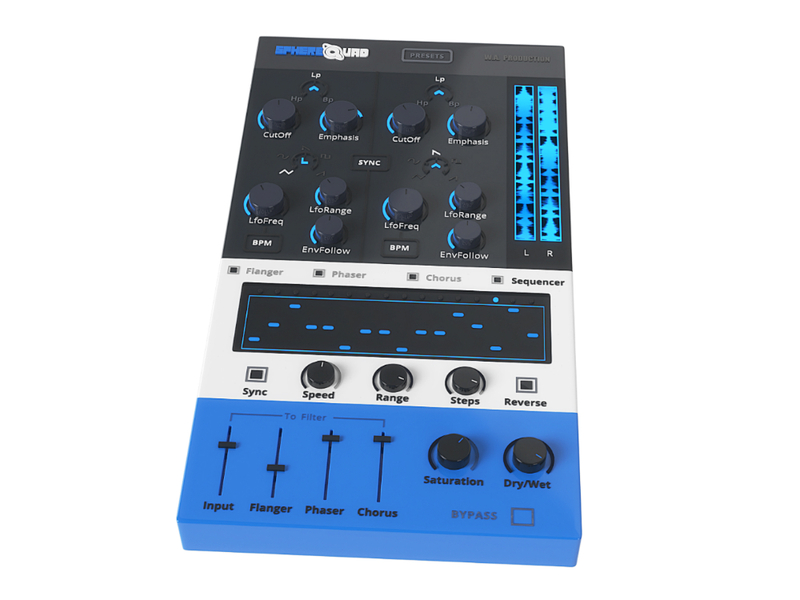
The concept behind SphereQuad is a combination of stereo flanger, phaser and chorus effects fed into a stereo filter, combined with an onboard step sequencer that controls the filter. However, the execution of these effects is far more interesting as you can control the left and right filters independently to push sound around the stereo field. The flexible routing between the different modules can be quickly dialed in to create a huge variety of special effects.
Each of the Flanger, Phaser and Chorus modules has multiple parameters for adjusting the main characteristics. The modules can be activated individually, or mixed and routed in various combinations to create a wall of unusual effects.
We’ve been using SphereQuad for a while now and find it incredibly useful for everything from spacey synth leads to making bass lines wobble. We’ve even dialed it in on full mixes to create DJ-style breakdowns with massive filter sweeps and extreme flanging. There’s no instrument we haven’t tried to transformed with SphereQuad and the effect is impressively huge every time. W. A. Production are real-life producers making creative plugins to help you achieve studio effects quickly and easily. Enjoy!
Features
- 64 Creative Presets for one-click transformations
- Stereo Flanger, Phaser & Chorus modules with multiple parameters
- Mixer & Output controls with Saturation module
- Flexible signal routing between all modules
- 16 Step Sequencer
- Independent left and right filter modules for true stereo manipulation
- Sync to BPM
- Real-time waveform display corresponding to the filter cutoff
- Full PDF Manual
Learn more about SphereQuad.
SphereDelay
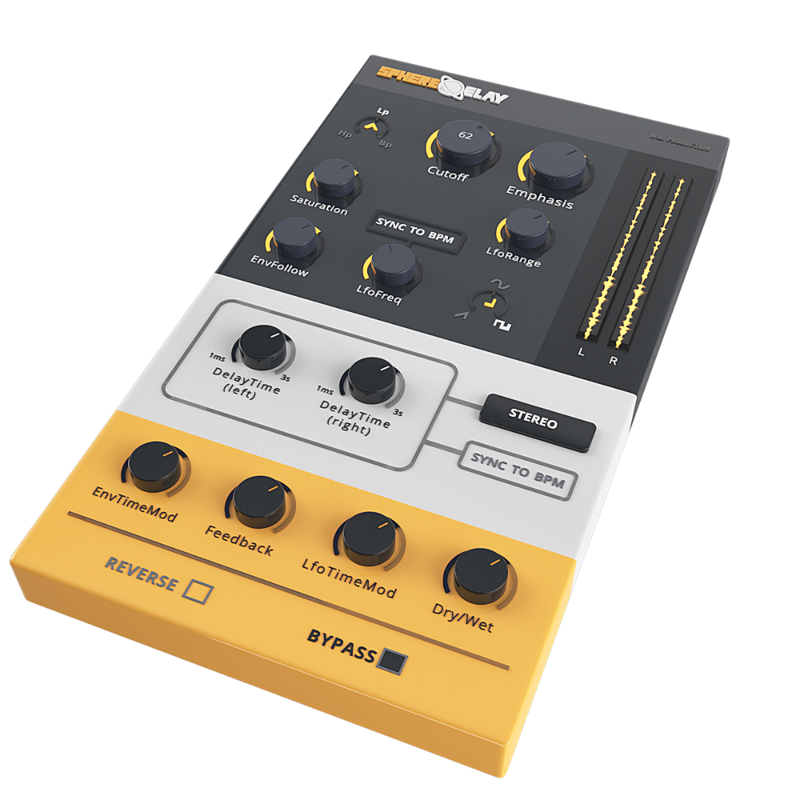
SphereDelay is an innovative Multimode Delay Effect Plugin. We developed this plugin for the producers around the world who want something more when it comes to effects. The basic plugins that give the same Delay presets that we all know and are familiar with, whether it be DAW stock Delay plugins or third party Delay plugins that just aren’t enough. We wanted to add something new to the table. We believe that Beginner and Experienced producers will enjoy the sleek and easy workflow of SphereDelay as well as the pure customization of your Delay sound. We believe SphereDelay would give you a totally new depth experience, with a wide variety of customization features that makes the sounds it provides unique and limitless.
Features
- Variable State Filter – (High-Pass, Low-Pass, Band-Pass) stereo linked 24db/oct self-oscillating filter
- Saturation – Analog Tape Style Saturation, to get the warm classic sound of a real Tape Delay
- 4 Delay Modes
- Mono
- Stereo
- Ping-Pong
- Ping-Pong Separate
- Envelope Follower - to modulate the filter cutoff and the delay time
- LFO – with variable waveforms to modulate the filter cutoff and the delay time
- BPM Sync – The delay time and the LFO frequency can be synced to your project tempo to create rhythmic effects.
Learn more about SphereDelay.
SphereComp
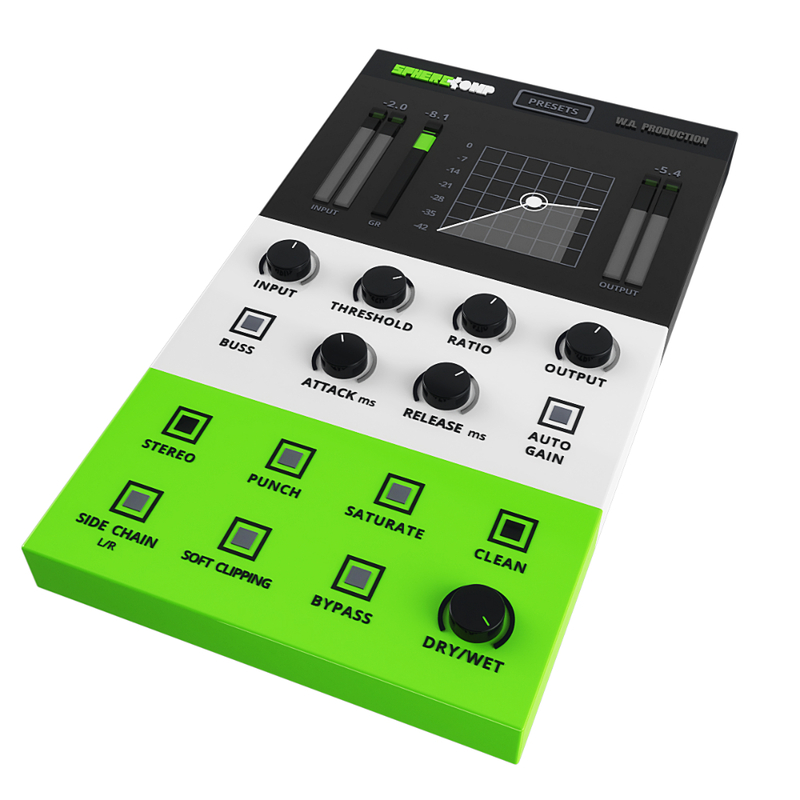
W.A. Production has created the perfect way to approach and achieve proper compression. All producers know compression can either be an award-winning tool if used properly, or it can totally destroy your mix. Audio students are introduced to compression and most are left confused or scared to death of it. SphereComp is capable of catering to the seasoned pro and the beginner. To get the same results you get with SphereComp you would have to spend thousands of dollars in high-end rack gear, invest time getting acquainted, making adjustments over and over until you get the result you want. Not to mention installation and routing your patch bay. Breathe a sigh of relief. Don't dread compression. Embrace it.
Features
- Input – Control the input gain by +/- 15dB.
- Threshold – Threshold (dB), when the signal level exceeds the threshold the compressor goes into action.
- Ratio – (ratio/1) As an example, a 3:1 ratio means that for every 3dB the input signal exceeds the threshold, only 1dB will be allowed to pass by the compressor.
- Output – Control the output gain by +/- 15dB.
- Now that you have your set your levels as a basic start, let's adjust the timing and behaviour. When you're done, you can come back and fine tune everything to make your track seat perfectly in the mix.
- Buss – Switch between Regular mode (peak compression) and Buss mode (RMS compression).
- Attack – Time in milliseconds that it will take for the compressor to reach its destination gain reduction after the signal has crossed the threshold.
- Release – Time in milliseconds that it will take for the compressor to reach 0 gain reduction after the signal returned below the threshold.
- Auto Gain – Auto Gain matches the output volume to input volume automatically.
- Stereo – Switch between stereo and mono modes.
- Punch – Parallel processing to add punch to the signal before the compression stage.
- Saturate – Add tube style saturation to the compressed signal.
- Clean – Make the compressor sound as clean as possible. If Punch or Saturate is on, it will reduce their effect giving you different timbre options.
- Side Chain – Signal from the right channel input goes to the detector and the signal from the left channel input goes to the compressor.
- Soft Clipping – Use to round the signal when it approaches 0.0dB and ensures it does not exceed it.
- Bypass – Allows you to engage and disengage the compressor.
- Dry/Wet – Mixes between the processed signal and the input signal creating a parallel compression effect, which leaves the peaks untouched while boosting the lower part of the signal.
Learn more about SphereComp.
System Requirements
- Windows 8 or later (64-bit only)
- macOS 10.13 and later (64-bit only)
- VST, VST3 & AU
Please Note: AAX format requires Pro Tools 11 or higher.
Important Note for Mac Apple Silicon users: Before purchasing, please review the current compatibility status of this plugin on your system here.
22Bullets
Spinin' Records, Musical Freedom, Revealed Recordings
"Wow, sphere squad is works in a really creative way and easy to manipulate the sounds, i use for easy transition in the parts of my tracks ,specially the sequencer and env followers for the fx , love it!"
The Samplecast
A show for sample library geeks, plug-in fans and soundware enthusiasts.
"SphereQuad really takes rhythmic modulation to the next level. The standout feature here is how the signal flows between the different fx modules and I love experimenting by routing the audio in complex ways."
BL3R
EDM producers.
"Didn't think there could be a better filter sweep than the ones I already had.. WA does it again with SphereQuad!"


