


 Log In

Free gifts available with your purchase
Product information
Vitamin Sonic Enhancer
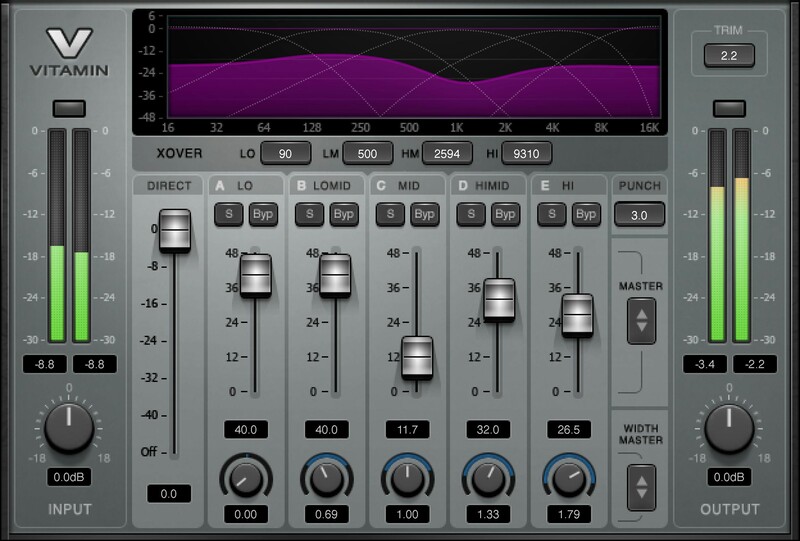
Sharpen Your Tracks with Clarity and Spark
Vitamin Sonic Enhancer is the audio equivalent of powerful Photoshop image settings that make colors more vivid, sharpen edges, increase contrast, and revive focus. Now you can bring out all the sonic details of individual tracks, groups, or your full masters, in a way that’s not possible with any other kind of processor.
This multiband harmonic enhancer uses a powerful blend of parallel EQ, dynamics, and saturation under the hood—and gives you easy control through the no-brainer user interface. You get a focused, vital result, comparable to what you would get from a complex parallel chain—fast.
Features
- Stereo Width control for each band
- 5 independent frequency bands for focus and flexibility
- Variable crossover frequencies for the five bands
- Punch control accentuates or softens transients
- Input/output faders and meters facilitate proper gain-staging
- Solo buttons simplify choosing the right crossover frequencies
- Blend the direct signal with the enhanced processed sound
- Zero latency processing
System Requirements
Mac
- macOS Monterey 12, Ventura 13, Sonoma 14, Sequoia 15
- VST / AU / AAX
PC
- Windows 10+
- VST / AAX
Installation Instructions












Customer Reviews
(1)


