


 Log In

Free gifts available with your purchase
Wiggle Your Waveform
At W.A. Production they're serious about music and over the last few years, they've created many top-quality plugins with finely tuned controls and pro studio features. But sometimes they just like to go a bit crazy...
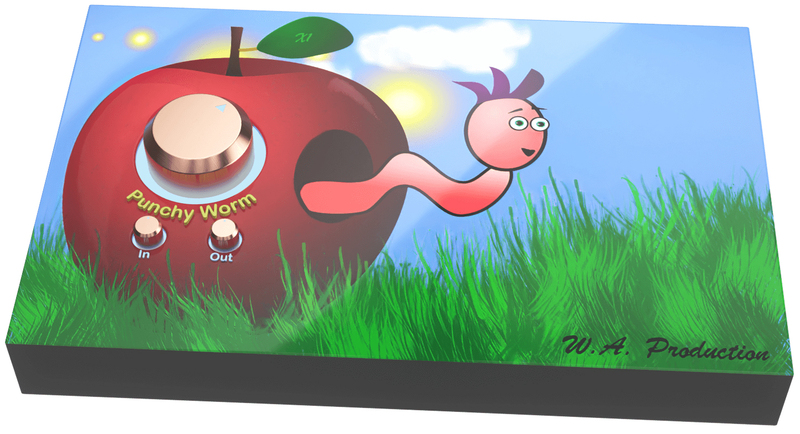
Presenting “Punchy Worm”, the only one-knob punch powerhouse featuring a dancing worm! This little dude can keep your beats bouncing and synths saturated as long as you keep feeding him audio apples. He’ll head-bang along with your track whilst shaping transients and adding harmonics. Why did they add a wobbly worm to their latest plugin?... They can’t really answer that with a straight face, but in these serious times, why not?!
Easy Controls
With just a couple of simple controls, Punchy Worm keeps you concentrated on the most important thing about your music... the sound. Simply drag the dials to operate and double click to reset them to default. Trust your ears to tell you what sounds good and let the dancing worm take the strain.
Punch & Saturation
Depending on if you set the main dial to the left or right of centre, you’ll hear punch or saturation, combined with smooth and responsive upward and downward compression. With more subtle settings you’ll hear more presence and power. Pushed harder will result in more brutal transient shaping and saturated harmonics.
In / Out / Bypass
Use the Input control to drive more signal into that rosy red apple, increasing the amount of the effect and resulting in more aggressive processing (and a more frantic freakout from the bewigged worm). The Output dial can be used to volume match the original signal so you can hear exactly what effect the plugin is having on the audio, without artificially increasing the loudness. Click the “Punchy Worm” logo to bypass the plugin for easy A/B comparison.
Oversampling
The leaf at the top of the interface acts as a toggle, which can be set to x1, x2 or x4 interval oversampling. Careful use of this control will reduce unwanted noise from digital aliasing.
W. A. Production are real-life producers making creative plugins to help you achieve studio quality processing quickly and easily. Enjoy!
Features
- Dancing worm!
- One-knob punch and saturation processing.
- In / Out controls for accurate A/Bing.
- Bypass toggle.
- Up to x4 oversampling to reduce aliasing noise.
- Full PDF Manual & Tutorial video.
System Requirements
- Windows 8 or higher (32 / 64-bit)
- macOS 10.13 and later (64-bit only)
Please Note: AAX format requires Pro Tools 11 or higher.
Important Note for Mac Apple Silicon users: Before purchasing, please review the current compatibility status of this plugin on your system here.

Manene
World-famous DJ and Bass Producer
"Punchy worm packs a serious punch. Graphically comical, lightweight, and easier to operate than a light switch."

The Sample Cast
The show for sample library geeks, plug-in fans and people who love toys that make noise.
"That grooving worm had me smiling from the start with hard-as-nails sound shaping as the icing on the (apple) cake."


