


 Log In

Free gifts available with your purchase
Granular Echo Synthesizer
Pitch Shifting Granular Reverse Echo. A Mind-Warping Sound Design Trip.
Crystallizer is an otherworldly creative effect that transforms instruments using a combination of pitch shifting and reversed echo. Based on the Eventide H3000’s innovative “Reverse Shift” algorithm, Crystallizer brings granular echo slicing, old-school pitch shifting and powerful new features together into one inspiring tool.
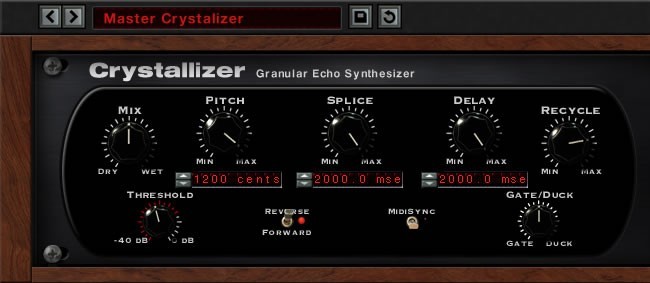
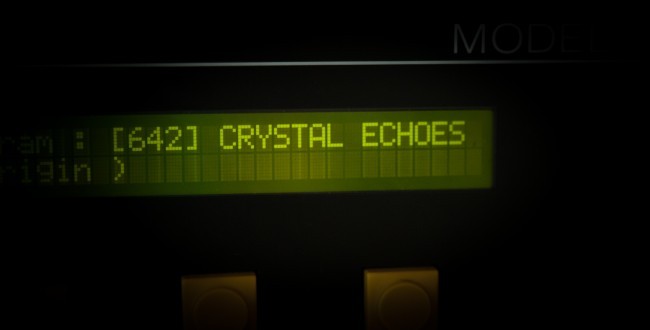
If you listened to the radio in the late 80s, you’ve heard the Crystal Echoes effect from the Eventide H3000 effects processor. The sound is absolutely unmistakable and has been used on countless records to transform simple chords into epic soundscapes. Once musicians and engineers got their hands on this unique technique and realized how it instantly turned minimal guitar lines into shimmering symphonic textures, there was no going back. You can hear it on hundreds of records - from 80s anthems to ambient compositions, to modern indie rock and chillwave. And now you can have it, too.
Getting the Glitch Right
Because Soundtoys’ founders actually designed algorithms for the original H3000, you can be sure Soundtoys didn’t rest until they’d recreated its icy tones flawlessly. One of the key elements of the Crystallizer sound is its old-school pitch shifting. Modern pitch shifters (like Little AlterBoy for example) use sophisticated mathematical algorithms to transform music and vocals as naturally as possible. The original old-school devices (like Eventide’s classic H910 Harmonizer) used a simpler resample and crossfade technique that introduced audible artefacts in the pitch-shifted audio. This retro technique adds a glitchy character to the sound that is an essential part of Crystallizer’s 80s-futuristic charm.
Upping the Ante
Once Soundtoys nailed the sound of the original effect, they didn’t stop there. Soundtoys put their heads together to improve it. MIDI sync and automation were added to give you precise creative control. A built-in Gate and Duck feature adds a new level of dynamic control over triggering echos, helping you keep this sometimes wild effect in check. You can also shape the sound with low- and high-cut filters to create bright shimmery blooms or dark, rich beds of sound. In short, Soundtoys brought a classic effect up to date with all the convenience and tweakability of a Soundtoys plugin.
Instant Inspiration
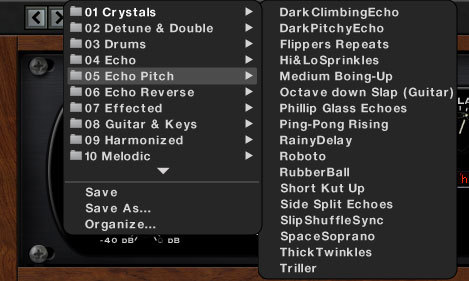
Does “granular echo synthesizer” sound a bit hard to get your head around? Don’t worry. Soundtoys included over 200 ready-made presets that you can explore, organized into categories that make finding the perfect starting point for your tracks simple. Soundtoys included everything from the subtle to the all-out psychedelic, so don’t be afraid to experiment! When you’re ready to go deeper, you’ll find plenty of tweakability and control for making your own signature presets.
Features
- Recreate the classic crystalline sounds of the Eventide H3000
- Turn simple melodies and chords into shimmering, textured soundscapes
- Create rich, evolving effects with reverse echos and pitch shifting
- Lock the effect to your project’s tempo and even add custom automation
- Transform guitar, bass, drums or loops into something completely new
- An amazing tool for creative sound designers
System Requirements
Mac
- macOS 10.12 Sierra and later (Intel / Apple Silicon supported) (64-bit only)
- VST2, VST3, AU, AAX Native, AAX AudioSuite
Windows
- Windows 7 and later (64-bit only)
- VST2, VST3, AAX Native, AAX AudioSuite
Supported Sample Rates:
- Minimum - 44.1 kHz
- Maximum - 192 kHz
Important Notes:
- A FREE account at ilok.com is required (a physical USB iLok is not required)
- This software is 64-bit only and is not compatible with 32-bit systems.
Officially Supported Host Applications:
All version 5 Soundtoys products come in 64-bit VST2, VST3, AU and AAX Native plugin formats.
Supported DAWs:
- Pro Tools: 12 or higher (Mac & PC: AAX Native and AudioSuite)
- Logic Pro X: 10.7 or higher (Mac: AudioUnits)
- Ableton Live: 10.0 or higher (Mac: AudioUnits, VST2 & VST3; Windows: VST2 & VST3)
- Studio One: 4.5 or higher (Mac: AudioUnits, VST2 & VST3; Windows: VST2 & VST3)
- Cubase: 9.5 or higher (Mac & PC: VST3)
- Nuendo: 8 or higher (Mac & PC: VST3)
- Reaper: 6 or higher (Mac: AudioUnits, VST2 & VST3; Windows: VST2 & VST3)
- Bitwig: 4 or higher (Mac & PC: VST2 & VST3)

















Reviews Summary
While it aims to provide a helpful overview, it may not capture every perspective or detail. We encourage you to read individual reviews to make an informed decision.
Users highly praise the Soundtoys Crystallizer plugin as an exceptional creative tool for producing unique pitch-delay, atmospheric textures, and synth-like effects. Reviewers frequently note its versatility across guitars, vocals, and synths, commending its user-friendly interface, smooth workflow, and impressive stock presets that elevate music productions across various genres.


