Buy PSP Echo, get a free gift with purchase:
PSP Echo is a high quality echo processor (plug-in AudioUnit, VST, RTAS AAX for Mac OSX (Universal Binary); VST, RTAS and AAX for Windows). PSP Echo’s powerful and unusual features combined with its smooth operation makes it ideal for all kinds of creative uses from simple slap back and sustain effects through ping-pong delays and spacious echoes.
Use the delay sliders to add special tape echo effects for even more unique effects. The tape wow control and built in ducker further extend the creative potential of PSP Echo. Internally, the Echo is like a combination of four mono tape delays—two for the initial ping-pong pre-delay and two for the main stereo echo. PSP Echo includes a set of extremely useful factory presets that cover a wide range of this plug-in’s settings.
System Requirements
PC
- Windows 7 – Windows 11
- VST, VST 3 and AAX
- The latest iLok License Manager application installed
Mac
- macOS 10.12 – macOS 13 Ventura (Apple Silicon Supported)
- VST, VST 3, AAX and AU
- The latest iLok License Manager application installed
PSP Audioware are no strangers to delay plug-ins, having previously released Lexicon PSP 42, PSP 85, and the PSP 608 Multi-delay, but until now they hadn't taken a swing at creating a tape delay. That all changes with the newest member of the PSP family, the simply-named Echo. WHAT IS IT? PS...
Read MorePSP Audioware's name has become synonymous with the audio processing techniques of yesteryear. While plenty of their plug-ins produce effortlessly modern-sounding treatments, the popularity of their VintageWarmer and OldTimer show they've captured the spirit of vintage gear better than most. Thei...
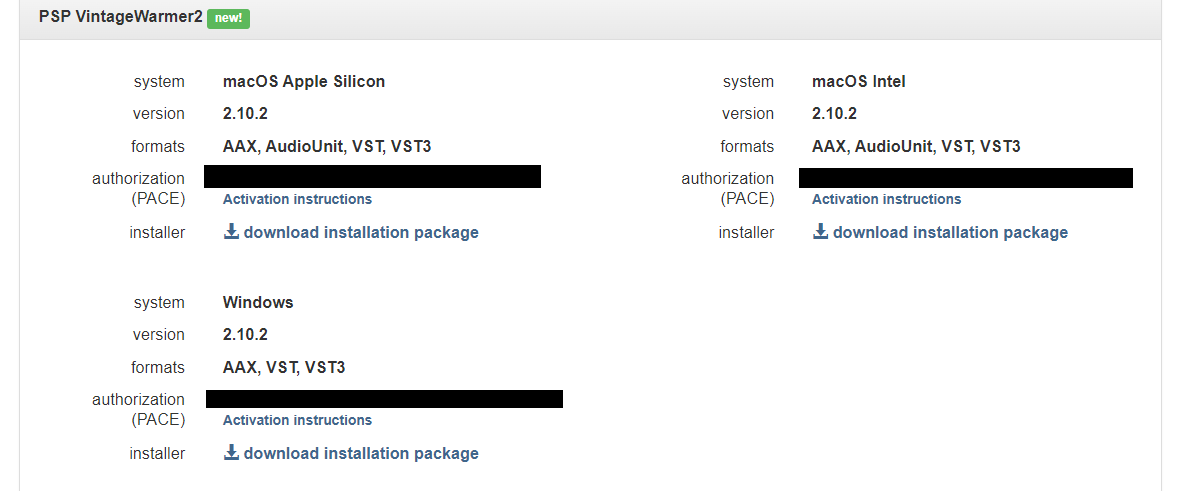
Read MorePlease Note: PSP VintageWarmer2 is used as an example.

Activation
1. Visit the PSP Registration Centre and create/log into your PSPaudioware account.

2. Select the Manual Product Activation link and copy and paste/manually enter the serial number that is provided with your User Account. > click 'Activate!.'

3. Your PSP product will now show up in your PSP customer account. Your 30-digit iLok activation code will also be listed under authorization (PACE). Download the relevant installer.

iLok Registration
1. Go to the iLok website and create a new account if you are not currently registered and do not have the iLok Licence Manager installed on your computer.

2. Download and install the iLok License Manager.
3. Open your iLok license manager application > click 'Sign In'.

4. Enter your iLok registered User ID and password > click ‘Sign In'.

5. Once you are signed in, click the ‘Redeem’ icon which is located at the top-right corner of the iLok Licence Manager’s interface.

6. Copy and paste/manually enter the 30-digit code from your PSP Audioware account into the available Activation Code boxes, and then click ‘Next'.

7. Select your activation destination > Click 'Activate'.

8. Click 'Ok'.

Installation
Mac
1. Open the recently downloaded .dmg file to begin the installation.
2. Click 'Continue'.

3. Click 'Continue'.

4. Click 'Continue'.

5. Click 'Agree'.

6. Click 'Continue'.

7. Click 'Install'.

8. Click 'Close'.

9. Open your DAW > Open your newly installed software.
Your software is now activated and ready to use.

PC
1. Open the recently downloaded .exe file to begin the installation.
2. Click 'Next >'.

3. Select 'I Accept the Agreement' > Click 'Next'.

4. Click 'Next >'.

5. Click 'Next'.

6. Click 'Next'.

7. Click 'Next' to begin the installation.

8. Click 'Finish'.

9. Open your DAW > Open your newly installed software.
Your software is now activated and ready to use.