


 Log In

Free gifts available with your purchase
Product information
Abbey Road TG Mastering Chain
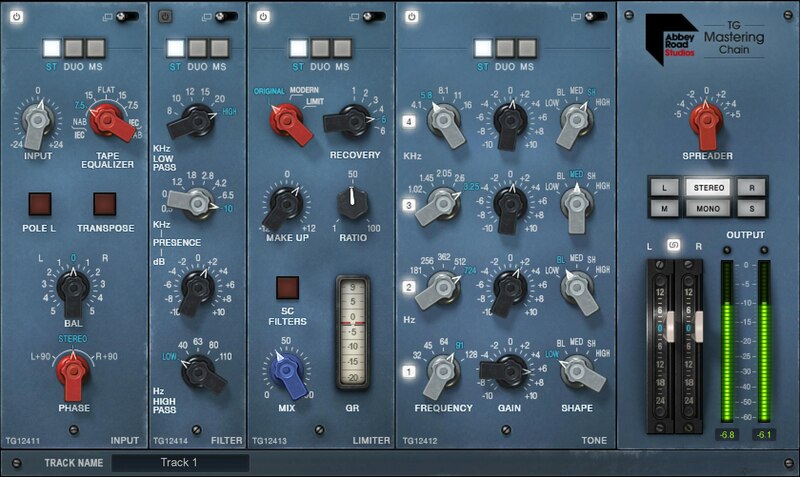
Abbey Road’s Complete Mastering Chain—In Your Hands
From the 70s to today, from Pink Floyd to Ed Sheeran, the EMI TG12410 Transfer Console has defined the Abbey Road Studios sound. At long last, Waves has modeled this magical mastering chain down to the very last detail, and added modern touches designed with Abbey Road Studios.
With modular Input, Tone, Compression/Limiting, Filter/EQ, and Output/Stereo Spread sections—now you can give Abbey Road’s distinctive sonic flavoring and control to your masters, buses, groups, and even individual tracks.
Features
- Includes all 5 modules of the original TG12410 mastering desk
- Designed in close collaboration with Abbey Road Studios
- Re-order the Tone, Limiter, and Filter modules for custom chains
- Extreme flexibility—from vintage warmth, to cinematic clarity
- 170 presets from superstar mix engineers
- Two limiting flavors: aggressive Original and pristine Modern
- Each module is expandable for extra control
- Process in stereo, dual mono, or mid-sides
- Includes the Abbey Road TG Meter Bridge plugin
- Monitor your mixes and masters in Mono, Stereo, L, R, M/S
- Live component optimized for live sound: ultra-low latency, low CPU
- 48 dB/Oct linear phase sidechain filters added
System Requirements
Mac
- macOS Monterey 12, Ventura 13, Sonoma 14, Sequoia 15
- VST / AU / AAX
PC
- Windows 10+
- VST / AAX
Installation Instructions












Customer Reviews
(3)


