


 Log In

Free gifts available with your purchase
Balancing the low-end is one of the hardest challenges in any mix or master. BASSROOM is a final mix and mastering EQ that helps beginners and pros nail their low-end in seconds.
The Struggle Is Over
Balancing the low-end is one of the hardest challenges in any mix or master. This is where so many potentially awesome tracks fail. Too much bass and your track will sound bloated and lack clarity. Not enough bass and your track will sound weak.
BASSROOM is a final mix and mastering EQ that helps beginners and pros nail their low-end in seconds. It does this by delivering exceptional sound quality and suggesting genre-specific EQ adjustments a great audio engineer in a world-class studio would make.
We analyzed the best mixes in various genres to give you EQ target presets you can trust. You can also create your own targets with BASSROOM's inbuilt analysis tools. From this starting point, you can tweak your low-end to perfection using the immersive 3D room interface.
How To Use BASSROOM
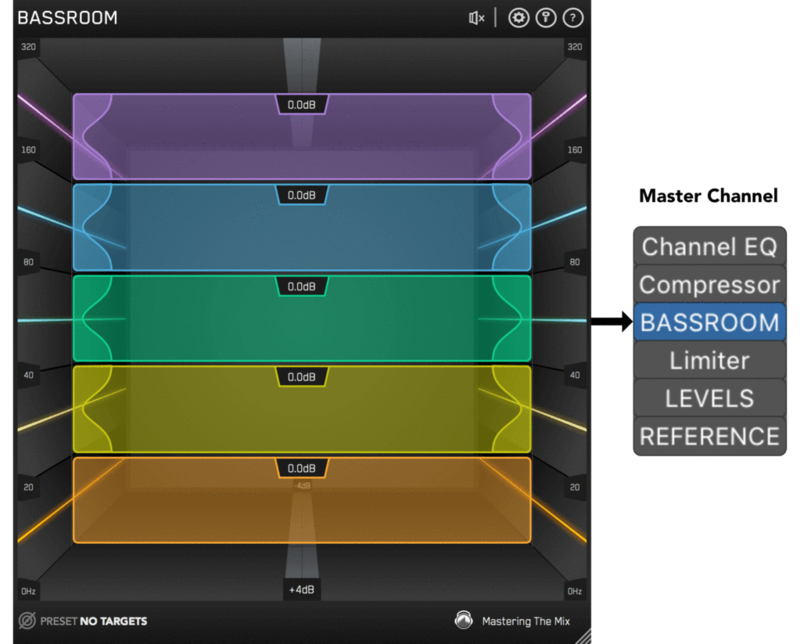
Master Channel
BASSROOM uses complex algorithms that accurately identifies how the human ear perceives low-frequencies relative to the balance of the whole mix. For that reason it should be loaded on your master channel so it can analyse and be applied to your whole mix.
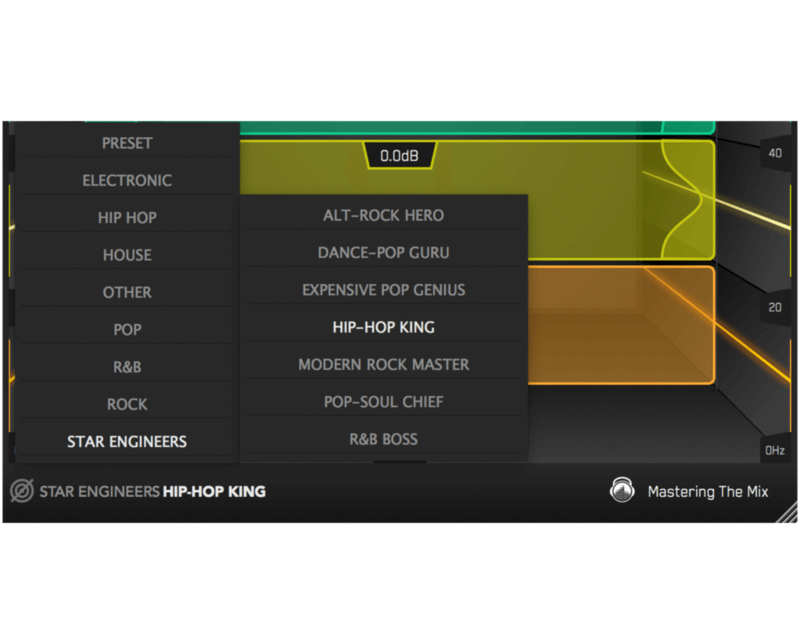
Choose A Preset
To get the most value from BASSROOM, start by selecting a preset that best suits the material you’re working on.
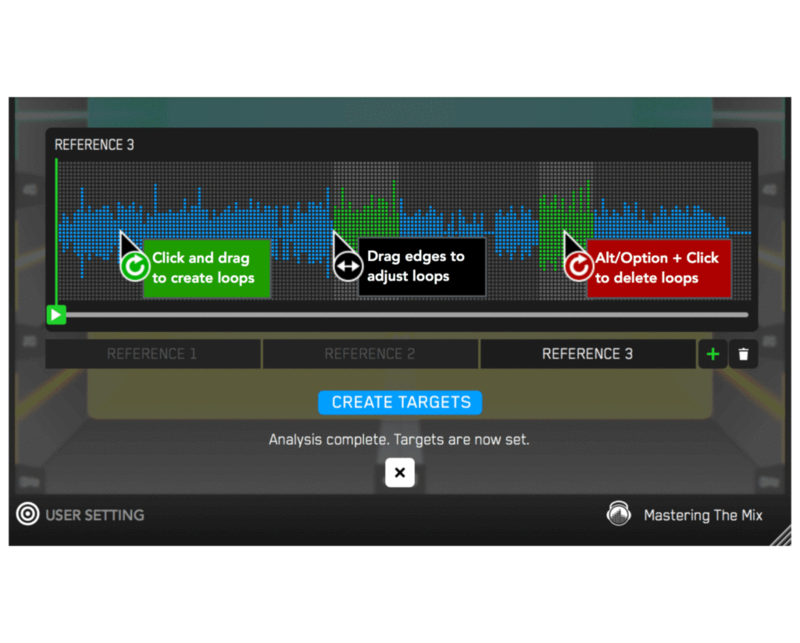
Create A Target
Alternatively, you can create your own target values by clicking the target icon in the bottom left corner and importing reference tracks. If you’re creating targets, we recommend clicking and dragging on the waveform to select the drop or chorus for the analysis, as this is usually the material with the best representation of the bass in the track. BASSROOM will create targets based on all the tracks loaded into the analysis window.
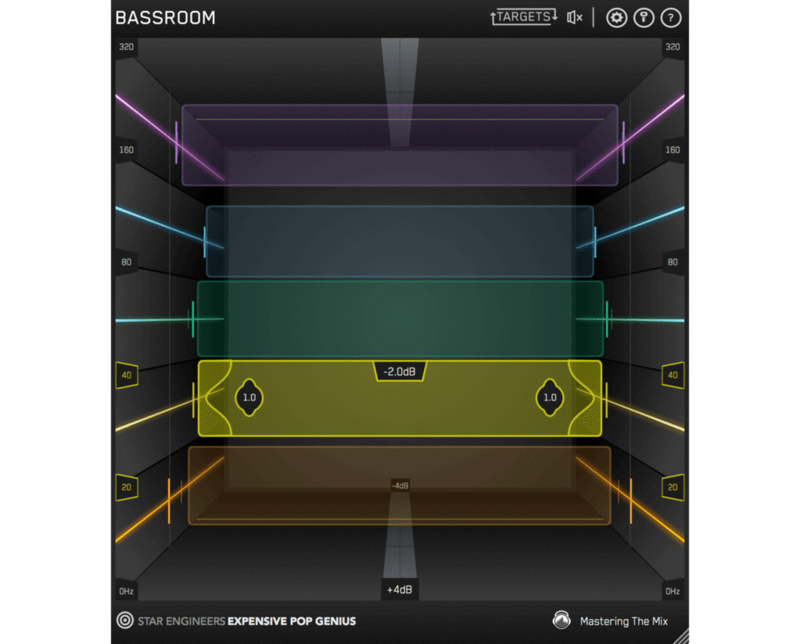
Shape your low-end
Now monitor a bass heavy section of your production (i.e. the drop or chorus), and you’ll see the targets move to the suggested EQ positions based on the tonal balance of your mix compared to the tonal balance of your preset. Use the targets to get a great starting point, then adjust by ear to tweak your low-end to perfection. The algorithm accounts for differences in loudness, so the targets will be accurate and relevant whether you’re mixing or mastering.
Level Match
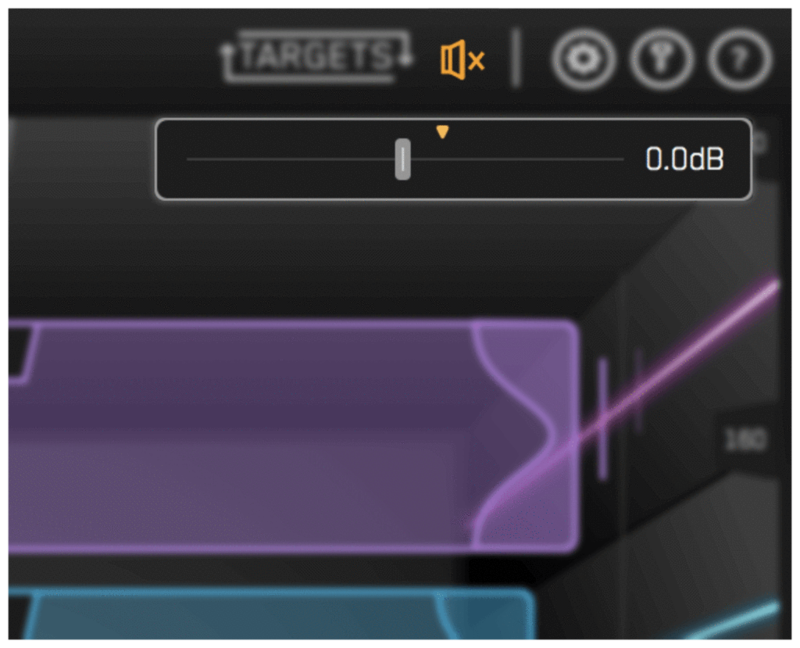
The EQ adjustments may have changed the overall gain of your audio. If the gain has changed by more than 2dB the speaker icon will turn orange. Hover your mouse over the bypass icon to open the output gain and level match pointer. Match the gain slider to the level match pointer to match the perceived loudness of your audio before it passed through BASSROOM.
Hear The Difference
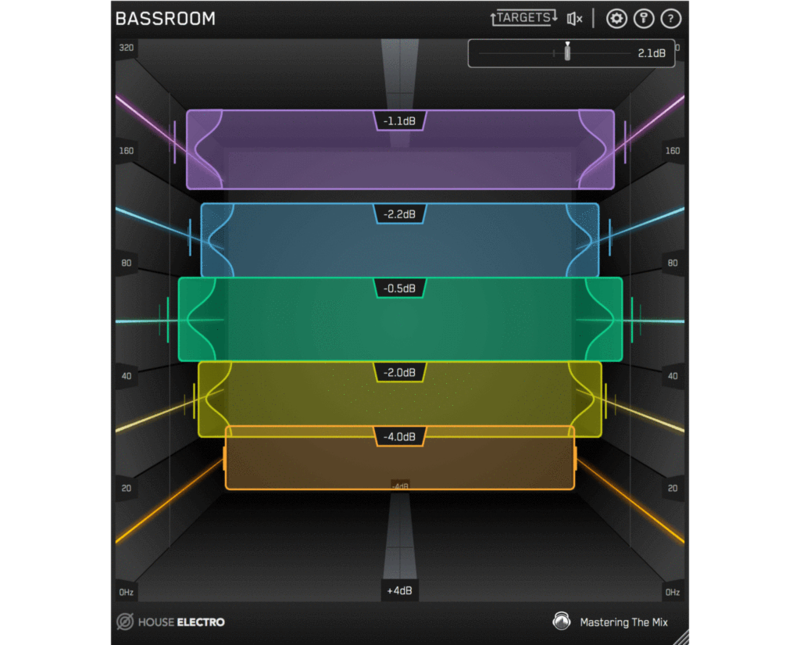
Not only will your low-end fall into place, but the level matching will give you a well balanced sound across the whole frequency spectrum. Toggle bypass on and off to hear the difference.
Unique Features
Unparalleled EQ Quality
BASSROOM gives you unparalleled EQ quality when working with low-frequencies on your master channel. Other EQs can introduce transient ringing and smearing or phase distortion that reduces the quality and clarity of your audio.
BASSROOM has specifically designed filters that have minimal phase distortion AND minimal transient distortion providing greater transparency than standard linear-phase filters at low-frequencies. This means that the low-end is not affected by unwanted phase changes that can alter the timbre of your audio or by transient distortion that means you lose the bite from kicks or bass-lines.
For example, the plots show the transient effects on a step function when applying a 6dB gain at 240Hz. Think of this as a simplified waveform of a kick drum. It's clear that the output of the filter in Plot 2 has an oscillation before and after the "hit". This is a "ringing" of the transient and can sound like a sucking effect. In Plot 3 BASSROOM’s EQ produces virtually no oscillation and so the transient is preserved.
With BASSROOM, you can transparently shape your low-end without compromising the clarity of your mix or master. This translates into retaining punch in the low-mids, and definition in the low-end compared to other EQs.

Immersive 3D Room Display
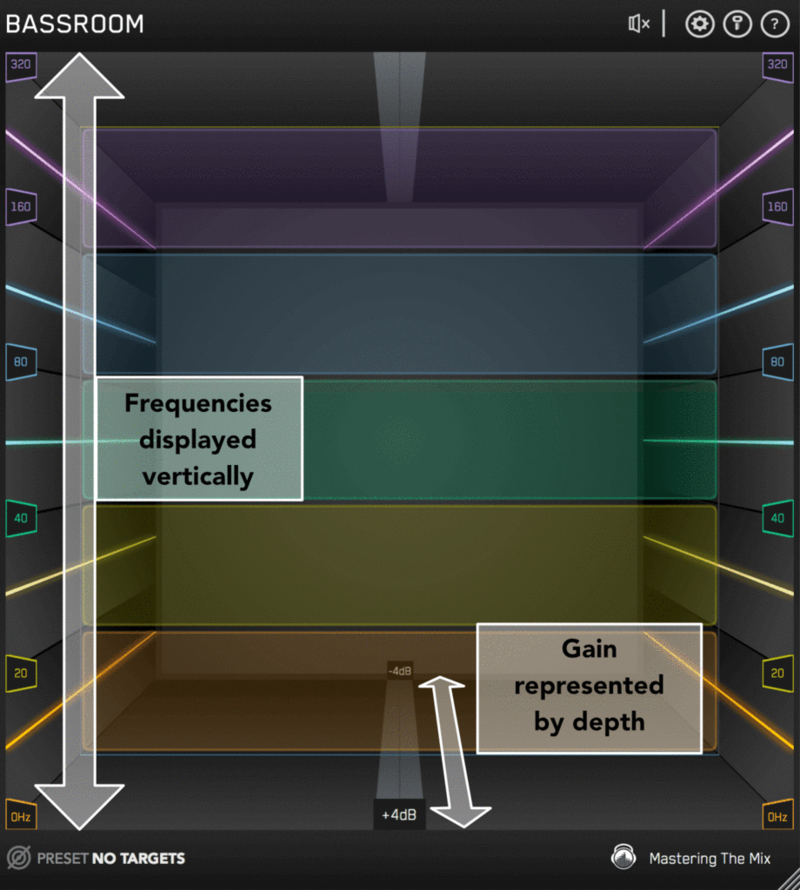
Ordinary EQs use a horizontal representation of frequencies and vertical representation of gain. BASSROOM takes a unique approach and focuses more on how we experience audio in the real world. Louder sounds feel closer while quieter sounds feel further away and lower frequencies are associated with a ‘foundation’ whilst higher frequencies are perceived as ‘air.
To reflect this, in BASSROOM frequencies are displayed vertically, and gain is represented by depth in the room.
When a band is on the central 0dB line in the middle of the room, there is no gain adjustment. Push frequency bands back in the room to decrease gain, and bring them forward to increase gain.
The unique and intuitive UI helps you visualise how you’re adjusting the low-end of your song. This gives you a more immersive mixing experience, helping you connect more with your music.
EQ Targets You Can Trust
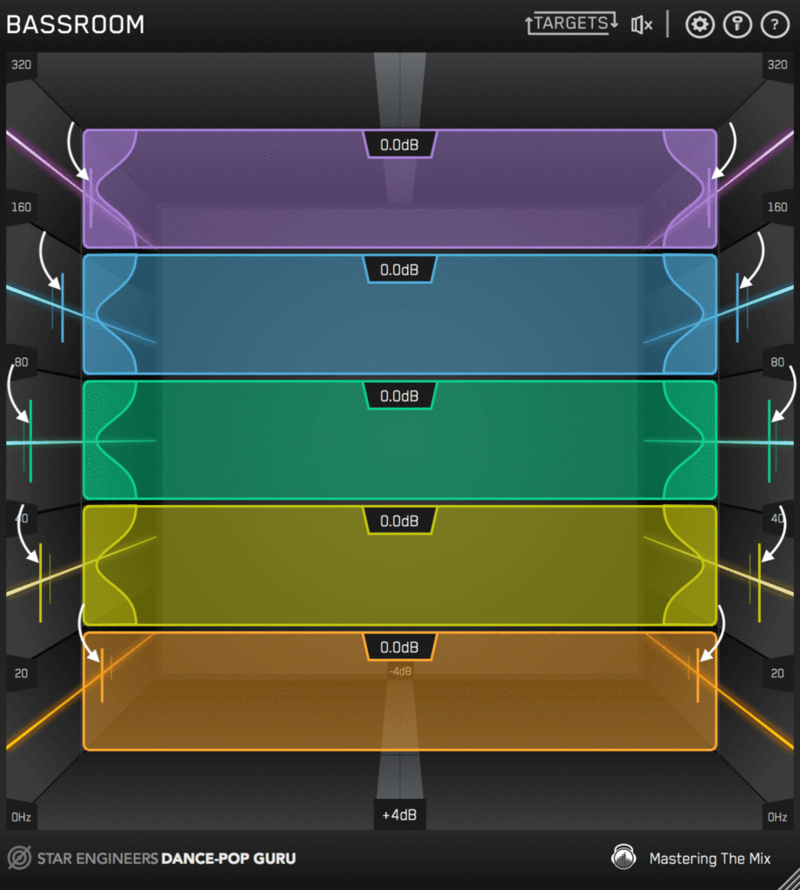
The targets on the walls of BASSROOM suggest the genre-specific EQ adjustments a great audio engineer in a world-class studio would make.
We analysed the best mixes in various genres to give you EQ target presets you can trust.
This isn’t simple ‘slowed-down’ frequency matching. The targets are a result of a complex algorithm that accurately identifies how the human ear perceives low-frequencies relative to the balance of the whole mix. BASSROOM analyses your mix and displays a target in each frequency band to help you make informed mixing decisions sonically relevant to your audio.
Matching the bands to target suggestions results in a clear and defined low-end that’s well balanced in the context of the whole mix. Use the targets to get a great starting point, then adjust by ear to tweak your low-end to perfection.
System Requirements
Mac:
- OS X 10.15 or higher.
- 64-bit AU, VST3 or AAX host. Apple Silicon Native (64-bit only)
Windows:
- Windows 10 or higher
- 64-bit VST3 or 64-bit AAX host (64-bit only)
Please note: AAX compatible with Pro Tools 11 and later only.
Important note: When accessing this software via a Rent to Own plan or the Beatport Studio membership, it's installed and run through the Beatport Access portal. An internet connection is required every 30 days to validate your license.
Awards


MusicTech
The world’s leading media brand at the intersection of music and technology.
"Mixing bass can be hard, but Mastering The Mix may have the solution with BASSROOM. Time to get low - 10/10 Stars."
Dirty South
Superstar DJ.
"This is the plugin that I’ve been missing on my master bus! It really helps me nail the bass in my mix and have it sounding big and tight. A MUST HAVE!!!"
Gary Noble
3 x Grammy Winner & 19 x Grammy Nominated Mix Engineer.
"BASSROOM is great. It makes it really easy to dial in your low end."
Reviews Summary
While it aims to provide a helpful overview, it may not capture every perspective or detail. We encourage you to read individual reviews to make an informed decision.
Bassroom is highly praised as an easy-to-use and efficient tool for balancing the low-end, making it especially valuable for producers mixing on headphones. While some users note that the built-in presets can be inaccurate and recommend using custom reference tracks, they agree that it serves as an excellent visual guide and safety check to achieve a clean, punchy bass without muddiness.


