/ Vocal Processing / Maserati VX1
Waves

Maserati VX1

$27.99 $99.00

71% off until Dec 07

Waves Maserati VX1
Waves Maserati VX1
Waves Maserati VX1
Waves Maserati VX1 gallery thumbnail
Buy Now
Product information

Maserati VX1

Enhance Vocals with Go-To Chains by Tony Maserati (Beyoncé)

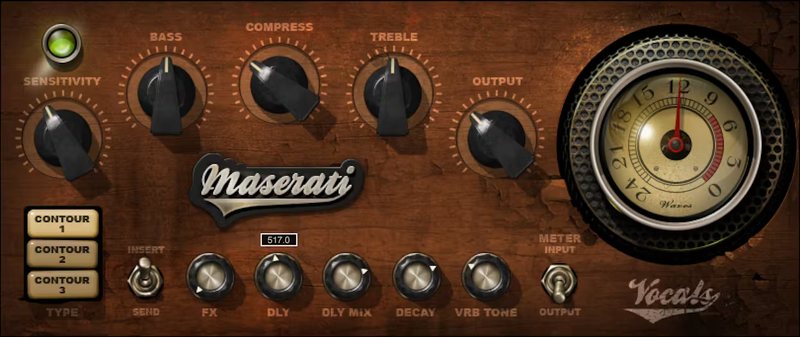
Contour 1 provides the sound of studio recording, 2 is a larger chamber, and 3 is a small room with delay optimized for uptempo songs. These aren’t just different reverb or delay settings, but involve incorporating the right effects for squeezing out subtleties, or engulfing vocals in a full production.

Created in close collaboration with Grammy winner Tony Maserati (Beyoncé, Jason Mraz, Robin Thicke, more), this is the easiest way to bring his platinum vocal sounds into your studio.

“VX1 will help you squeeze more emotion from a subtle performance, or get the vocal to sit just right in a large production. CONTOUR 1 gives you a studio or small venue room; CONTOUR 2 is a larger chamber with reflective pre-delays, most suited for slow ballads; CONTOUR 3 is set up for quicker-tempo songs with a very small room and matching pre-delay.”—Tony Maserati

Features

  • Designed with Grammy®-winning mixer Tony Maserati (Beyoncé)
  • 3 Contours shape the overall initial effect for different vocals
  • The Compress control in Contours 1 and 2 accentuates nuances
  • Contour 3’s Air control gives clarity with uptempo vocals
  • Delay and reverb interact to create animated textures
  • Each Contour has customized Bass and Treble control curves
  • Delay effect changes subtly for the 3 Contours
  • 16 presets cover multiple Contour applications

System Requirements

Mac

  • macOS Monterey 12, Ventura 13, Sonoma 14, Sequoia 15
  • VST / AU / AAX

PC

  • Windows 10+
  • VST / AAX
Installation Instructions

1. Head to https://www.waves.com/create-account

2. Enter your email and choose a password to create an account (if you already have a Waves account, choose Log in, enter your details and head to Step 5) > click 'Submit'

3. Open your email inbox > click the activation link in the email from Waves

4. Click 'Log in here' > Log in to your Waves account

5. Click 'Register New Products'

6. Enter the Serial Number found in your Plugin Boutique user account > click 'Submit'

7. Click download in your Plugin Boutique user account or head to https://www.waves.com/downloads/central > download the Waves Central app for your operating system

8. Install Waves Central > Open Waves Central

9. Click 'Log in' > enter your log in details

10. Click the 'Install Products' tab

11. Tick the blue dot on all products you wish to install or click the top dot to install all products > click 'Install & Activate'

12. Click 'OK'

13. Open your DAW > open the Waves plugin

Your Waves plugins are installed and ready to use, enjoy!

Plugin Boutique Rewards

Discover the most rewarding loyalty programme among all plugin retailers.

  • Free Loopmasters Samplepacks
  • Discounts on products and courses
  • Extra Virtual Cash claimed immediately at checkout
Find out more

Follow us:

X (Twitter) Facebook YouTube Instagram
Logo Logo

Plugin Boutique Limited, Part of the Beatport Group LLC.

Copyright © 2011-2025 Plugin Boutique. All rights reserved