


 Log In

Free gifts available with your purchase
CLA Vocals
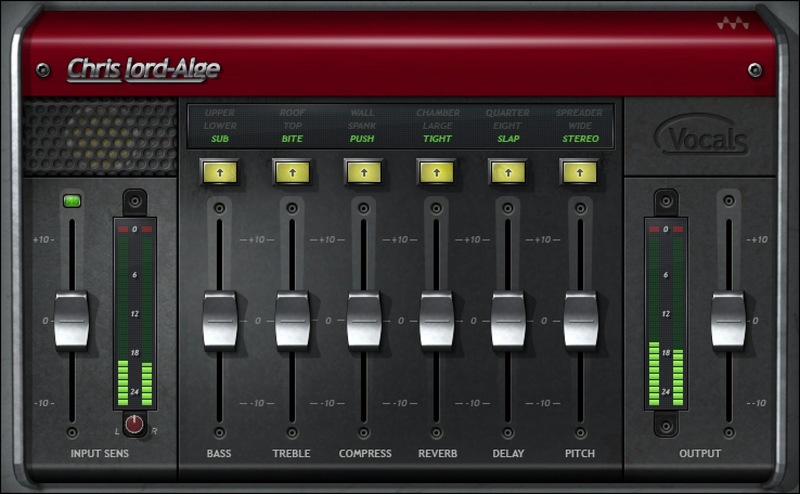
Get Pro Vocals in Literally Seconds
We worked with Grammy-winning mixer Chris Lord-Alge to pack his six favorite vocal effect, each with three optimized variations, into a plugin that excels at all-around vocal processing. Six faders optimize bass, treble, compression, reverb, delay, and pitch—quickly and easily.
Now, the same kind of expertise applied to vocals by Green Day, James Blunt, Foo Fighters, and countless others can be part of your productions—and bring out the very best in your voice.
Features
- Multi-effects with six processors, optimized for vocals
- Three variations for each processor give extra flexibility
- Faders dial in more or less of the various effects
- Streamlined editing options speed up the creative process
- Over 30 presets cover a wide variety of vocal styles
- Input and output metering simplify foolproof gain-staging
System Requirements
Mac
- macOS Monterey 12, Ventura 13, Sonoma 14, Sequoia 15
- VST / AU / AAX
PC
- Windows 10+
- VST / AAX












Reviews Summary
While it aims to provide a helpful overview, it may not capture every perspective or detail. We encourage you to read individual reviews to make an informed decision.
Customers highly recommend this all-in-one vocal plugin for recording, tracking, and mixing across various genres, especially Hip Hop and Rap. It is widely praised as an easy-to-use, go-to solution for both lead and background vocals that eliminates the need for complex hardware or multiple separate plugins.


