


 Log In

Free gifts available with your purchase
Clarity Vx
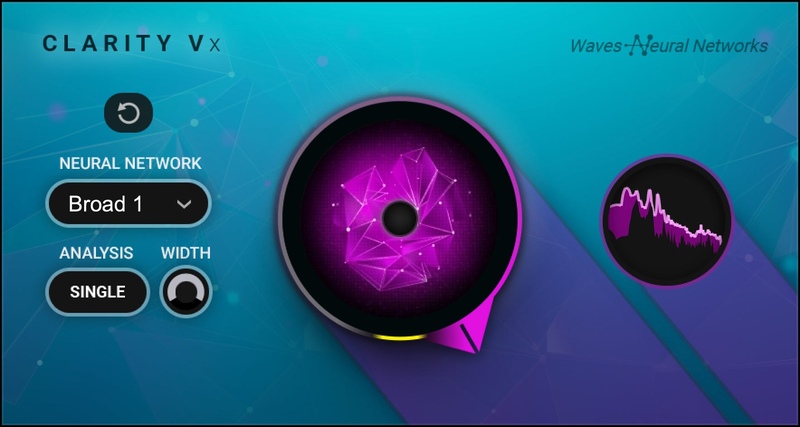
Clean Your Vocals Instantly with AI-powered Purity
Got great vocal recordings ruined by unwanted background noise—air conditioner, room rumble, rain, traffic, airplane flyovers, background talking, etc.? Solve these issues with Clarity™ Vx, whose advanced Neural Networks (the same engine as in the larger Clarity™ Vx Pro) are trained to recognize vocals, and separate them from noise.
With its revolutionary combination of artifact-free audio quality and instant results, Clarity Vx works miracles with any vocal, in music or in voice recordings for video, podcasting or film. Hands down, this is the highest-quality AND the fastest way to clean your vocal/voice recordings.
Features
- Ultra high-fidelity noise cleaning for vocals, unequalled clarity
- Ideal for music, voiceovers, and dialogue post-production
- Fast results in real time—no learning curve
- Non-destructive, no rendering or consolidation time required
- Save hours every session with real-time workflow & automation
- Choose the exact vocal/noise balance with a single knob
- Choice of two ‘Broad’ Neural Networks to handle different noise characters
- Third ‘ECO’ Neural Network for low-CPU dialogue cleaning: 2-3x the performance efficiency
- ‘Double’ analysis plus width control for stereo Asources
- Powered by Waves Neural Networks technology
System Requirements
Mac
- macOS Monterey 12, Ventura 13, Sonoma 14, Sequoia 15
- VST / AU / AAX
PC
- Windows 10+
- VST / AAX












Reviews Summary
While it aims to provide a helpful overview, it may not capture every perspective or detail. We encourage you to read individual reviews to make an informed decision.
Reviewers highly recommend the plugin as an essential, time-saving tool for home studios and voice recordings, praising its simple one-knob interface and impressive ability to eliminate background noise while keeping vocals natural. While overwhelmingly positive, users caution that pushing the effect too aggressively can cause artificial-sounding artifacts or detail loss.


