/ Vocal Processing / Silk Vocal
Waves

Silk Vocal

5.0 (9 Reviews)
$29.99 $149.00

79% off until Dec 07

Waves Silk Vocal
Waves Silk Vocal
Waves Silk Vocal
Waves Silk Vocal gallery thumbnail
Buy Now
Product information

Silk Vocal

Take Your Vocals from Raw to Pro – In No Time.

Mixing vocals is challenging, and every vocal is different. Resonant frequencies, boominess, harshness & sibilance prevent vocals from sitting in the mix, and removing them sensitively requires time, precision and accurate monitoring.

Accelerate your vocal mixing. Start working with Silk.

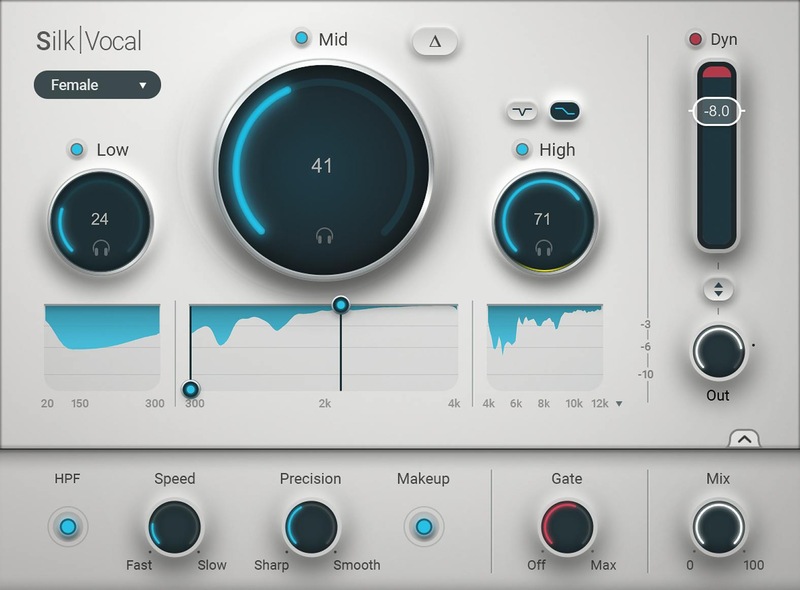
Silk Vocal is a smart EQ & dynamics processor that takes your vocals from raw all the way to balanced and mixed. With its intuitive UI you’ll solve problems without needing several other plugins.

Employing innovative technology, Silk automatically detects resonances across 2000 analysis bands. Its smart vocal engine decides where and when processing should occur— you decide how much. Try it, see how fast you mix vocals.

Features

  • Smart EQ & dynamics processor for vocals
  • Raw vocals to balanced & mixed vocals in no time
  • Remove boominess, harshness and sibilance from vocals
  • Accelerate your vocal mixing & remove guesswork
  • Includes license for Silk Vocal Live, a real-time version
  • Seamless & musical dynamics control
  • Male voice & female voice modes
  • Linear phase processing curves
  • Includes High Pass Filter, Gate, Mix, band solo, band bypass, Delta, Speed & Precision controls
  • Adjustable midrange tuning for more focused processing

System Requirements

Mac

  • macOS Monterey 12, Ventura 13, Sonoma 14, Sequoia 15
  • VST / AU / AAX

PC

  • Windows 10+
  • VST / AAX
Installation Instructions

1. Head to https://www.waves.com/create-account

2. Enter your email and choose a password to create an account (if you already have a Waves account, choose Log in, enter your details and head to Step 5) > click 'Submit'

3. Open your email inbox > click the activation link in the email from Waves

4. Click 'Log in here' > Log in to your Waves account

5. Click 'Register New Products'

6. Enter the Serial Number found in your Plugin Boutique user account > click 'Submit'

7. Click download in your Plugin Boutique user account or head to https://www.waves.com/downloads/central > download the Waves Central app for your operating system

8. Install Waves Central > Open Waves Central

9. Click 'Log in' > enter your log in details

10. Click the 'Install Products' tab

11. Tick the blue dot on all products you wish to install or click the top dot to install all products > click 'Install & Activate'

12. Click 'OK'

13. Open your DAW > open the Waves plugin

Your Waves plugins are installed and ready to use, enjoy!

Plugin Boutique Rewards

Discover the most rewarding loyalty programme among all plugin retailers.

  • Free Loopmasters Samplepacks
  • Discounts on products and courses
  • Extra Virtual Cash claimed immediately at checkout
Find out more

Follow us:

X (Twitter) Facebook YouTube Instagram
Logo Logo

Plugin Boutique Limited, Part of the Beatport Group LLC.

Copyright © 2011-2025 Plugin Boutique. All rights reserved