


 Log In

Free gifts available with your purchase
Product information
TrapTune by Soundevice Digital
Automatic Tuner for Trap and more...
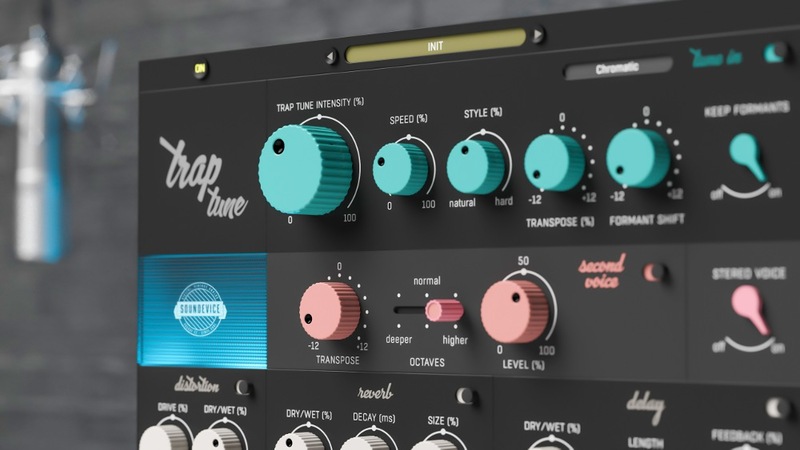
A perfect vocal track is the key element of almost every song. That’s where TrapTune steps forward. This mighty vocal effect can become the only tool you might need for it. TrapTune is (not just) an automatic tuner which can give you everything from subtle pitch correction to the strong artificial Cher-effect. Combine it with a second voice harmony, doubler and special FX section to get a vocal track that really stands out.
Features
- Get Trapped - TrapTune is here for natural tuning, hard tuning, and also complex vocal effecting. The plugin is especially well suited to genres where hard-tuning is needed, such as Hip Hop, Trap, RnB, contemporary pop or EDM etc. But creativity should have no limits. Any style can benefit from TrapTune’s unique character.
- Simply Tune-in - The core of the effect is the Tune-in section. For some, Trap Tune Intensity may be the only knob they will use. Tune-in controls the intensity and speed of natural tuning and the intensity of HARD tuning as an effect. It also works with formants, voice transposing and key of tuning.
- Create harmony - The Second voice section adds to your vocal, well, another voice singing in unison. You can transpose it by semitones and switch octaves to lower or higher if desired.
- Get bigger - Hit the Stereo voice switch to activate TrapTune’s doubler which does exactly what you would expect. The vocal gets bigger, wider and stronger immediately.
- Get rusty and nasty - Traptune includes a distortion specially tuned for vocals. Controlled by two knobs only, this section can provide you with a great variety of distortion effects, from warm saturation to total mayhem.
- Time and space - TrapTune would be incomplete without a chance to add delay and reverb effects. Beautiful plate reverb tuned for vocals is controlled by as few parameters as possible. And TrapTune’s delay has all the necessary parameters such as Feedback and Time.
- Start with the presets - Scan through the vast number of presets (use the trial version) to hear the variety of unique sounds TrapTune can offer.
- Use any part solo - Every section of TrapTune has a dedicated bypass switch, which allows you to use any part you need separately. May it be the Tune In section, Second Voice or the vocal focused FX sections. TrapTune will always adapt to your needs.
- Combine with Voxessor - As TrapTune’s visual design indicates, TrapTune creates a perfect duet with Voxessor. While TrapTune takes care of the effect part, Voxessor does the hard „technical“ work and fulfils the voice’s essential needs.
- Hassle-free software protection - No iLok, no dongle nor internet access is required for activation. United Plugins software uses licence files to activate your software. You can freely use the purchased software on all your computers as long as you are the user.
- 15-Days unlimited trial version for FREE - All the descriptions are nothing compared to putting your hands on the plugin. No saving limits. No noises. No boundaries. Engage the plugin in your project for real and fully exploit its powers for two weeks.
- 64-bit audio quality at ANY sampling rate - The plugin provides the maximum audio quality you can get. It uses internal 64-bit audio processing and can handle any sampling rate. 192 kHz or even higher.
- Smart bypass - The intelligent way United Plugins' plugins manage bypassing ensures that you don't get any clicks or harmful noises when automating the parameter. It also compensates for latency ensuring that the bypass states are perfectly in sync with each other.
- Intelligent sleep on silence - This plugin intelligently detects whether it makes sense to perform processing at all. And if not, it temporarily turns on sleep mode. In such a state, it requires virtually no CPU at all to save the computing sources for other processes.
System Requirements
Mac
- Mac OS X 10.10 and newer (64-bit only)
- Intel or M1 Apple Silicon Processor
- VST2, VST3, AAX and AU
Windows
- Windows 8 - Windows 11 (64-bit only)
- Intel or AMD processor with SSE2 support
- VST2, VST3 and AAX
Installation Instructions
Customer Reviews
(1)


