/ Exciter / Aphex Vintage Aural Exciter
Waves

Aphex Vintage Aural Exciter

5.0 (6 Reviews)
$29.99 $149.00

79% off until Dec 07

Waves Aphex Vintage Aural Exciter
Waves Aphex Vintage Aural Exciter gallery thumbnail
Buy Now
Product information

Aphex Vintage Aural Exciter
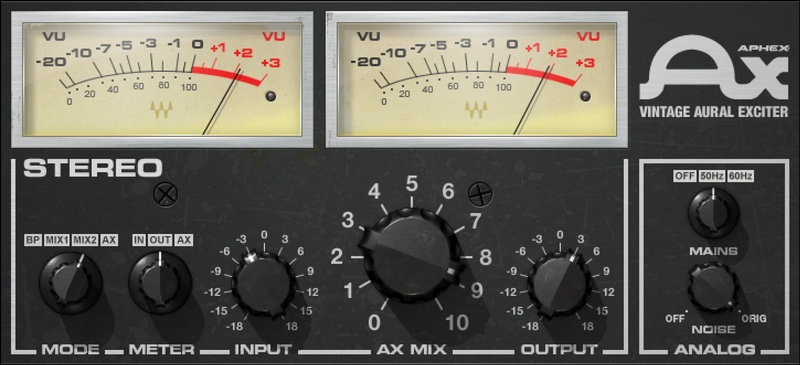
Make Your Tracks Sparkle with ‘Air’ and Excitement

In the 70s, the Aphex Aural Exciter had almost mythical status. It ‘excited’ tracks by restoring the highs lost through the recording and playback processes of the time, and was available only as an expensive rental item.

The Aphex Exciter’s secret for adding sheen, brightness and excitement was based on creating controlled 2nd-harmonic distortion. Now, Waves has captured the original unit’s elegant sound quality, enabling you to make tracks brighter without making them more trebly or forcing you to reach for an EQ.

Features

  • Developed in close association with Aphex®
  • Provides brightness without boosting treble or adding hiss
  • Secret weapon for vocals, guitars, (especially acoustic) and more
  • Add spark and sheen to final masters
  • Controlled distortion adds sonic excitement to tracks and masters
  • Compensates for speakers with weak high-frequency response
  • Restores older, duller recordings by giving them new life
  • Two insert modes and send/return mode give three sound qualities

System Requirements

Mac

  • macOS Monterey 12, Ventura 13, Sonoma 14, Sequoia 15
  • VST / AU / AAX

PC

  • Windows 10+
  • VST / AAX
Installation Instructions

1. Head to https://www.waves.com/create-account

2. Enter your email and choose a password to create an account (if you already have a Waves account, choose Log in, enter your details and head to Step 5) > click 'Submit'

3. Open your email inbox > click the activation link in the email from Waves

4. Click 'Log in here' > Log in to your Waves account

5. Click 'Register New Products'

6. Enter the Serial Number found in your Plugin Boutique user account > click 'Submit'

7. Click download in your Plugin Boutique user account or head to https://www.waves.com/downloads/central > download the Waves Central app for your operating system

8. Install Waves Central > Open Waves Central

9. Click 'Log in' > enter your log in details

10. Click the 'Install Products' tab

11. Tick the blue dot on all products you wish to install or click the top dot to install all products > click 'Install & Activate'

12. Click 'OK'

13. Open your DAW > open the Waves plugin

Your Waves plugins are installed and ready to use, enjoy!

Plugin Boutique Rewards

Discover the most rewarding loyalty programme among all plugin retailers.

  • Free Loopmasters Samplepacks
  • Discounts on products and courses
  • Extra Virtual Cash claimed immediately at checkout
Find out more

Follow us:

X (Twitter) Facebook YouTube Instagram
Logo Logo

Plugin Boutique Limited, Part of the Beatport Group LLC.

Copyright © 2011-2025 Plugin Boutique. All rights reserved










