


 Log In

Free gifts available with your purchase
Iconic "Secret Weapon" Compressor — Full Of Attitude — Perfect For Guitars, Vocals, Synths, And Drums
Now compatible with any soundcard on Mac and PC
The Teletronix LA-3A compressor is an iconic "secret weapon" limiter, famous for pushing sounds right to the front of your speakers with a unique, aggressive character.
Modeled from a unit in UA’s vintage collection, the Teletronix LA-3A Audio Leveler plug-in gives you all the tone and pugnacious dynamics control of the rare hardware.
Get In-Your-Face Optical Compression Tones
By giving you faster limiting than the tube-driven smooth operator Teletronix LA-2A with the clarity of the iconic solid-state 1176, the Teletronix LA-3A plug-in offers bold, mid-forward compression, guaranteed to make your sounds pop.
Easily Get Pro Limiting on Drums
Use the HF Emphasis sidechain filter to punch up your drum bus with legendary LA-3A tone, without triggering the threshold of the compressor with the kick drum. Plus, the Dry/Wet Mix control gives you quick parallel compression on a synth or piano track, seasoning your productions with legendary Teletronix LA-3A attitude.
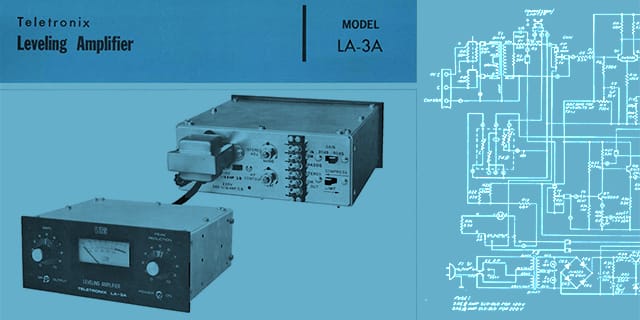
LA-3A History
The Teletronix LA‑3A Audio Leveler made its debut at the 1969 NY AES show, and marked the departure from the tube design of the Teletronix LA‑2A. The LA‑3A incorporated components and design concepts from UA's solid-state driven 1176LN Limiting Amplifier, while also harnessing the LA‑2A's optical compression design, giving the LA‑3A its own distinctive sound and expanded versatility.
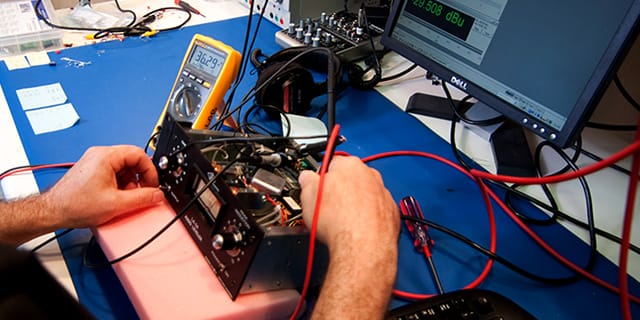
Faithfully Capturing a Classic
Immediately embraced as a studio workhorse, the LA‑3A is still widely used today. Engineers and producers the world over favor the LA‑3A for its unique compression characteristics and sonic signature. Modeled from a unit in UA’s vintage collection, the Teletronix LA‑3A Audio Leveler plug-in faithfully captures the rare hardware, working magic on vocals, guitars, and even drums.
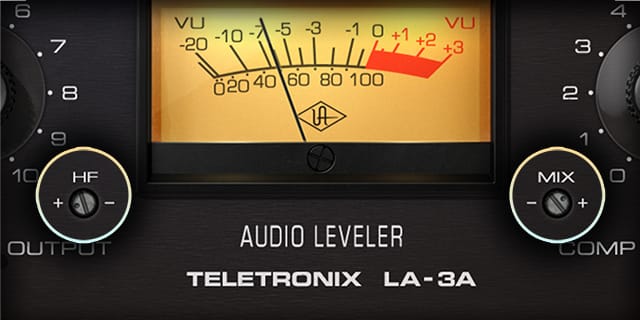
New Modern Features
By adding the hardware’s original HF Emphasis sidechain filter, you can now easily use the Teletronix LA‑3A plug-in to punch up your drum bus without triggering the threshold of the compressor with the kick drum. Plus, a new Dry/Wet Mix control lets you easily add parallel compression on an instrument bus, allowing you to season your productions with legendary Teletronix LA‑3A attitude.
Features
- Use any audio interface, with both UAD Native and Apollo Realtime/UAD-2 versions included
- Get the unique tone of the definitive solid-state optical compressor
- Add energy and harmonics to vocals and acoustic guitars
- Inject grit and texture to bass guitar and soft synths
- Punch up your drums using the HF Emphasis sidechain filter and parallel Dry/Wet Mix
Versions Included with your Purchase
- UAD Native: Runs on your Mac or PC without any UA hardware
- Apollo Realtime & UAD-2: Runs accelerated on Apollo interfaces and UAD-2 hardware
- macOS Big Sur 11, Monterey 12, Ventura 13, Sonoma 14, Sequoia 15 and Tahoe 26
- Windows 10 or Windows 11 (64-bit editions)
- Intel, AMD, or Apple silicon processor
- Internet connection to download software and authorize UAD Native plug-ins (UADx)
- Free iLok account
- Compatible with iLok USB (2nd generation or higher) but not required
- Free UA Connect application for managing UAD Native plug-ins (UADx)
- A supported DAW compatible with VST3, AU, or AAX plug-in file formats.
Reviews Summary
While it aims to provide a helpful overview, it may not capture every perspective or detail. We encourage you to read individual reviews to make an informed decision.
Users highly praise this Universal Audio LA-3A compressor plugin as a versatile and must-have tool. Reviewers highlight its smooth sound, natural saturation, and analog warmth, noting its excellence on bass and heavy distorted guitars. While tonal qualities vary among different LA-3A plugin manufacturers, users consider this UA version to be one of the best.


