


 Log In

Free gifts available with your purchase
Soul / Funk Vibe Compressor Pedal
Introducing the SoulSquash Vintage Audio Compressor Pedal: A sonic time capsule brimming with retro allure and modern finesse. Sampled and accurately replicated with Tone Empire's proprietary NM2 Neural Network technology, this pedal embodies a pristine and clean solid-state sound, adding a touch of nostalgia to your audio.
Its intuitive design and minimalist controls channel soulful and funky vibes, ensuring effortless integration into any setup. From pianos to clavinets, orchestra to bass, vocals to drums, the SoulSquash pedal delivers an enchanting compression that enhances every note with a touch of soul.
Elevate your sound with a pedal that captures the essence of vintage punch and versatility, inviting you to infuse your music with a dash of timeless charisma.
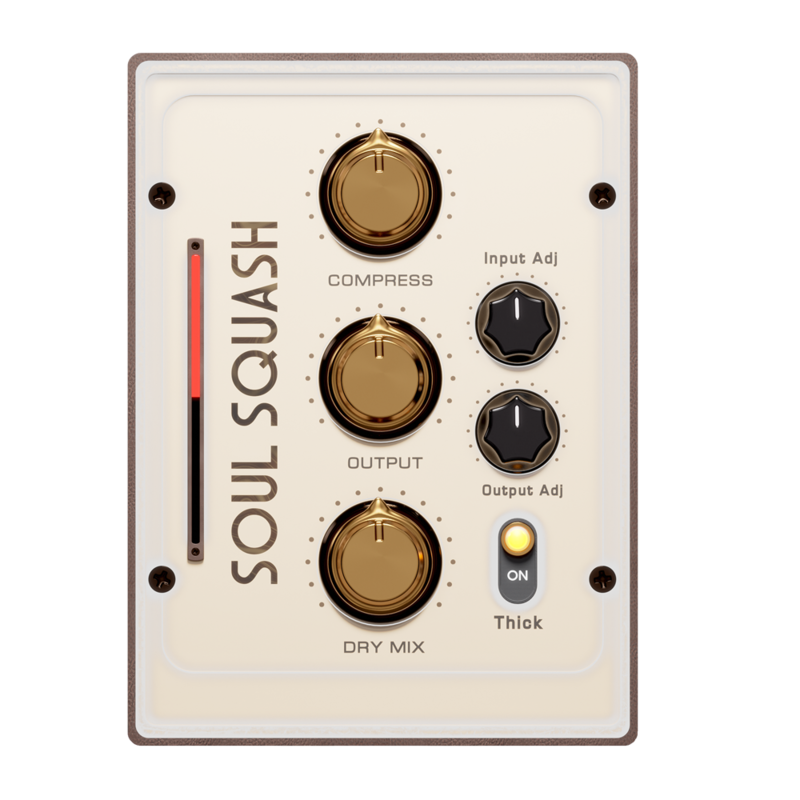
Controls
- Compressor: Control the input gain into the compressor processing .
- Output: This is the control for output attenuation after the compression processing.
- Thick: This switch adds a Lo Eq Bump post compression for a "thicker" sound!
- Input Adjust: Use this control to further adjust the input signal gain before processing.
- Output Adjust: Use this control to trim the final output of the processing after the dry mix .
- Dry Mix: Add the original unprocessed signal to the mix as parallel processing.
System Requirements
Mac
- macOS 10.13 or later (Intel / Native M1 supported) (64-bit only)
- VST3, AU, or AAX
- Intel i3 / AMD Ryzen or equivalent
- 2 GB RAM / 300 MB HD Required
- Screen resolution - 1024 × 768
Note: M1 Mac users running Logic Pro (10.7.2 and above) or Ableton (11.1) please use the 'M1' installer. For all other DAWs please use the regular 'Mac' installer.
Windows
- Windows 10 or later (64-bit only)
- VST3 or AAX
- Intel i3 / AMD Ryzen or equivalent
- 2 GB RAM / 300 MB HD
- Screen resolution - 1024 × 768













