Buy PSP Flare, get a free gift with purchase:
PSP Flare a new kind of psycho-acoustic compressor!
PSP Flare (originally PSP Flow) is a new kind of psycho-acoustic compressor that provides exceptional volume consistency without the usual audible side effects associated with heavy compression. Developed with insights from post-production engineer Paolo Pasquariello PSP Flare uses a psychoacoustic approach inspired by advanced post-production techniques to subtly maintain track level consistency. This ensures that your audio remains naturally dynamic without the perceptible effects of compression. While it was specifically designed for film and TV/video post-production, its unique behavior can deliver excellent results in almost any application, and is excellent at leveling elements in a dense mix.
Features
- Single-band unique probability compression algorithm.
- Wide compression knee.
- Peak or RMS level detector.
- Optional automatic release readjustment.
- Wide range of threshold and ratio settings.
- Preamp section modeling on input.
- Lookahead for reduction of transients through the compressor.
- Smooth control of the side chain high pass filter and link.
- Optional automatic makeup gain.
- Dry/Compressed Mix control.
- Output brick wall limiter with adjustable ceiling level and release time.
- 64-bit double precision floating point math for ultra-low cumulative errors in the filters and proper filter characteristics across the entire frequency spectrum.
System Requirements
Windows
- Windows 7 – Windows 11
- 64-bit
- VST / VST3 / AAX
- The latest iLok License Manager application installed
macOS Intel or macOS Silicon
- macOS 10.12 – macOS 13 Ventura
- 64-bit
- AU / VST / VST3 / AAX
- Up to date iLok License Manager application installed

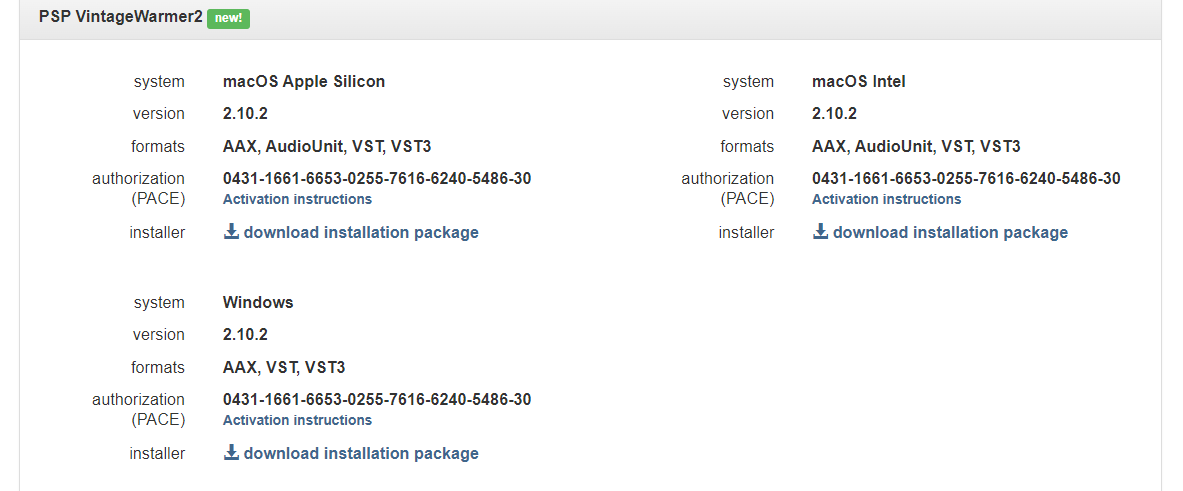
Please Note: PSP VintageWarmer2 is used as an example.
Activation
1. Visit the PSP Registration Centre and create/log into your PSPaudioware account.

2. Select the Manual Product Activation link and copy and paste/manually enter the serial number that is provided with your User Account. > click 'Activate!.'

3. Your PSP product will now show up in your PSP customer account. Your 30-digit iLok activation code will also be listed under authorization (PACE). Download the relevant installer.

iLok Registration
1. Go to the iLok website and create a new account if you are not currently registered and do not have the iLok Licence Manager installed on your computer.

2. Download and install the iLok License Manager.
3. Open your iLok license manager application > click 'Sign In'.

4. Enter your iLok registered User ID and password > click ‘Sign In'.

5. Once you are signed in, click the ‘Redeem’ icon which is located at the top-right corner of the iLok Licence Manager’s interface.

6. Copy and paste/manually enter the 30-digit code from your PSP Audioware account into the available Activation Code boxes, and then click ‘Next'.

7. Select your activation destination > Click 'Activate'.

8. Click 'Ok'.

Installation
Mac
1. Open the recently downloaded .dmg file to begin the installation.
2. Click 'Continue'.

3. Click 'Continue'.

4. Click 'Continue'.

5. Click 'Agree'.

6. Click 'Continue'.

7. Click 'Install'.

8. Click 'Close'.

9. Open your DAW > Open your newly installed software.
Your software is now activated and ready to use.

PC
1. Open the recently downloaded .exe file to begin the installation.
2. Click 'Next >'.

3. Select 'I Accept the Agreement' > Click 'Next'.

4. Click 'Next >'.

5. Click 'Next'.

6. Click 'Next'.

7. Click 'Next' to begin the installation.

8. Click 'Finish'.

9. Open your DAW > Open your newly installed software.
Your software is now activated and ready to use.