


 Log In

Free gifts available with your purchase
Deluxe Drum Treatment
The ultimate rhythm section compressor, Comp VCA-65 is a perfectly recreated VCA compressor with a modern twist.
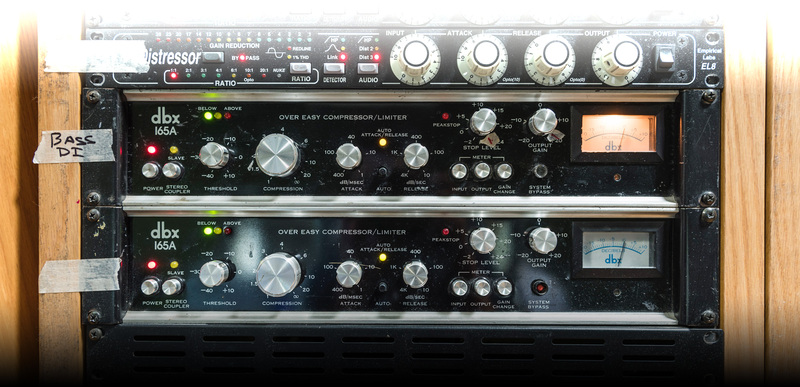
When it was released, the original DBX 165A® was a compressor unlike any other. Rather than the more traditional vacuum tube, it used a solid-state VCA to create its compression effect, and cutting-edge RMS dynamics detection. It also sounded great, which is the important thing!
These days, it’s getting harder and harder to find working originals, but their legendary sound-shaping power is still highly sought-after. Now, thanks to Arturia’s advanced TAE® modelling, you can enjoy using this fabled compressor in your DAW, on as many channels as you want, and with advanced features only possible through software.
Unlike the more common DBX 160, the 165A® sported several unique features that made it a “must-have” for studios looking for tight, punchy percussive sounds. Known as the “Over Easy” compressor, its auto attack-decay detection made great compression simple, its harsh peakstop limiter added a touch of vintage filth when things really hit hard, and its unique compression sound gives even extreme settings a natural feel.
If you’re looking for an easy-to-use compressor with character, you’ll love Comp VCA-65.

Vintage tone, modern features
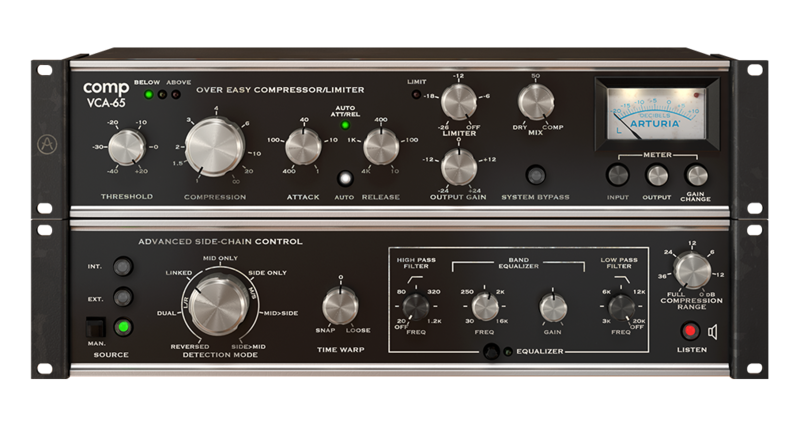
As incredible as the original compressor was, music production has moved on since the 70s. Just because the technology has changed, it doesn’t mean we have to leave these classics behind. When Arturia recreated this compressor, they included several contemporary features with modern producers in mind. The top panel of the interface gives you access to all of the original controls. You can click to expand the plugin to and access its advanced, new features.
New Features
Let’s do the Time Warp
Because we’re working in the digital domain, it’s easy to introduce a couple of milliseconds of pre-delay without you even noticing. The “Time Warp” function lets you take advantage of this, so you can get creative with your placement of the compression envelope as it engages and releases. This is a dream come true for experimental producers and sound designers!
The “S” Word
The sidechain includes an integrated SSL®-style EQ, letting you hone in on particular frequencies of the sidechain signal that activates the compressor. One easy, effective use for this is to use the EQ to boost the sibilance of a vocal, and let the sidechain act as a highly customizable de-esser.
Push the button
Last, but certainly not least, Comp VCA-65 includes a “manual” mode for the sidechain. When this mode is engaged, you can trigger the side chain with the virtual button to see how it reacts and automate it in your DAW so you can get total control without even needing an input audio source.
Pretty exciting, right? Why not try it out for yourself? You can download a free trial of the Comp VCA-65, use it in your own setup with your own audio, and fall in love with it first hand.
Half a century of hit-making tone, right in your DAW
Push hard for that saturated, soft-clipping sound that cuts through any mix; get the tonal balance just right at the input stage; add vintage analogue warmth in your mastering chain; use the in-built mid/side processing to enhance your whole mix.
Compatible with all major DAWs, now you too can enjoy the harmonic push, subtle overtones, and tone-shaping power of the most iconic studio gear ever made.
Main Features
- Virtual recreation of famed classic VCA compressor
- Original electronic path accurately modelled, including VCA and transistors, using Arturia’s state-of-the-art TAE® analogue modelling
- Original fast attack & release parameters with Auto mode
- Original Peakstop limiter
- Original variable ratio form 1:1 to 1:oo
- Additional Arturia's creative side-chain features:
- External side-chain source to trigger the compressor to an external source
- Playful manual pad to manually trigger the compression
- 7 creative detection mode, including M/S processing
- Time warp function with look ahead or delay added to your side-chain path
- Advanced Side-chain EQ
- Compression range parameter to limit the amount of gain reduction applied, with 0dB position for FET-76 with no compression/distortion only sound
- Monitor Side-chain signal directly
- Dry/wet Mix knob for parallel compression
- Switchable Analog VU meter with 3 calibrations mode (-18dBFs, -12dBS, -8 dBFs)
- Analog clipping LED indicator
- Comprehensive set of presets
- A/B comparison setting
- Integrated tutorials and unique dynamic preset tips
- Resizable window
- State-of-the-art TAE® analogue modelling
System Requirements
- Works in Standalone, VST, AAX, Audio Unit, NKS (64-bit DAWs only).
Mac
- Mac OS 10.13+
- 4 GB RAM
- 4 cores CPU, 3.4 GHz (4.0 GHz Turbo-boost) or Apple Silicon CPU
- 1GB free hard disk space
- OpenGL 2.0 compatible GPU
Windows
- Win 10+ (64bit)
- 4 GB RAM
- 4 cores CPU, 3.4 GHz (4.0 GHz Turbo-boost)
- 1GB free hard disk space
- OpenGL 2.0 compatible GPU
- ARM processors not supported on Windows
Protection
All Arturia software is protected by the Arturia Software Center.


