


 Log In

Free gifts available with your purchase
SuperRack SoundGrid
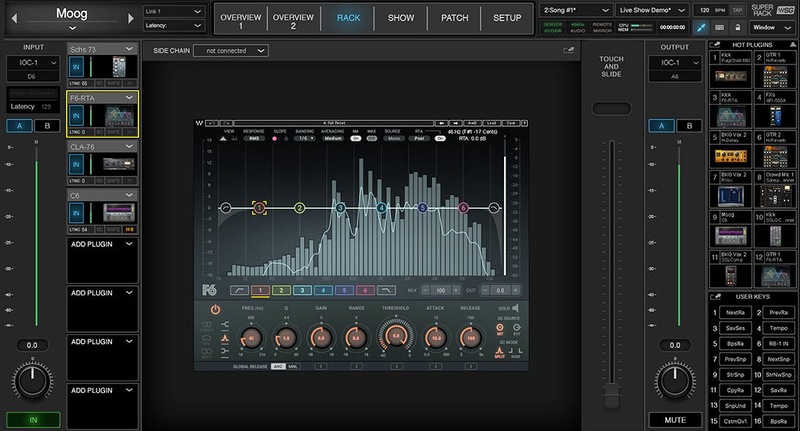
Add the Power of Waves Plugins to Your Live Sound Console
Built and optimized for speed, SuperRack SoundGrid is a cutting-edge plugin rack for FOH, monitor, broadcast, and AV engineers. Run up to 64 stereo multi-channel racks, through multiple instances of Waves’ plugins, with near-zero latency—and with endless customization options.
SuperRack SoundGrid handles plugin processing on an external SoundGrid DSP server to significantly increase plugin count, minimize latency, and enable the host and I/O devices to be far apart from each other, to accommodate complex setups.
SuperRack SoundGrid is a natural extension of your mixing console. Designed for quick setup time, flexible touch-friendly workspace, and unlimited workflow customization, SuperRack SoundGrid enables FOH, monitor, broadcast, and AV engineers to run any show with speed and confidence.
Features
- NEW! ProLink Console Remote Integration Protocol now available for DiGiCo, LAWO consoles
- Support for multiple languages
- Share SoundGrid I/Os in a network to build complex setups
- Supports plugin resizing to accommodate monitor resolutions
- Selectively recall snapshots via scope filter
- Multitouch-friendly graphic interface
- Comprehensive device and network monitoring
- Supports up to four active and four redundant SoundGrid DSP servers
- Advanced latency alignment management
- Expand your workspace with up to four standard or touch monitors
- Host mirroring (DiGiCo) and DSP server redundancy
- Use ‘Touch & Slide’ fader for touch with small plugin parameters
- Waves mRecall app quickly recalls pre-programmed audio settings
- Map app and plugin controls to MIDI and computer keyboards
- mRecall works over wi-fi, from phones and tablets
- Switch inputs and outputs while maintaining processing chains
System Requirements
Mac
- macOS Monterey 12, Ventura 13, Sonoma 14, Sequoia 15
PC
- Windows 10+














