


 Log In

Free gifts available with your purchase

Chord FX Suite
Easily create your own professional-sounding basslines, melodies and arpeggios over any chord progression.
Now updated to version 2!
Play your MIDI controller like an expert. Easily create signature basslines, melodies and arpeggios from any chord progression. Our patented improvements upon traditional Scale, Arp and Chord effects provide users with unlimited possibilities for creating their own unique sound. VST Instrument and AU MIDI Effect versions available.
Chord Generator
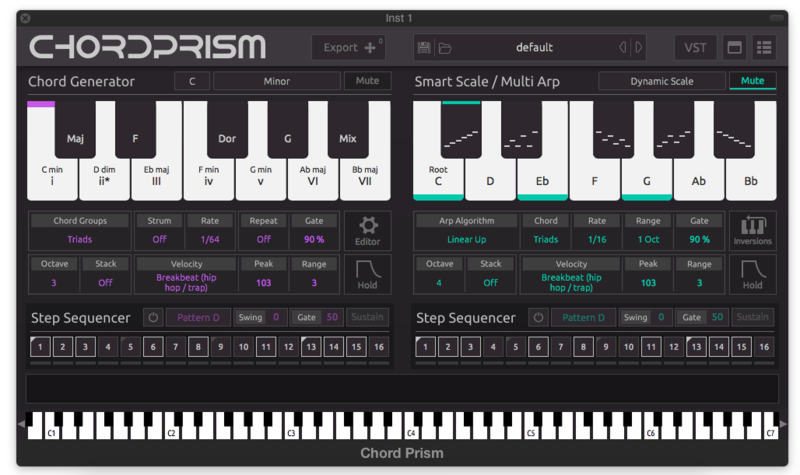
Play one finger chords from any Key or Scale. Choose from multiple chord types (triads, 7ths, 9ths) and multiple inversion and voice leading options. Apply Strum, Repeat, Hold and Velocity effects.
Smart Scale
Play amazing basslines and melodies with Mozaic Beats' patented Smart Scale. Features different mappings for different experience levels. For beginner mappings, the Scale shifts with each Chord Selection. This allows you to keep your hand in the same position, while the right tones shift to your fingers.
Step Sequencers
Program and apply different rhythmic patterns to the content you create with the Chord Generator and Smart Scale. Chord Prism comes with a wide range of genre-based presets which take full advantage of the Step Sequencers.
Multi Arp
Create from a palette of multiple one finger arpeggios which can be applied to any chord selection. Mozaic Beats' patented Multi Arp allows you to mix and match arp patterns into unique directional and tempo changing combinations.
Instance Sync
When using multiple instances of Chord Prism within a project, each instance will share Key, Scale and Chord information. This allows you to quickly add elements like bass, melody and arpeggios to a chord progression without having to think about what tones will work over the chords.
Multi-Instrument Performance
Play a chord progression, melody and bassline simultaneously with different instruments inside of your DAW... like you have four hands. Chord Prism's Mute buttons allow you to isolate specific roles for each instance.
Chord Editor
Adjust the notes of each defined chord on a step by step basis with Mozaic Beats' patented Chord Editor. Create any inversion, voicing, extended or altered chord imaginable. A powerful tool for more experienced users looking for advanced accompaniment options.
Export MIDI
Once you have gotten your track to where you want it, you can easily drag and drop the actual midi notes being performed to an instrument track within your DAW.
Key/Chord Shifters
Change your key or chord types on the fly with Chord Prism's shifter keys. Great for live performance or quickly auditioning different ideas in the studio.
New in version 2
- Expanded genre based preset library by Attack Magazine
- New Pattern Generators that add Melody values to go along with Multi Arp values
- Arpeggio functions added to Chord Generator
- Copy/Paste functions added to Pattern Generators
- Multiple octave values added for the Chord Editor’s Octave Step parameters
- Independent Chord Editors for each Chord/Key/Scale shifter key
- Improved preset saving process
Features
- Chord Generator – One Finger Chords of any type with Strum, Repeat and Velocity Effects.
- Smart Scale – Keep your hand in the same position while the scale conforms to each Chord Selection.
- Step Sequencers – Create dynamic rhythms for your chords, melodies and basslines.
- Pattern Generators – Customizable One Finger Arpeggios and Melodies of the current chord.
- Chord Editor – Customize tones within each chord for unique voicings, inversions and extended chords.
- Synchronization – Chord Prism syncs Key, Scale and Chord selections between all open instances
System Requirements
- Mac OS 11.5 and above (64-bit only).
- Windows 10 and above (64-bit only).
*Not compatible with Pro Tools or Garageband
Most DAWs - Chord Prism is recognized as a VST Instrument within your DAW. It does not produce any sound, but can be set up as a MIDI Output to another instrument within your DAW. You can then record your selections to the Chord Prism track, which will control the playback of another instrument track. You can also export the midi from Chord Prism to other instrument tracks. Multiple instances of Chord Prism can be used within a project.
Maschine and Reason - Since these DAWs do not allow for routing MIDI from one track to another, Chord Prism allows you to load an additional VST Instrument within itself. You can scan your VST instruments into Chord Prism's library or drag and drop individual VST instruments from their folders on your computer to the Chord Prism Library.
Logic Pro and Pro Tools - Chord Prism provides AU and AAX MIDI FX formats, where the plugin can be placed in front of the instrument in the signal chain

Strobe
Professional DJ with over 30 years experience
"Regardless of how much theory you cram into your head, this app is a great tool for anyone."

Johnny Atar
Member of Klaypex: an electronic trio that produces variations of house, complextro, and dubstep.
"The Chord Editor lets me experiment with near-infinite tonal combinations to get the exact sound I am looking for."

DJ Afterthought
Professional DJ and producer - RiFF RaFF, Wiz Khalifa, Action Bronson, Mac Miller
"Chord Prism helps me create complex tunes in between shows. Being able to play a whole band's worth of instruments with 2 hands is incredible."


Reviews Summary
While it aims to provide a helpful overview, it may not capture every perspective or detail. We encourage you to read individual reviews to make an informed decision.
Customers highly praise this music production plugin as an intuitive, accessible, and essential tool for songwriting and learning music theory. They appreciate features like one-finger chords, customizable presets, and the melody section, noting it integrates seamlessly into workflows. However, a reviewer cautions that owners of the first version might find it too similar to the original, with no notable new presets.


