


 Log In
Save $0.00 compared to buying products individually
Free gifts available with your purchase
Inspire, Compose, and Create in an Instant
You could spend thousands on college courses and countless hours on YouTube tutorials learning music theory just so you can try to remember every possible scale and chord progression. Almost impossible! Imagine all that knowledge being available to you in an instant. Designed for those who know, those who are learning, and those who are stuck asking the age-old question, "What comes next?" - W.A Production offers you, the InstaSeries Bundle.
W.A Production have combined their most powerful resources InstaComposer, InstaScale, and InstaChord, into one fantastic package. Now, you can access the missing link in that perfect scale or brilliant chord progression - or let InstaComposer's AI generate melodies and progressions for you with ease.
Explore your innermost creativity and rekindle your inspiration with endless combinations and possibilities. All three plugins are user-friendly, clearly labelled, and easy to navigate. And, since they are lightweight, they won't devour your CPU.
As a professional with time restrictions and deadlines, who has time to sit and play the guessing game or look up the 4th degree of an A major? Or what the 3rd chord in C major is? Get the perfect scale, the perfect chord, and cohesive melodies in an instant with InstaSeries.
With this bundle, you can take advantage of drastic savings over purchasing them individually. Get in on this incredible deal and feed the need to create - brought to you by the sound design masterminds at W.A Production.
InstaComposer
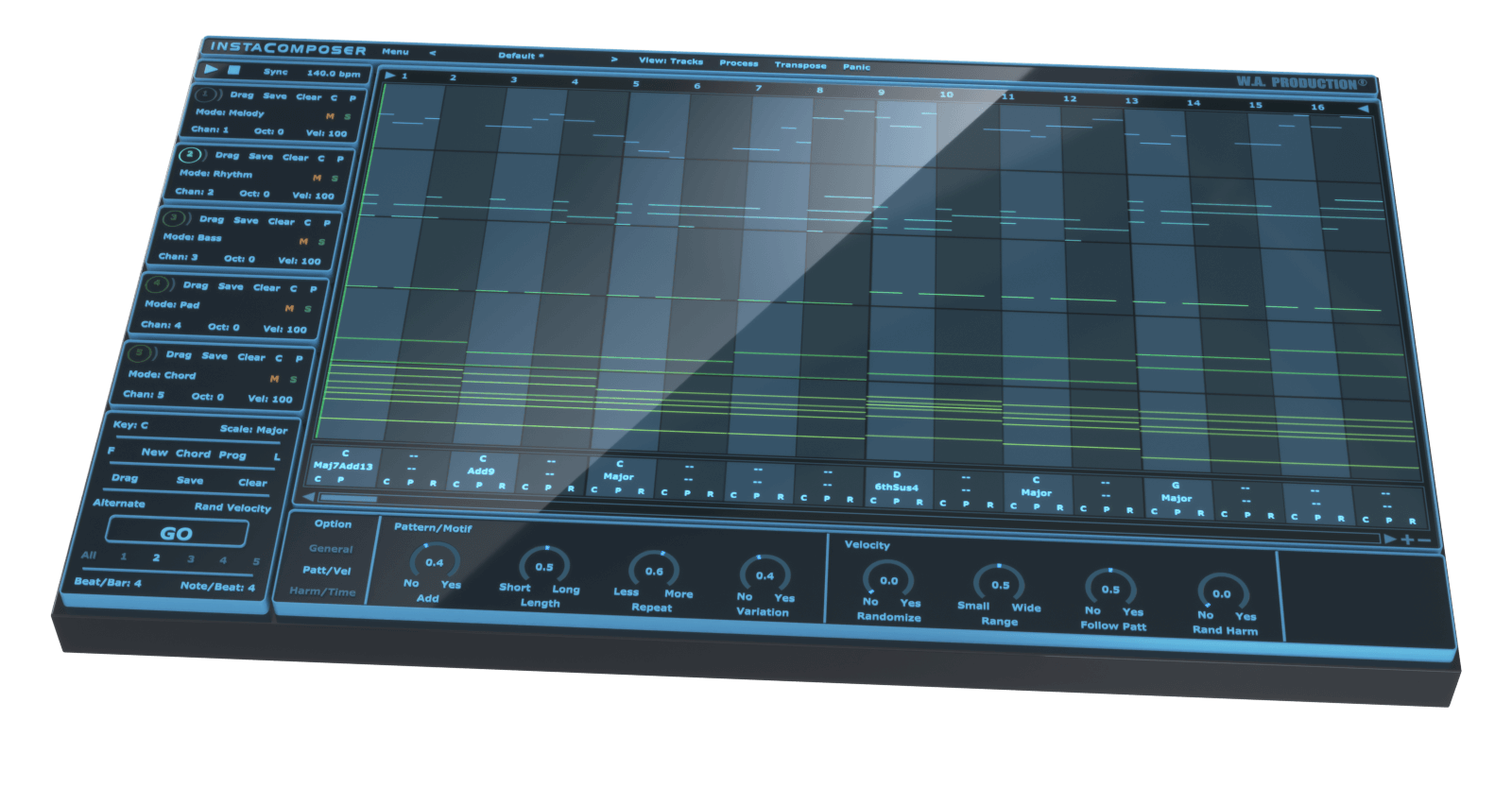
Sometimes inspiration comes at you thick and fast... but sometimes not. Instacomposer is your saviour when creativity runs dry, or when you just need your talent topped up. This MIDI generation plugin can conjure melody, rhythm, bass, pads and chords at the click of a button - all using artificial intelligence to create genuinely useful and musical riffs. This is the next step in automatic composition, using a complex algorithm to determine notes, harmonies and chords based on your personal preferences. With this much composing power at your fingertips, you’ll never be stuck in a musical rut again.
Artificial Intelligence
The backbone of Instacomposer is a behind-the-scenes decision-making matrix that creates notes based on both mathematics and musical knowledge. Plus, the artificial intelligence factors in a whole host of parameters that you can set in the bottom panel, from repetition probability to the complexity of chord shapes. Harmonic variations, strumming techniques and note density are just some of the myriad of options that can be adjusted, feeding the algorithm your own personal set of preferences.
Total Flexibility
Instacomposer is as unique as you are, taking into account your chosen scale, time signature and riff length. Choose to create new sequences for one, some or all of the 5 tracks, and in any combination of melody, rhythm, bass, pad and chord.
MIDI Editor
The onboard MIDI editor can be used to tweak the output of Instacomposer within the interface itself. This means that you can manipulate the music before it leaves the plugin, adding your own creativity and personal style on top of what the plugin has offered you. Move, copy and delete notes within a familiar piano-roll interface, even changing the velocity.
MIDI Export
Drag the MIDI tracks straight out of Instacomposer and into your DAW for ultimate ease of use. Alternatively, set up multi-channel instruments and route the MIDI from Instacomposer into your favourite VSTi’s. In this way, you can preview all 5 tracks simultaneously, without ever leaving the Instacomposer environment.
Presets
Instacomposer includes a huge number of factory presets; useful musical motifs to get you up and running quickly which can eventually become the basis for whole tracks.
W. A. Production are real-life producers making creative plugins to help you achieve studio quality processing quickly and easily. Enjoy!
Learn more about InstaComposer.
InstaScale
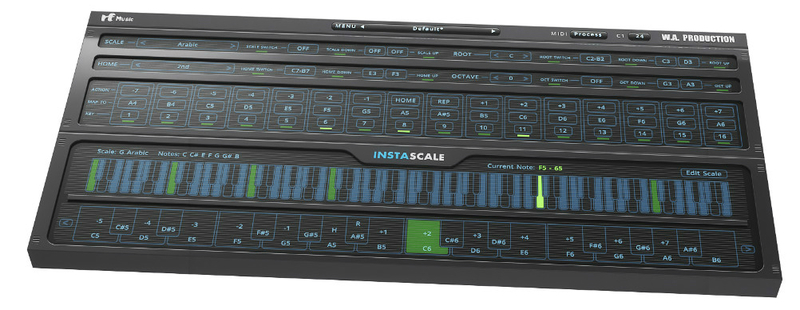
What is it?
InstaScale is a newly invented, scale oriented instrument with only 16 keys to play with. But wait, is that enough? Turns out it's more than enough. Unlike the standard keyboard instruments where each key can only play a single note, Instascale has a set of smart keys, each one capable of playing different notes. The new note will be based on the given scale, last note's position and the action of the key assigned to it.
InstaScale is available as a MIDI processor plugin that can be used in any DAW that supports VST instrument plugins (with MIDI routing) or AU MIDI effect plugins, giving you the freedom to play any instrument you choose without any limitations regarding the sound and hardware.
What can I use it for?
- Learning. With all the scales included in the plugin and various information displayed on the interface, Instascale can be a valuable source to study and learn different scales and modes very quickly.
- Ear Training. Get familiar with the scales in different keys and modes without having to know how to play them. Train your ear to recognize intervals and distances quickly. Using the home feature you can stay on a certain note and see what feelings it creates compared to the other notes of that scale.
- Serious playing. Instascale might seem like a strange and unfamiliar instrument at first but don't be fooled, like any other instrument with enough practice and dedication you can play a kind of mind-blowing music that you could have never done with any other instrument out there.
- Experimenting and getting inspired. Considering that you can never hit a wrong note with Instascale, just play random keys and get inspired by the unpredictable but musically pleasant results. Happy accidents always happen. You don't even have to use your MIDI keyboard, you can use your drum pad/kit, map the pads to the correct keys and start playing. You'd be surprised how cool it feels and sounds.
- Breaking the rules. The foundation of the plugin is based on doing things differently, knowing the rules first and then breaking them. So let it inspire you to go even further and find new ways to create music without limiting your mind to the concept of black and white keys and minor and major scales. The plugin guards the rules but lets you change them, bend them or break them. It lets you change the scale, root and home notes on the fly, do crazy runs, it even allows you to create your own experimental scales.
Learn more about InstaScale.
InstaChord
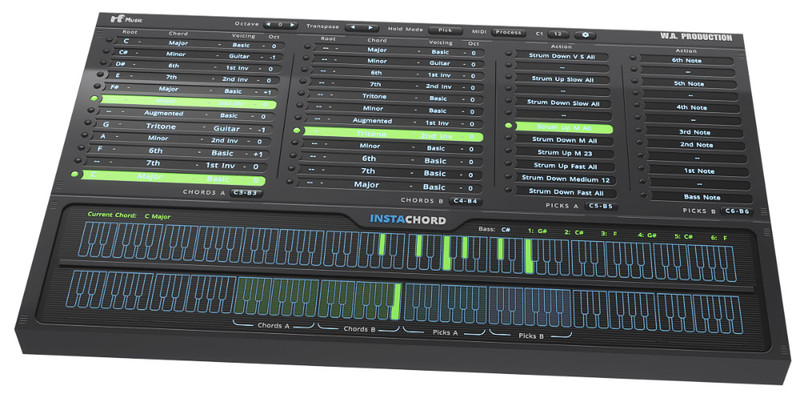
A MIDI Processing Plugin that helps you play chords and chord progressions faster and easier.
The foundation of a great song is based on its harmonic movements and chord changes which often is called chord progression. A change in chord progression can have a drastic effect on the mood or direction of a song. Even those with a background in music theory can experience repetition and stagnation. Using richer chords and new chord progressions can take the song to a new level and make it sound unique and professional.
Whether or not you are an experienced musician or just a beginner, with a vast chord bank and amazing playability, Instachord has something to offer to you.
- If you're a songwriter or a producer It will help you speed up the workflow and song creation process. Find the best progression and use a single midi pattern to play all of them.
- If you're a player it allows you to play some of the hardest chords in any musical key and combination of notes and different voicings, using just a few keys on your controller. Or jam and practice over them without spending much time creating a jam track.
- If you're a student or a teacher you can use the plugin to learn and study the chords and use it as a reference and hear them in action.
Learn more about InstaChord.
System Requirements
Windows
- Windows 8 and later (32 / 64-bit)
- VST Format
Mac
- macOS 10.13 and later (64-bit only)
- VST & AU Formats
Important Note for Mac Apple Silicon users: Before purchasing, please review the current compatibility status of this plugin on your system here.
DAW Compatibility
Windows
- FL Studio 12 (and newer)
- Cubase 10 (and newer)
- Studio One 5 (and newer)
- Ableton Live 9 (and newer) (Blue Cat's Patchwork plugin needed for multi-channel MIDI routing)
- Pro Tools 11 (and newer)
Mac
- FL Studio 12 (and newer)
- Cubase 10 (and newer)
- Studio One 5 (and newer)
- Ableton Live 9 (and newer) (Blue Cat's Patchwork plugin needed for multi-channel MIDI routing)
- Logic Pro X (and newer) (Blue Cat's Patchwork plugin needed for multi-channel MIDI routing)
- Pro Tools 11 (and newer)
Global
- NI Maschine - Blue Cat's Patchwork plugin needed for multi-channel MIDI routing
- Mixcraft - Blue Cat's Patchwork plugin needed for multi-channel MIDI routing
Incompatible with
- Maschine 2 (Win / Mac) - No MIDI routing. You can still use Drag&Drop MIDI function.
- Reason (Win / Mac) - No MIDI routing. You can still use Drag&Drop MIDI function.
Important Note: In order to use this product with multiple MIDI outputs in Ableton Live, a copy of Blue Cat's Patchwork is required.


