


 Log In

Free gifts available with your purchase
Confidence and precision
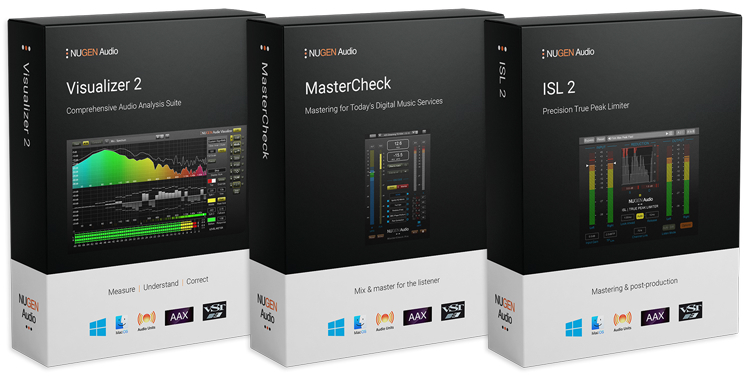
These award-winning plug-ins are designed to allow you to master effortlessly, with confidence and precision. Modern Mastering delivers groundbreaking functionality - streaming service auditioning, pristine limiting and a full suite of audio analysis tools & play-out delivery measures - all built with a level of usability not available anywhere else.
Elite mastering tools
Mix and master for today's playout technologies.
- Audition for today's play-out services in real-time
- Check and compare dynamics
- Essential loudness and codec analysis
- Produce for iTunes, Spotify etc
- Full suite of audio analysis tools
- Precision true-peak limiting
Included in the bundle:
MasterCheck is an optimisation plug-in for cross-platform mastering, designed to ensure that your masters sound consistent across all platforms — physical, digital and streaming. Audition how loudness normalisation will affect your track, and preempt the impact that each codec will have, alongside industry standard loudness and True Peak measurement.
Find the sweet spot between perceived loudness and dynamics, and avoid nasty surprises by compensating for encoding artefacts ahead of time.
How does your music sound when it reaches the listener? You already optimise masters for domestic hi-fi systems, car stereos, headphones and earbuds. In the streaming era, shouldn’t you optimise for each streaming platform too?
Audition and preempt data compression and loudness normalisation for…
- Spotify
- Apple Music
- Tidal
- YouTube
- Soundcloud
- Bandcamp
- Qobuz
- Pandora
…and more, using the Codec mode and Offset to match function.
Learn more about MasterCheck 2.
ISL 2st
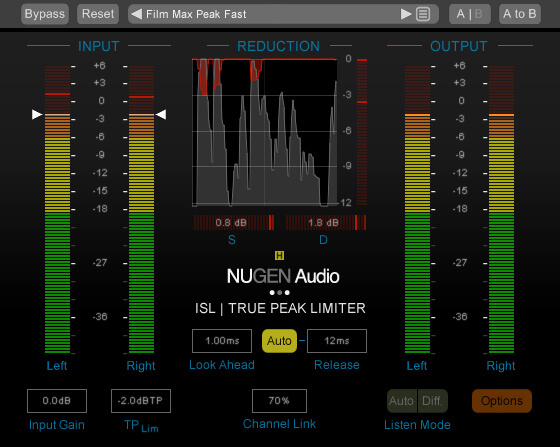
World class, broadcast quality limiting is an essential requirement for any audio production, and the latest standards also demand true-peak compliance. ISL 2st delivers both, giving you superb sound with complete confidence about meeting the new standards for online delivery.
ISL 2st is an intelligent look-ahead brick-wall limiter that provides highly transparent True Peak limiting for all stereo & mono content. ISL 2st is designed to allow you to get on with creative audio production while it takes care of true-peak compliance for you. It delivers content fully compatible with loudness normalization standards used by iTunes Radio, Spotify and many others. The risk of distortion from down-stream codec conversion (mp3, AAC etc.) is eliminated with ISL 2 on the master bus.
No need to second guess your sample-peak limiter time and again, or deliberately increase headroom to avoid a downstream problem. Just dial in your true-peak limit and let ISL take care of the rest.
Pristine Quality True-Peak Limiting
ISL 2st includes Apple ‘Mastered for iTunes’ true-peak detection, and many other algorithms suitable for the control of audio for Music & Post Production applications.
Powerful Processing and Visualisations
With unique Steering and Ducking meters, ISL2st guides you to the perfect settings. Whether you are preserving directional integrity or atmospheric ambience, ISL2st gives you the information and control you need to achieve your objective with ease. New processing enhancements assess the incoming audio for frequency content and automatically take care of those minor adjustments required when LF content drives the limiter, delivering increased transparency whilst maintaining our renowned reputation of intuitive operation.
Learn more about ISL 2st.
Visualizer
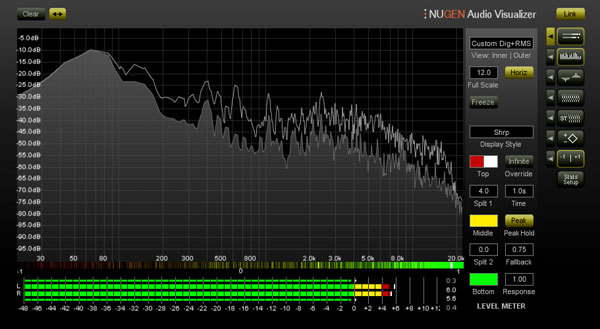
Measure, Understand, Correct. Visualizer gives you Indispensable Audio Analysis for Quality Audio Production, with a Standardised Reference Set of Professional Tools that let you Work Faster, Avoid Mistakes, Repeat Past Success and Leverage the Success of Others.
Powerful, flexible Audio Analysis, giving you immediate access to precisely the information you need, when you need it, through a unique, intelligent window system.
Single Intelligent Window System
Visualizer’s unique intelligent window facility lets you select multiple view combinations, automatically resizing and aligning windows to maximise legibility and cross referencing information across screens. No need to switch between plugins to get the combination of views you want. User configurable presets let you switch instantly between setups and interface sizes to build the workflow that suits you.
Learn more about Visualizer.
System Requirements
MasterCheck
Minimum System Specification:
- Mac OSX 10.7.x, 512 MB RAM
- Windows XP or above, 512 MB RAM
Supported Standards
Our loudness products are compatible with all recommendations and guidance based upon the international standard ITU-R B.S. 1770, revisions 1, 2, 3 and 4 including:
- ATSC A/85 (CALM ACT)
- EBU R128
- EBU R128 S1
- ARIB TR-B32
- OP-59
- AGCOM 219/9/CSP
- Portaria 354
- DPP
Supported Audio Codecs:
- HE-AACv1 (AAC+)
- HE-AACv2 (DAB+)
- Ogg Vorbis
- AAC-LC
Available Formats:
- Nugen support AAX, VST, VST3, and AU in both 64-bit and 32-bit versions. RTAS is also available as 32-bit only
ISL 2st
- Nugen support AAX, VST, VST3, AU and AudioSuite in both 64-bit and 32-bit versions. RTAS is also available as 32-bit only.
- AAX DSP Version supports sample rates up to 96Khz.
- Mac OSX 10.6.x, 512 MB RAM
- Windows XP or above, 512 MB RAM
Travis Huisman
American mix engineer and producer.
"MasterCheck has now become the most essential part of the end of my mixing and mastering process."
Peter McCabe
Kiss, Puff Daddy, Focus@Will
"One of the things I appreciate the most about Visualizer is its excellent graphical interface."
Howie Weinberg
Aerosmith, U2, Red Hot Chili Peppers.
MasterCheck is good for us engineers and producers out there, to know what you're up against."





















