


 Log In

Free gifts available with your purchase
Transform Your Mixes with Three Essential Production Tools
Designed as the ultimate core set of plugins for producers, engineers and sound designers, the Ultra Essentials Bundle features three of our most powerful plugins: UltraChannel, UltraReverb and UltraTap. Whether you are mixing or tracking a record, live sound or post-production, our Ultra Essentials will make everyday tasks easier and fire your imagination.
The bundle comes with more than 600 presets across the three plug-ins, many designed by Eventide artists including Andrew Scheps, Chris Carter, Richard Devine, Sasha, ROCASound, Brian Montgomery, Matt Lange, Colin Newman and many more. Valued at over $500 if purchased separately, bundles are the most affordable way to own Eventide's award-winning tools.
UltraChannel
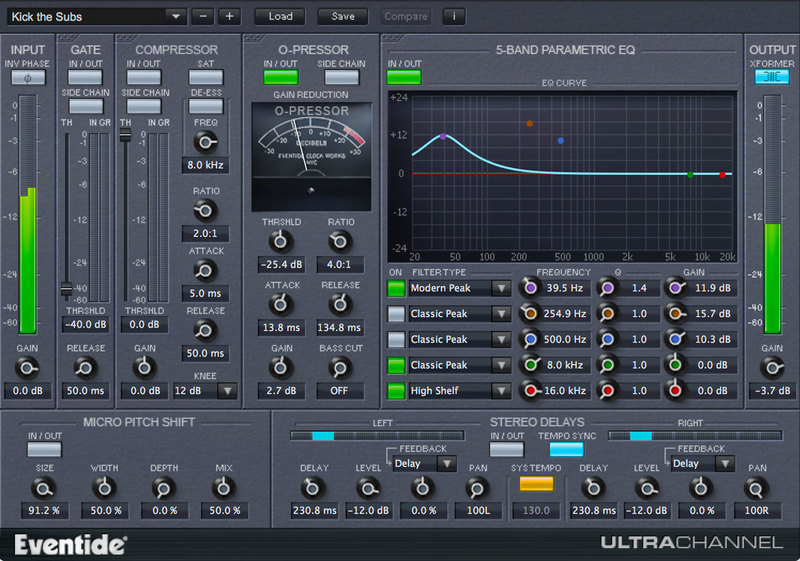
Professional Audio Engineering For All
UltraChannel™ is a high-precision channel strip that includes several feature-packed versions of Eventide’s legendary effects, all in one plug-in. Whether mixing or mastering, regardless of genre, UltraChannel is the ultimate tool to make your tracks and mixes come to life. It not only has industry benchmark performance, but is also the most versatile channel strip available due to our exclusive FlexiPath™ routing, which allows processors to be ordered based on desired workflow.
The Secret Sauce of Mixing
UltraChannel shines in carving out space for any instrument or vocal to sit just right in the mix. There are an infinite number of ways to generate the exact tone, dynamics and frequency characteristics you’re seeking. Additionally, through its support for side-chaining, you can use an alternative audio source to color the characteristics of your main signal. It wouldn’t be an Eventide if it didn’t also feature micro pitch functionality (from our flagship H8000 hardware) to thicken or increase the stereo spread of any instrument or vocal.
FlexiPath™
Allows drag and drop for reordering the signal path of the top level components (O-Pressor, compressor/de-esser, EQ, Gate) for ultimate flexibility and experimentation.
Learn more about UltraChannel.
UltraReverb
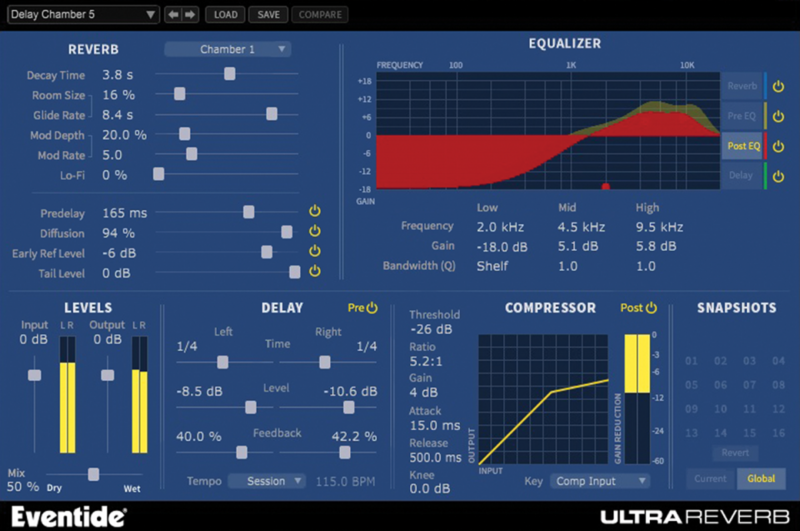
Comprehensive reverb toolbox with nine H8000 hardware-derived, reverb algorithms to realistically simulate halls, chambers, rooms, plates and ambience or, taken to the extreme, other-worldly environments. The toolbox includes 4 parametric EQs, compression and delay which can be routed pre or post reverb. Packed with more than 300 presets it is arguably the most comprehensive reverb plug-in available.
Features
- Halls, Chambers, Rooms, Plates, and Ambience derived from Eventide's flagship hardware processor, the H8000 UltraHarmonizer®
- Create acoustically natural or other-worldly environments
- Packed with over 300 killer presets for mixing, mastering, post-production, and sound design
- Includes Artist Presets designed by top engineers and recording professionals
Learn more about UltraReverb.
UltraTap
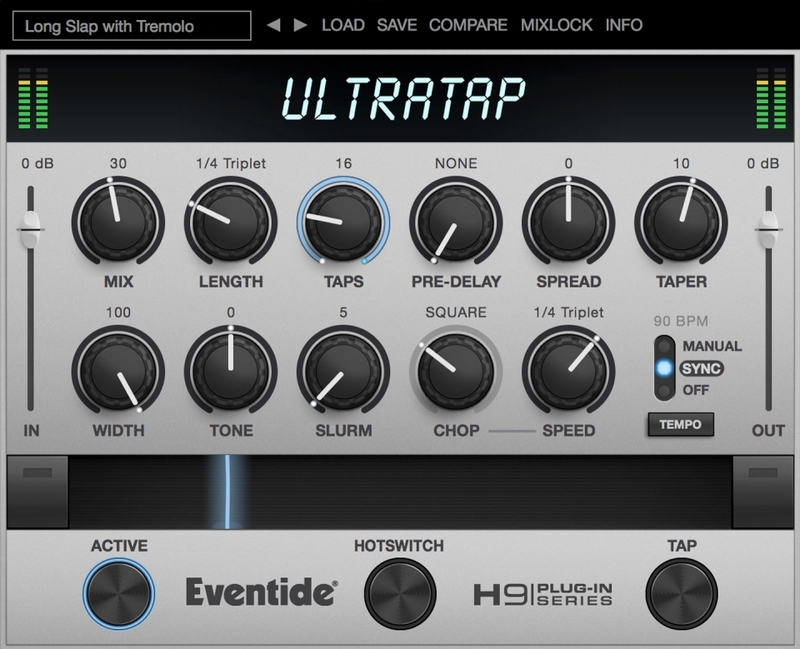
UltraTap is a unique multi-tap effect capable of rhythmic delays, glitchy reverbs, huge pad-like volume swells and extraordinary modulation. It’s the perfect tool for creating drum fills, vocal choruses, swelling guitar chords and other evolving effects — everything from reversed reverbs to a massed church choir singing a Gregorian chant in Notre-Dame Cathedral!
Ultra Responsive
Think of UltraTap as the mother of all Echoplexes and you won’t be too far off. That’s basically how it operates but with the flexibility to add as many ‘tape-heads’ as you want and expressively control their positions and levels.
Designed for real-time manipulation, UltraTap features The Ribbon, an innovative control which allows you to program two settings for any combination of the controls and seamlessly transition between them.
The programmable HotSwitch allows you to instantly jump to an alternate setting at the push of a button. This combination of controls is intended to bring you as close as possible to the experience of tweaking real hardware.
Features
- Over 150 presets designed to inspire; including artist presets by Chris Carter, Colin Newman, Sasha and many more.
- Manipulate effects in realtime using The Ribbon to transition seamlessly between two settings of any combination of controls.
- Using the innovative Slurm control, smear taps together or modulate them to create truly unique reverbs.
- Create drastic changes in effect and sound by assigning the HotSwitch to an alternate version of the current settings.
- Use up to 64 taps to create simple repeats or morph delays into chorus and reverb.
Learn more about UItraTap.
System Requirements
Windows
- Windows 10 and later (Windows 11 supported) (64-bit only)
- AAX, VST2, VST3
Mac
- macOS 10.14 and later (Intel / Apple Silicon supported) (64-bit only)
- AAX, AU, VST2, VST3
Important Notes:
- Eventide tests their desktop plugins in Ableton Live, Cubase, FL Studio, Logic Pro, Pro Tools, and Studio One (However, their plugins should work with any compatible host.)
- No iLok dongle is required to run this software - only a FREE iLok account/Manager is required for authorisation.
Music Connection
Music Connection is a United States-based monthly music-trade magazine, which began publication in 1977.
"I like that UltraReverb starts with such great sounding reverb algorithms, that tweaking them into perfection is easy."
Producer Spot
Music production audio news, reviews, best VST plugins, virtual instruments, royalty free loops and sample packs, recording tutorials, mixing and mastering.
"UltraChannel is a great channel strip with some bonus features not found on other strips. It is easy to use…it comes with a lot of presets which sound awesome from the get-go and offers up a great starting point to shape your sound just the way you like it."
Audiofanzine.com
Audiofanzine.com reviews midi, home studio and self-production. It also tests synthesizers and software.
"UltraChannel is more than just your average channel strip. It also features Eventide's signature delay and modulation effects, and is almost like an entire effects collection in a single plug-in."


