


 Log In
Free gifts available with your purchase
Streamlined & accessible
The Focus Elements bundle consists of streamlined versions of our Focus plug-ins - Stereoizer, Monofilter and Stereoplacer. The Elements plug-ins use the same powerful technology under the hood, in a simplified package.
Monofilter Elements
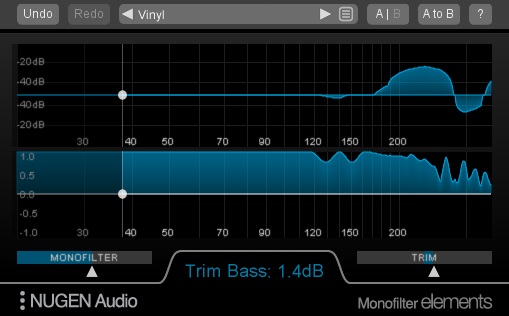
Monofilter Elements is a streamlined version of our Monofilter plug-in, giving access to the same bass management technology, in a simplified package.
Features
- Sum your bass to mono
- Sharpen, tighten and define low frequency information
- Optimise for louder playback
- Safely mix and master for vinyl
- Anchor your bass with ease, while maintaining the original character of the track.
Centring the bass where stereo FX are used.
Applying stereo effects to enliven or enrich a sound can work wonders in the mid and high frequencies, but often muddies up the bottom end. Using Monofilter Elements you can add stereo effects and still retain a solid centre in the bass frequencies, by reducing the width below the point at which stereo nature of the effect has ceased to make significant impact.
During Live Recording and Performance.
When working with live material, giving attention to taming the unpredictable and treating the PA with respect can bring real benefits. Using Monofilter Elements to ensure that the subs (and even the bass frequencies in general) are centred in the mix can help share the load between over worked amplifiers and speakers as well as providing a sharper level of clarity in the bottom end. Where a more subtle approach would be of benefit, Monofilter Elements can be used with individual problem instruments and groups (toms/laptop performers/DJ’s/keyboard players using global
delay etc.)
Stereoplacer Elements
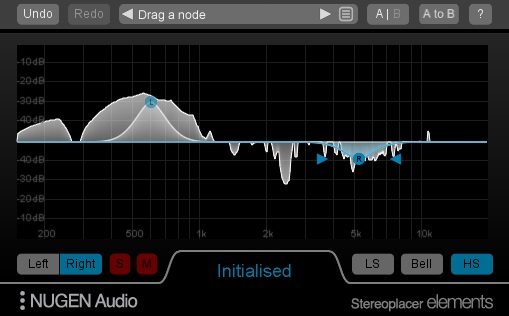
Stereoplacer Elements is a simplified version of our Stereoplacer plug-in, allowing the same frequency-specific panoramic placement, in a lightweight package.
Features
- Reconstruct a stereo image from mono
- Fix poor stereo microphone placement
- Restore archive recordings
- Tidy up samples from old records
The rest of the stereo image will remain intact, and the balance of original sounds will be preserved.
Stereo Spectrum Analysis
The graphical display in Stereoplacer Elements can be used as a Stereo differential spectrum analyser. Leaving controls in their default positions will set up the plugin in analysis mode. The incoming sound is not affected, but is analysed for stereo content, which is then displayed visually.
‘Panning’ Bass.
Panning bass sounds is usually something best avoided as off-centre high energy in the low frequencies can present more problems than it resolves. However, using Stereoplacer Elements, the low frequencies present in say a bass guitar track, can be left centre while the higher frequencies (i.e. much of the attack component) can be moved in the stereo field with a shelving band, without the usual problems of the attending lows, giving the impression that the bass part has been panned, when really it is only the high, directional information carrying frequencies that have been moved.
Stereoizer Elements
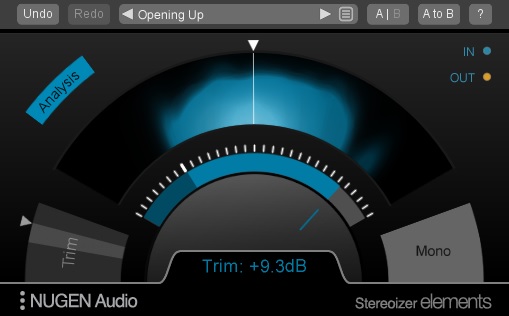
Stereoizer is a stereo width plug-in with a clear difference - your mix will still sound great in mono. Add natural sounding width and depth to any recording, mono or stereo, leaving the character of the source intact. Or go super wide - the choice is yours. Achieve a more coherent sound with polish and spatial balance, without adding artificial reverb, chorusing or delay. Total mono compatibility and no unwanted artefacts.
Features
- Natural panoramic extension
- No unwanted artefacts
- Retains original character
- Highly mono compatible
- Band limited precision
- Dynamic visual feedback
Detailed stereo extension
Each of Stereoizer's algorithms adapts the characteristics of your audio using techniques based on the way the human ear perceives width. The IID (Interaural Intensity Difference), ITD (Interaural Time Difference) and Linear Width algorithms work independently of each other, giving you maximum flexibility. For more lively adjustments, use the IID and ITD controls; the Linear Width control is more subtle and, crucially, leaves the 'centre space' of your mix untouched.
Highly mono compatible
Mono compatibility is easily overlooked, but is as important now as it has ever been. Many club and PA sound systems are still set up for mono playback, and the majority of portable radios, smartphones and many TV sets are mono.
Stereoizer does not add any artificial reverberation, which means no disruptive artefacts such as doubling/chorusing effects or phase cancellation affecting your mono signal. The 'Collapse output to mono' option allows you to check mono compatibility on the fly for your own peace of mind.
For mixing and sound design
Stereoizer can be used to introduce width to mono recordings, or to expand a narrow stereo mix. It can add richness and gloss to your recordings, without having to resort to overcooked heavy EQ and/or compression.
Use Stereoizer to add finesse by introducing natural-sounding width, or zone in and enhance specific frequencies, without upsetting the inherent balance of the sound.
For post production and restoration
Stereoizer is a gift for subtle enhancement of ambience sounds, clearing space for dialog in the centre, or even injecting stereo liveliness into formerly mono recordings.
Whether restoring old recordings or optimising new recordings for louder playback, Stereoizer allows for natural-sounding extrapolation of your existing stereo image. This can be used to re-introduce natural ambience which may have been lost during other stages of the production process.
System Requirements
Mac
- Mac OSX 10.7 and above
- 512 MB RAM
- 64-bit only
- Available in 64-bit AAX, VST3, AU & AudioSuite Formats
Windows
- Windows XP and above
- 512 MB RAM
- 64-bit only
- Available in 64-bit AAX, VST3 & AudioSuite Formats



















Reviews Summary
While it aims to provide a helpful overview, it may not capture every perspective or detail. We encourage you to read individual reviews to make an informed decision.
Users generally praise the Focus Elements Bundle as a practical, transparent, and easy-to-use set of tools for enhancing clarity, loudness, and stereo width in music production and mastering. While widely appreciated as a valuable, straightforward addition to an audio library, some reviewers view it as a basic introductory collection that does not necessarily replace stock DAW plugins.


