Buy SSL Band Bundle, get a free gift with purchase:
Band Bundle
Why only use focused processing on a single instrument? Treat the whole band with raw processing power with this exciting new bundle from Solid State Logic.
Tried-and-tested instrument-specific processing plugins from one of the most trusted plugin manufacturers on the planet, now bundled into one accessible package!
Drumstrip
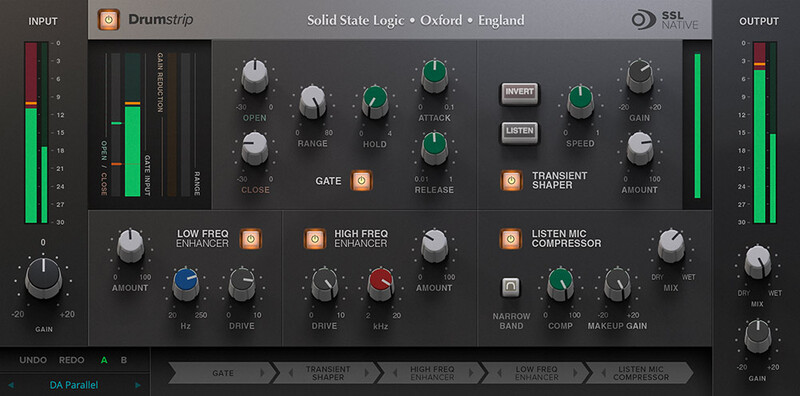
The Quickest Path to Better Drums and Percussion
Take your drum sounds from ordinary to exhilarating in a few quick, easy steps. Featuring 5 carefully tailored audio processing tools – an intuitive gate, low and high frequency harmonic enhancers, a transient shaper, listen mic compressor (LMC) and fully re-orderable processing path.
Find out more about Drumstrip.
Vocalstrip 2
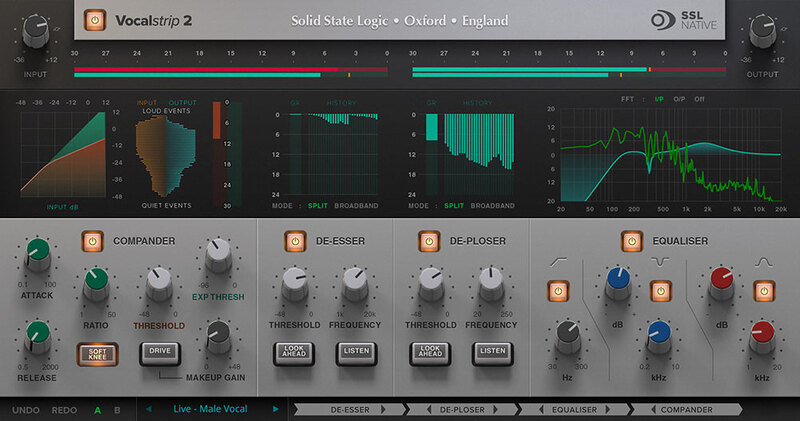
The Simple Route to Professional Vocals
The SSL Vocalstrip 2 plug-in combines EQ and dynamics modules with essential vocal processors to bring you power, character and clarity for your vocals – all from a single interface. Use the dynamic envelope based de-esser and de-ploser, compander and EQ alongside informative and intuitive visual feedback.
Find out more about Vocalstrip 2.
Guitarstrip
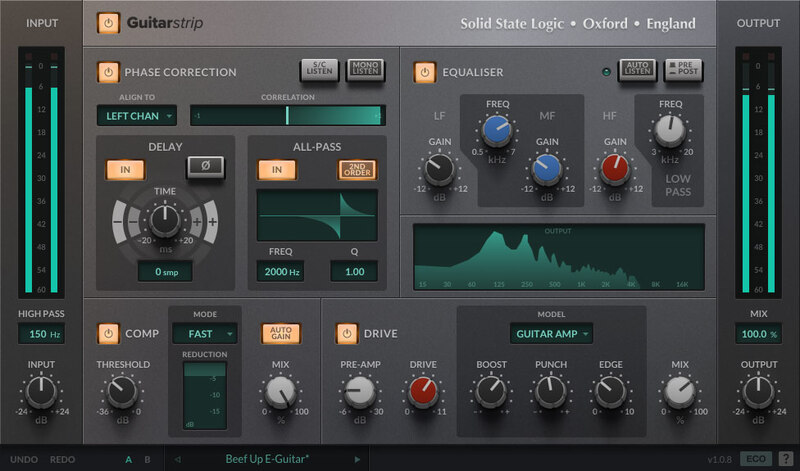
Crafting the Perfect Guitar Tone
SSL Guitarstrip is your new go-to processor for electric, acoustic and bass guitars. Featuring two classic analogue drive emulations – guitar amp and bass amp – the Guitarstrip also includes an easy-to-use compressor with auto gain, shaping EQ and phase correction module.
Find out more about Guitarstrip.
System Requirements
Please Note: A FREE iLok Account is required for the authorisation of this software.
Mac
- macOS 10.15 Catalina - macOS 11 Big Sur (64-bit only)
- Intel Dual-Core Mac running at 2.4GHz or higher
- 4 GB of RAM minimum (8 GB of RAM recommended)
- AU, VST2, VST3, AAX Native
Windows
- Windows 7 - Windows 10 (64-bit only)
- Intel Core 2 (or comparable) CPU running at 2.4GHz or higher
- 4 GB of RAM minimum (8 GB of RAM recommended)
- VST 2, VST3, AAX Native
Important note:
- For licenses with the format - XXXXXXX-XXXX-XXXX-XXXXXXXX - please scroll down and follow the instructions for Harrison Multi Band Compressor, below
- For iLok licences with the format XXXX-XXXX-XXXX-XXXX-XXXX-XXXX-XXXX-XX please follow the instructions for Harrison Bass Flow & SSL Guitarstrip immediately below
Please Note: Harrison Bass Flow & SSL Guitarstrip are used as examples
iLok Registration
1. Go to the iLok website and create a new account if you are not currently registered and do not have the iLok Licence Manager installed on your computer
Note: Skip to the 'Registration' procedure if you are already an iLok registered user

2. Download and install the iLok License Manager
SSL Download Manager Installation
1. Go to https://solidstatelogic.com/ssl-download-manager or click DOWNLOAD in your Plugin Boutique User Account
2. Click either macOS or Windows to download the installer (Linux versions available here)

3. Double-click installer > Follow the on-screen instructions to install
4. Open SSL Download Manager

5. Locate Harrison Bass Flow & SSL Guitarstrip > Click Install on each plugin
iLok Authorisation
1. Open your iLok license manager application > click Sign In

2. Enter your iLok registered User ID and password > click Sign In

3. Once you are signed in, click the ‘Redeem’ icon which is located at the top-right corner of the iLok Licence Manager’s interface

4. Copy and paste/manually enter the 30-digit code from your Plugin Boutique User Account into the available Activation Code boxes, and then click Next

5. Select your activation destination > Click Activate

6. Click OK

7. Open the plugins in your DAW

Your plugins are now installed and ready to use. Enjoy!
Please Note: Harrison Multi Band Compressor is used as an example
Note: Harrison and SSL plugins now share the same installation process via the SSL Download Manager
iLok Registration
1. Go to the iLok website and create a new account if you are not currently registered and do not have the iLok Licence Manager installed on your computer
Note: Skip to the 'Registration' procedure if you are already an iLok registered user

2. Download and install the iLok License Manager
Registration
1. Go to https://account.solidstatelogic.com/register-software > Create a new account or log into your existing account if you have one

2. Click REGISTER SOFTWARE

3. Enter your license code found in your Plugin Boutique User Account as well as your iLok ID > Click SUBMIT

SSL Software Installation
1. Go to https://solidstatelogic.com/ssl-download-manager or click DOWNLOAD in your Plugin Boutique User Account
2. Click either macOS or Windows to download the installer (Linux versions available here)

3. Double-click installer > Follow the on-screen instructions to install
4. Open SSL Download Manager

5. Locate Harrison Multi Band Compressor > Click Install
6. Open your DAW > Scan for plugins
7. Click Activate

8. Click Skip

9. Enter your iLok account details > Click Next

10. Select 'Harrison Multi Band Compressor' > Click Next

11. Select an activation location > Click Next

12. Click Continue

13. Open the plugin in your DAW
Your plugin is now installed and ready to use. Enjoy!