Log In
Free gifts available with your purchase
Cattaneo Pianos
Bundle containing CATTANEO Upright Piano and CATTANEO Electric Piano + CATTANEO Cassette, a bonus instrument available ONLY with this bundle.
Cattaneo Upright Piano
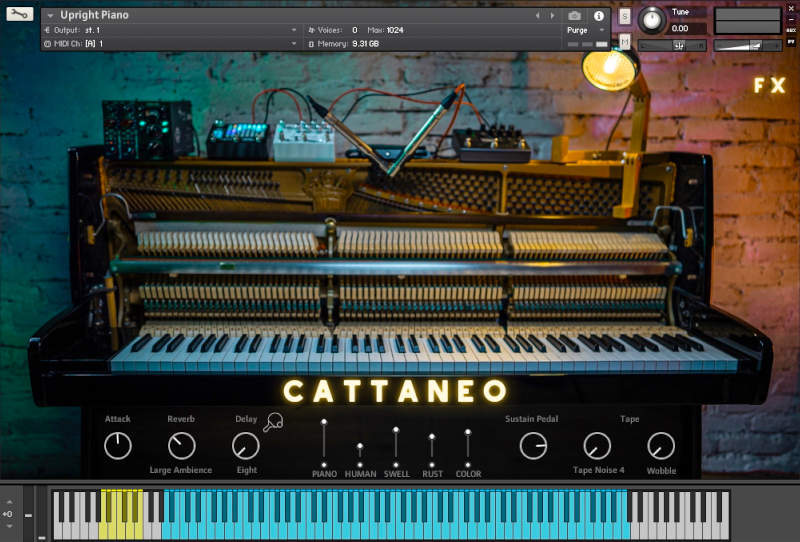
CATTANEO Upright Piano is an intimate, unique-sounding piano which is simply perfect for songwriting, indie/pop and introspective scoring. With its HUMAN layer, real samples of pedal-sustained notes that get engaged whenever you use your midi sustain pedal (together with press/release noises responding to it when activated), you’ll feel like you were playing the real instrument.
Additionally you can engage 2 sound design layers to add swells and analog distortion, and one extra color layer, created by sampling a vintage claviharp. Use them combined or solo to achieve unique, surprising results.
Engage the cassette tape noises and wobble FX to enter a lo-fi world, add rhythm and movement with the arpeggiator, top-class reverb algorithms, delay, and 3 built-in pedal FX with 6 different FX types to choose. All you need to create beautiful piano music and beyond.
Features
- 647 samples (NCW format)
5 mixable channels:
- PIANO: main sound
- HUMAN: human performance noises
- SWELL: swells
- RUST: distortion
- COLOR: claviharp
FX and controls:
- ATTACK: customize the attack to your taste
- REVERB: choose between 6 top-class algorithms
- DELAY chose your delay type (Normal/Ping-Pong), time subdivision menu and level.
- SUSTAIN PEDAL Volume: if you engage it, it reacts to your midi sustain pedal sounding like a real one.
- TAPE SECTION: turn your electric piano into a lo-fi gem
- Tape Noises: choose between 6 samples cassette tape hiss types
- Wobble: add wobbling to get those typical, random detuning effects
- ARPEGGIATOR
- 3 FX PEDALS with 6 FX types each to choose between Eq, Compression, Saturation, Chorus, Phaser and Leslie
Learn more about Cattaneo Upright Piano.
Cattaneo Electric Piano
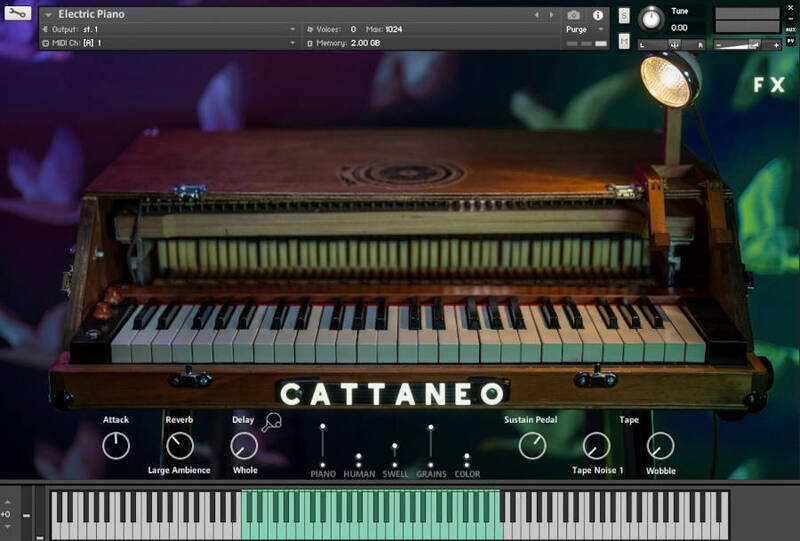
CATTANEO Electric Piano is an authentic dreamlike experience. Sampled directly from Cattaneo’s custom-modified and “augmented” Classic Electric Piano-type piano, it is nothing like any other electric piano you may have heard. With its HUMAN layer and press/release noises of the sustain pedal responding to your midi pedal, you’ll feel like you were playing the real instrument. Additionally you can engage 2 sound design layers to add swells, granular polyphony and an extra color layer, created by sampling tuned crystal glasses. Use them combined or solo to achieve unique, surprising results.
Engage the cassette tape noises and wobble FX to enter a lo-fi world, add rhythm and movement with the arpeggiator, top-class reverb algorithms, delay, and 3 built-in pedal FX with 6 different FX types to choose. All you need to create beautiful piano music and beyond.
Features
- 647 samples (NCW format)
5 mixable channels:
- PIANO: main sound
- HUMAN: it captures the sound of the hands while hitting the keys
- SWELL: sound designed swells
- GRAINS: granular sound design layer
- COLOR: tuned crystal glasses
FX and controls:
- ATTACK: customize the attack to your taste
- REVERB: choose between 6 top-class algorithms
- DELAY chose your delay type (Normal/Ping-Pong), time subdivision menu and level.
- SUSTAIN PEDAL Volume: if you engage it, it reacts to your midi sustain pedal sounding like a real one.
- TAPE SECTION: turn your electric piano into a lo-fi gem
- Tape Noises: choose between 6 samples cassette tape hiss types
- Wobble: add wobbling to get those typical, random detuning effects
- ARPEGGIATOR
- 3 FX PEDALS with 6 FX types each to choose between Eq, Compression, Saturation, Chorus, Phaser and Leslie
Learn more about Cattaneo Electric Piano.
System Requirements
- Requires Kontakt Full Version 6.6.1+ (not compatible with the free Kontakt Player)
- Total Size (Uncompressed) aprox 12,56 GB