Log In

Save $59.00 compared to buying products individually
Free gifts available with your purchase
Sampled Instruments with Character
For a limited time only, get two of Sampleson's finest sampled instruments, perfect for adding a touch of unique character to your productions. Things is an intuitive sound engine that features a bank of instantly usable sounds, while Akoustic offers a unique take on sound design through additive synthesis.
The Things + Akoustic Bundle is exclusive to Plugin Boutique and available for a limited time only.
Things
Intuitive Synth Sound Creator
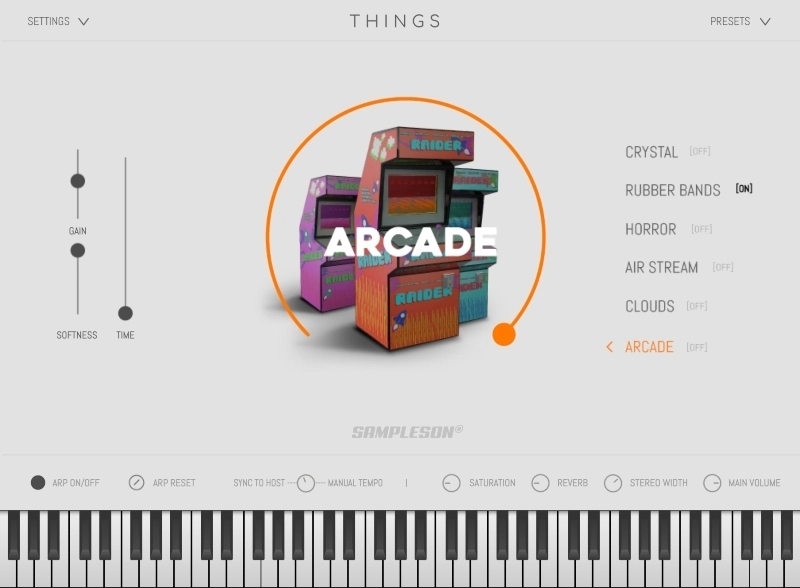
THINGS allows you to create high-quality synth sounds even if you have zero experience in synthesis. Sampleson implemented what they called "Descriptors" which are objects and ideas that will help you understand the effect of a knob and the kind of sound it will produce.
All of the parameters can be assigned to a CC controller (right-click over the desired slider/knob) and automatable via DAW.
Features
- Polyphonic Synth
- Built upon FM, additive and subtractive synthesis.
- Automatable DAW controls for all of the parameters.
- 32 steps arpeggiator
- FX Section
- HD Scalable interface.
- Mono and Stereo flavours via "Width" knob.
- No extra purchases needed (like Kontakt, UVI, etc) or any other 3rd. party player.
- Ready to be loaded into major DAWs (Cubase, Logic Pro, GarageBand, Cakewalk, Reaper, BitWig, Nuendo, FLstudio, etc)
- Win 32/64 bits and Mac VST/AU/Standalone versions included
- About ~65MB installed.
- No online activation required.
Learn more about Things.
Akoustic
Acoustic Models. Organic Results.
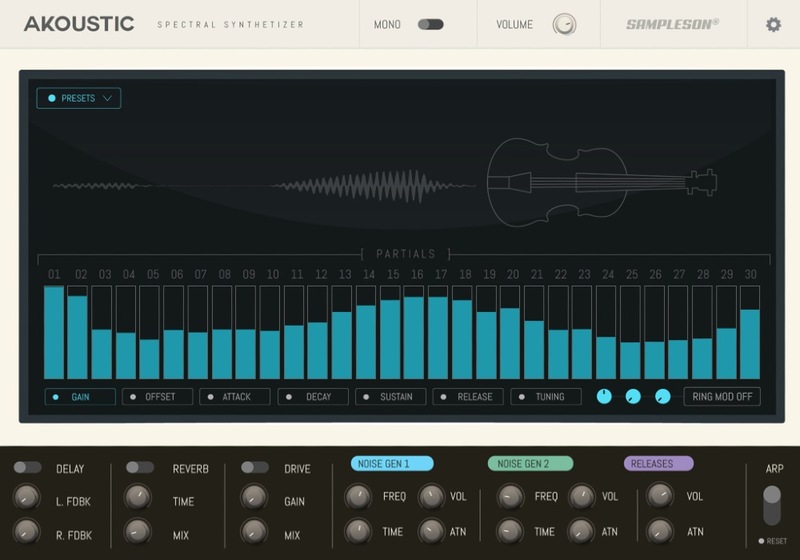
Taking a new approach to sound design, Sampleson created spectrums for acoustic instruments to be accessed via additive synthesis.
Akoustic gives you a very precise and obsessive way to create new sounds, allowing you to tweak every part in a detailed way. Envelope, tuning, offset or gain for any parts are accessible individually. This gives you an unmatched detailed editing power.
Every sound created with Akoustic is… acoustic!
The DNA of acoustic instruments will remain recognizable on any weird editing made with Akoustic. This is what Sampleson love about Akoustic. All of the patches have an organic, wood-like sounding, analogue feel.
Create Amazing Organic Sounds
Akoustic is fully based on spectral modelling. Recreating organic sounds by additive and spectral synthesis. This is why it's so lightweight. Sampleson doesn't need to include huge sampling audios. They just included the DNA. Creating organic sounds is in your hands.
Features
- Additive synthesizer based on spectral models.
- Drive, delay and Reverb FXs.
- Basic arpeggiator included.
- HD Scalable interface.
- Releases, mechanical noises knob.
- No extra purchases needed (like Kontakt, UVI, etc) or any other 3rd party player.
- Ready to be loaded into major DAWs (Cubase, Logic Pro, GarageBand, Cakewalk, Reaper, BitWig, Nuendo, FLstudio, etc)
- Win 32/64 bits and Mac VST/AU/Standalone versions included.
- About ~35MB installed.
- No library installation required.
Learn more about Akoustic.
MacOS
- macOS 10.7 or later
- VSTi or AU plugin host required
- 70 MB disk space
- 4 GB RAM
- Note: Pro Tools is not supported.
Windows
- Windows 7 or later
- VSTi plugin host required
- 70 MB disk space
- 4 GB RAM
- Note: Pro Tools is not supported.