/ Various Category / Jack Joseph Puig Signature Series
Waves

Jack Joseph Puig Signature Series

$69.99 $399.00

82% off until Dec 07

Jack Joseph Puig Signature Series
Using the Jack Joseph Puig Artist Signature Collection gallery thumbnail
Jack Joseph Puig on Making His Plugin Signature Series gallery thumbnail
Buy Now
Product information

Jack Joseph Puig Signature Series

Enhance Vocals and Instruments with Expertly Curated Mixing Chains

Grammy® winner Jack Joseph Puig excels at enhancing vocals, drums, cymbals, percussion, strings, keyboards, bass, and guitars. His custom multi-effects chains allow you to apply JJP’s unique palette of extraordinary tones and colors to the most essential instruments in any mix.

Having worked with artists across all genres—from Beck to Sheryl Crow, Keith Urban to Lady Gaga, Mary J. Blige to Green Day—JJP has infused these innovative, specialized plugins with the versatility needed for any genre.
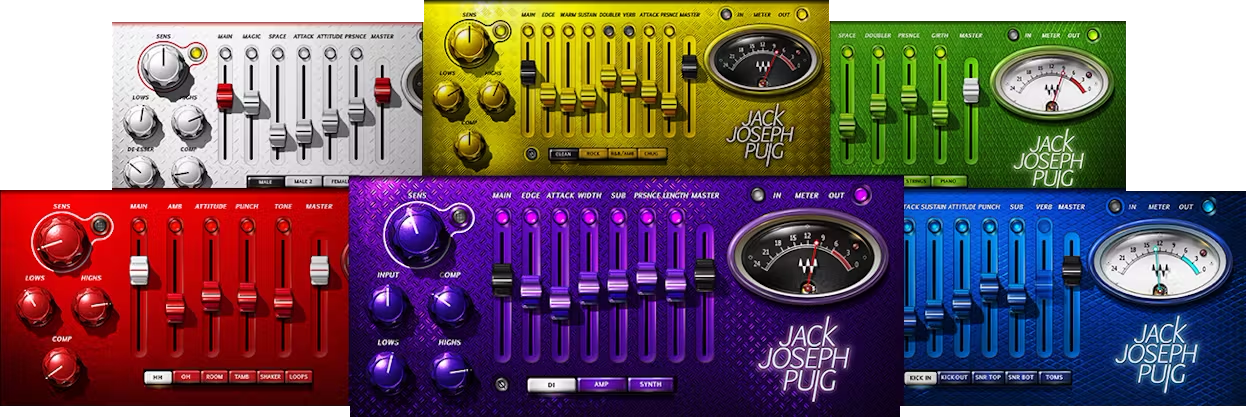
Included plugins:

  • JJP Bass
  • JJP Cymbals & Percussions
  • JJP Drums 
  • JJP Guitars 
  • JJP Strings & Keys 
  • JJP Vocals

Features

  • Created in close collaboration with Jack Joseph Puig
  • Comprehensive control sets for tailoring sounds to various genres
  • Replace strings of plugins with a unified, easy-to-navigate interface
  • Speed up the mixing process without compromising quality
  • Transparently layers four parallel effect paths for extreme versatility
  • Designed specifically for flexibility that covers all musical genres
  • Working as a team, these plugins can create cohesive arrangements
  • Presets provide a strategic starting point—then, refine your sound

System Requirements

Mac

  • macOS Monterey 12, Ventura 13, Sonoma 14, Sequoia 15
  • VST / AU / AAX

PC

  • Windows 10+
  • VST / AAX
Installation Instructions

1. Head to https://www.waves.com/create-account

2. Enter your email and choose a password to create an account (if you already have a Waves account, choose Log in, enter your details and head to Step 5) > click 'Submit'

3. Open your email inbox > click the activation link in the email from Waves

4. Click 'Log in here' > Log in to your Waves account

5. Click 'Register New Products'

6. Enter the Serial Number found in your Plugin Boutique user account > click 'Submit'

7. Click download in your Plugin Boutique user account or head to https://www.waves.com/downloads/central > download the Waves Central app for your operating system

8. Install Waves Central > Open Waves Central

9. Click 'Log in' > enter your log in details

10. Click the 'Install Products' tab

11. Tick the blue dot on all products you wish to install or click the top dot to install all products > click 'Install & Activate'

12. Click 'OK'

13. Open your DAW > open the Waves plugin

Your Waves plugins are installed and ready to use, enjoy!

Plugin Boutique Rewards

Discover the most rewarding loyalty programme among all plugin retailers.

  • Free Loopmasters Samplepacks
  • Discounts on products and courses
  • Extra Virtual Cash claimed immediately at checkout
Find out more

Follow us:

X (Twitter) Facebook YouTube Instagram
Logo Logo

Plugin Boutique Limited, Part of the Beatport Group LLC.

Copyright © 2011-2025 Plugin Boutique. All rights reserved










