/ Various Category / Signature Series Vocals
Waves

Signature Series Vocals

$69.99 $309.00

77% off until Dec 07

Waves Signature Series Vocals
Buy Now
Product information

Signature Series Vocals

Mix Vocals with Effects Chains from Legendary Producers

The vocal sounds you hear on mixes for Beyoncé, Ed Sheeran, Foo Fighters—and spanning back to David Bowie and Led Zeppelin—are shaped by studio legends Chris Lord-Alge, Tony Maserati, Jack Joseph Puig, and Eddie Kramer.

These meticulously crafted multi-effects chains represent decades of expertise, encapsulating the sonic signatures that define the vocals of the world’s most renowned recording artists. Now, you can harness their trusted vocal chains for your own productions.
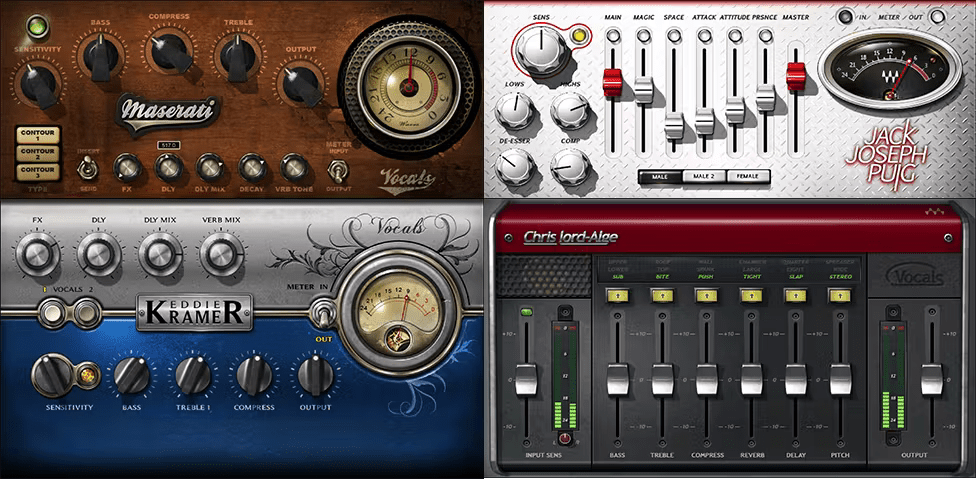
Included plugins:

  • CLA Vocals
  • Eddie Kramer Vocal Channel
  • JJP Vocals
  • Maserati VX1

Features

  • Created with Chris Lord-Alge, Tony Maserati, Jack Joseph Puig, and Eddie Kramer
  • Obtain the modern essence of pop and rock vocals with CLA Vocals
  • The classic rock sound comes alive with Eddie Kramer Vocal Channel
  • For multi-platinum hip-hop vocals, Maserati VX1 delivers the sound
  • JJP Vocals’ versatile controls accent vocal feel and style in any genre
  • Concentrate on the music—let the pros take care of your sound
  • Bring Grammy® Award-winning sound to your mixes
  • Generous preset collections trigger your creativity

System Requirements

Mac

  • macOS Monterey 12, Ventura 13, Sonoma 14, Sequoia 15
  • VST / AU / AAX

PC

  • Windows 10+
  • VST / AAX
Installation Instructions

1. Head to https://www.waves.com/create-account

2. Enter your email and choose a password to create an account (if you already have a Waves account, choose Log in, enter your details and head to Step 5) > click 'Submit'

3. Open your email inbox > click the activation link in the email from Waves

4. Click 'Log in here' > Log in to your Waves account

5. Click 'Register New Products'

6. Enter the Serial Number found in your Plugin Boutique user account > click 'Submit'

7. Click download in your Plugin Boutique user account or head to https://www.waves.com/downloads/central > download the Waves Central app for your operating system

8. Install Waves Central > Open Waves Central

9. Click 'Log in' > enter your log in details

10. Click the 'Install Products' tab

11. Tick the blue dot on all products you wish to install or click the top dot to install all products > click 'Install & Activate'

12. Click 'OK'

13. Open your DAW > open the Waves plugin

Your Waves plugins are installed and ready to use, enjoy!

Plugin Boutique Rewards

Discover the most rewarding loyalty programme among all plugin retailers.

  • Free Loopmasters Samplepacks
  • Discounts on products and courses
  • Extra Virtual Cash claimed immediately at checkout
Find out more

Follow us:

X (Twitter) Facebook YouTube Instagram
Logo Logo

Plugin Boutique Limited, Part of the Beatport Group LLC.

Copyright © 2011-2025 Plugin Boutique. All rights reserved










