Log In

Save $0.00 compared to buying products individually
Free gifts available with your purchase
Take your sound design to the next level with the Granular bundle from BLEASS, containing their iconic sample-based granular synthesis engine SampleWiz 2 and their high-tech granular effect plugin Granulizer. Create your own never-heard-before sounds and then warp, tweak, or mangle them however you see fit- whether it's your introduction to granular synthesis or you're looking for the best tech in the game, BLEASS has got you covered.
SampleWiz 2

Born of the imagination of legendary keyboardist Jordan Rudess and the software engineering excellence of French audio developer BLEASS, SampleWiz 2 is a unique and powerful S&S (sample & synthesis) instrument. BLEASS SampleWiz 2 combines modern features such as granular and cloud sample engines, MPE, with the satisfying, rapid workflow of classic hardware samplers.
With SampleWiz 2, BLEASS has distilled the phenomenal breadth and depth of Jordan’s expertise and experience into an intuitive synthesizer that will unleash your sonic imagination, inspiring both your musical and sound design creativity.
With just a few swipes of your finger, or a couple of clicks of your mouse, you can easily capture any sound or import any sample – a few more swipes/clicks will transform your sound into a playable, characterful synth voice. And with full support for MPE Slide and Pressure, SampleWiz 2 allows you to create nuanced and deeply expressive performances.
Creating original sounds with BLEASS SampleWiz 2 is as easy and fun as it is to load and play presets. The UI has been carefully designed to give a natural, intuitive workflow, with delightfully simple import of sounds, and a comprehensive suite of tools for chopping, granularizing, modulating, and adding effects to your sound designs.
Learn more about SampleWiz 2
Granulizer
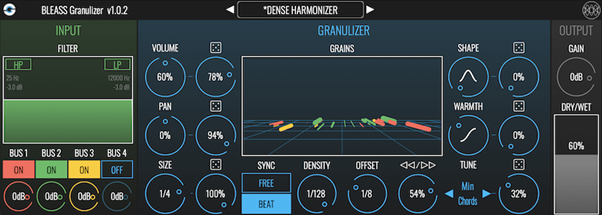
BLEASS Granulizer is a granular texture effect plugin with randomization, 4 multi-bus audio inputs and a mesmerizing 3D visualizer. BLEASS Granulizer generates short samples (‘grains’) from different input signals by modulating different parameters which you can visualize.
The Input Stage allows you to choose between a low-shelf or high-pass filter (to filter out the bass frequencies from input) as well as a gain adjustment.
BLEASS Granulizer takes up to 4 sources from different busses as inputs (compatible DAW required). When multiple busses are on, each grain is randomly extracted from one of the available sources.
The Granulizer generates short samples (‘grains’) from different input signals by modulating different parameters which you can visualize thanks to the 3D Visualizer.
- Volume
- Pan (represented by width in the visualizer)
- Size ( = grain’s duration)
- Density ( = frequency of grains generation)
- Offset ( = the amount of time between record and play represented by the depth in the 3D visualizer)
- Backward/Forward Playback Direction
- Shape ( = grain’s envelope, represented by the height dimension in the visualizer)
- Warmth ( = strength of the distortion applied to the grain)
- Tune ( = grains can be pitched up or down according to different modes: “Fine” / Chromatic / Major / Minor / 5th / Major 7th. / Minor 7th / Octave and other tuning modes such as dim / Dom / Maj 7th Chords)
The amount of randomization can be set with the “dice” knobs. Density, grain size and offset range can be freely synced or beat-synced to the host’s tempo.
Learn more about Granulizer
System Requirements
PC
- Windows 10 and later (64-bit)
- VST3
Mac
- macOS 10.15 and later (64-bit only) (including macOS 11 Big Sur and Silicon processors)
- VST3 / Audio Unit