/ Compressor / Teletronix LA-2A Leveler Collection
Universal Audio

Teletronix LA-2A Leveler Collection

4.8 (136 Reviews)
$49.00 $149.00

67% off until Dec 31

Universal Audio Teletronix LA-2A Leveler Collection- GUI
UAD Teletronix LA-2A Collection Plug-Ins Sound Examples | UAD Spark gallery thumbnail
UAD LA-2A Classic Leveler Collection Trailer gallery thumbnail
Main Image
Buy Now
Product information

The Ultimate Collection Of The Most Revered Optical Compressor Ever

Now compatible with any soundcard on Mac and PC

With its gentle, program dependent optical compression, and meticulously designed tube amplifier, the LA-2A is the go-to compressor for professional mixers around the world. In 2001, Universal Audio set the standard in analog emulation with the original UAD LA‑2A plug‑in.

Today, UA’s engineers have redesigned the LA-2A plug-in with more obsessive detail. The LA-2A Classic Leveler Plug-In Collection features immaculate models of three highly sought-after LA-2A units, giving you the most authentic emulations ever of this iconic compressor.
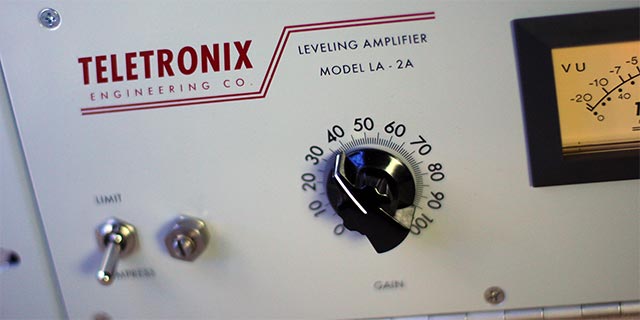
The Teletronix Story

Teletronix founder Jim Lawrence first used photocells for controlling audio gain in the early 1960s. His ingenious optical compression design was a technological breakthrough, far surpassing the stability and transparency of earlier circuits. Universal Audio founder M.T. ”Bill” Putnam later purchased this patented technology, continuing to manufacture the LA-2A for years to come.

Three Historical Units

The Teletronix LA-2A Leveler Collection puts three of the most coveted incarnations of the iconic Teletronix processor at your fingertips. Like the hardware, the LA-2A Silver, LA-2A Gray, and LA-2 models offer distinct variations in time constants, compression knee, headroom, distortion, program and frequency dependence, and more.
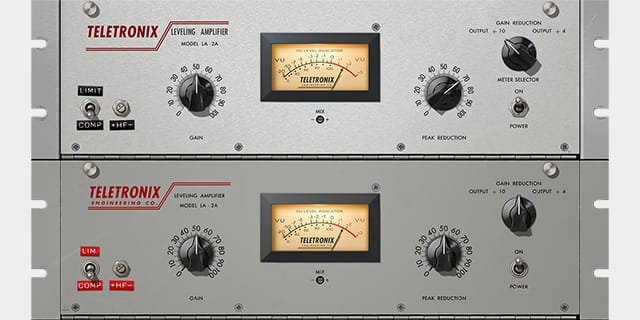
LA-2A Silver & Gray

With a brushed aluminum panel and original T4B gain reduction module, this cherished late-1960s “Silver” version of the LA-2A, manufactured by Bill Putnam, is perhaps the most flexible of the three plug-ins in the collection. Its fast time constant makes it suitable for the widest variety of program material, including transient-rich sources like drums and percussion. Jim Lawrence’s original mid-1960s “Gray” version the LA-2A maintains a more average time constant, providing a range of “medium-speed” compression.
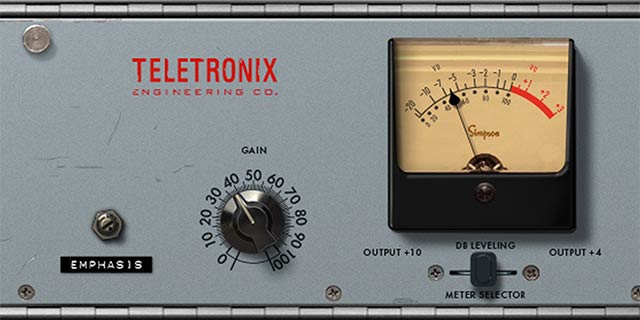
The Original LA-2

The exceptionally rare, early 1960s LA-2 unit preceded the LA-2A by several years. It provides the slowest response and a unique “mellowed” sound due to 50 years of luminescent panel aging inside the T4 module. Use the LA-2 with legato tempos and vocal sources for a transparency and sublime mood unlike any other compressor.

Features

  • Use any audio interface, with both UAD Native and Apollo Realtime/UAD-2 versions included
  • Track and mix with three historic versions of revered Teletronix LA-2A Leveling Amplifiers, each with its own distinctive sonic attributes
  • Record through a Teletronix LA-2A/LA-2 in real time with Apollo interfaces
  • Dial-in ideal optical compression textures for vocals, bass, drums, and more
  • Harness presets from LA-2A users Ross Hogarth, Darrell Thorp, and Vance Powell

Versions Included with your Purchase

  • UAD Native: Runs on your Mac or PC without any UA hardware
  • Apollo Realtime & UAD-2: Runs accelerated on Apollo interfaces and UAD-2 hardware

System Requirements

  • macOS 10.15 Catalina, 11 Big Sur, 12 Monterey, 13 Ventura
  • Windows 10 or Windows 11 (64-bit only Editions)
  • Intel, AMD, or Apple silicon processor
  • Internet connection to download software and authorize UADx plug-ins
  • Free iLok account with iLok Cloud or iLok USB (2nd generation or higher)
  • A physical iLok dongle is NOT required to activate this product

DAW Compatibility

  • Pro Tools 2022 (AAX)
  • Logic Pro (Audio Units)
  • Ableton Live 11 (VST 3, Audio Units)
  • Cubase 12 (VST 3)
  • Studio One 5 (VST 3)
  • LUNA Recording System

You can activate this software on an online system (using iLok Cloud) or an offline system (using an iLok USB):

  1. Online: an active internet connection and a FREE iLok account are required to authorise UAD Plug-ins using iLok Cloud

  2. Offline: you will need a physical iLok USB (2nd generation or higher) to authorise this software

Important note: UAD plugins do not work in Apple's Garageband DAW

Installation Instructions

Registration

1. Click the Download button in your Plugin Boutique account or go to https://www.uaudio.com/my/account/redeem/.

2. Enter your email and the serial code found in your Plugin Boutique User Account > Click 'Get my Plug-in'.

3. Enter the details required to create your Universal Audio account > Click 'Create Account'.

4. Download UA Connect by clicking either 'macOS' or 'Windows' depending on the system you are using.

Windows Installation

1. Once the download is complete, extract and open the ZIP folder you just downloaded > Open the PC folder > Double-click the UA Connect.exe installer file.

2. Read the terms of agreement > Click 'I Agree'.

3. The installation of PACE License Support will now begin > Click 'Next >'.

4. Read the license agreement > Click 'Yes'.

5. Click 'Install'.

6. Click 'Finish'.

7.  Locate and open UA Connect > Enter the email address and password of your Universal Audio account.

8. Click 'GET STARTED'.

9. Select the option that is relevant to you - either 'I Already Have an iLok Account' or 'Create an iLok Account For Me'.

10. Enter your iLok account User ID then click 'LINK ACCOUNT'

.

11. Enter the password for you iLok account and click 'Authorize'.

12. Locate the plugin you wish to install > Click 'DOWNLOAD'.

13. Once the plugin has been installed, open your DAW and then the newly installed plugin.

Your software is now activated and ready to use in your DAW!

Mac Installation

1. Once the download is complete, double-click the UA Connect.dmg installer file.

2. Drag UA Connect into your Applications folder.

3. Locate and open UA Connect > Enter the email address and password of your Universal Audio account.

4. Click 'GET STARTED'.

5. Select the option that is relevant to you - either 'I Already Have an iLok Account' or 'Create an iLok Account For Me'.

6. Enter your iLok account User ID then click 'LINK ACCOUNT'

.

7. Enter the password for you iLok account and click 'Authorize'.

8. Locate the plugin you wish to install > Click 'DOWNLOAD'.

9. Once the plugin has been installed, open your DAW and then the newly installed plugin.

Your software is now activated and ready to use in your DAW!

Plugin Boutique Rewards

Discover the most rewarding loyalty programme among all plugin retailers.

  • Free Loopmasters Samplepacks
  • Discounts on products and courses
  • Extra Virtual Cash claimed immediately at checkout
Find out more

Follow us:

X (Twitter) Facebook YouTube Instagram
Logo Logo

Plugin Boutique Limited, Part of the Beatport Group LLC.

Copyright © 2011-2025 Plugin Boutique. All rights reserved